Why DKIM Fails and How to Fix Every Type of Alignment Error
Of the 5,499,028 domains we scanned in our State of Email Authentication 2026 research, only 22.7% had a detectable DKIM record. That is the lowest adoption rate among all core email authentication protocols. Among the top 10,000 domains, adoption climbs to 38.9% — but even there, a 16.2 percentage-point gap separates the largest domains from everyone else.
When DKIM fails, your emails risk landing in spam or being rejected outright. And DKIM failure is not a single error. It is a family of failures — alignment mismatches, body hash verification errors, missing keys, expired signatures — each with a different root cause and a different fix.
Below, you will find every type of DKIM failure you will encounter in DMARC reports and email headers — with the exact diagnostic steps, CLI commands, and platform-specific configuration changes to resolve each one. If you are dealing with a broader DMARC issue, start with our DMARC Failed: The Complete Troubleshooting Guide for a full picture of DMARC authentication failures beyond DKIM.
What Does “DKIM Fail” Actually Mean?
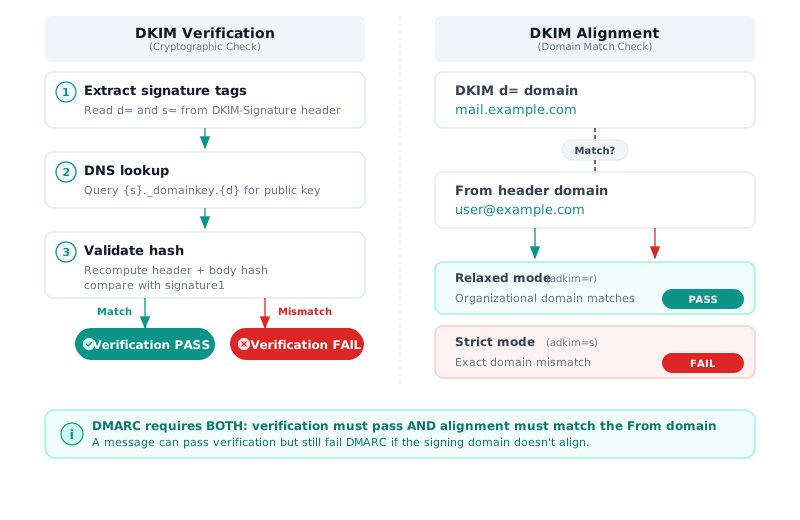
So what is DKIM failure, exactly? DKIM failure is an umbrella term covering two distinct categories: verification failure and alignment failure. Understanding the difference is the single most important step in DKIM troubleshooting, because the fix for each is completely different.
DKIM failure occurs when the receiving mail server cannot verify a DKIM
signature (verification failure) or when the domain in the DKIM signature does
not match the domain in the email’s From header (alignment failure). DMARC
evaluates both — a message must pass DKIM alignment, not just DKIM verification,
to satisfy DMARC’s DKIM check.
How DKIM Verification Works
The DKIM verification process has three steps, defined in RFC 6376 Section 6.1:
- Extract the signature tags. The receiving server reads the
DKIM-Signatureheader and extracts the following:d=: signing domain, for exampleyourdomain.com, ands=: selector tags, for examplek2,k3, etc.
- Look up the public key. The receiver queries DNS for a TXT record at
{selector}._domainkey.yourdomain.comto retrieve the signer’s public key. - Validate the cryptographic hash. The receiver recomputes the hash of the message headers and body, then compares it against the hash in the signature using the public key. If they match, verification passes.
How DKIM Alignment Works
Alignment is a separate check, defined in
RFC 7489 Section 3.1. DMARC
requires the d= domain in the DKIM signature to match (or be a subdomain of)
the RFC 5322 From header domain. A message can pass DKIM verification — the
cryptographic signature is valid — but fail DKIM alignment because the signing
domain does not match the From domain.
This is the number one source of confusion in community forums: admins see “DKIM
pass” in raw authentication results and assume DMARC will also pass. It does
not, unless the signing domain aligns with the From domain.
Our scan data quantifies the risk: 43.0% of DMARC-enabled domains (718,876 domains) rely on SPF-only alignment with no DKIM detected. If SPF fails — for example, when an email is forwarded — DMARC fails entirely for nearly half of all DMARC-protected domains (DMARCguard State of Email Authentication 2026).
How DKIM Alignment Affects Your DMARC Results
DMARC requires either SPF alignment OR DKIM alignment to pass — not both. But DKIM alignment is the more resilient of the two, because DKIM signatures survive email forwarding. SPF does not.
When a message is forwarded, the envelope sender changes, and SPF alignment breaks. DKIM, if the message body and signed headers remain intact, continues to pass.
Strict vs. Relaxed Alignment
Your DMARC record’s adkim tag controls how strictly DKIM alignment is
evaluated:
- Relaxed (
adkim=r, the default): Thed=domain in the DKIM signature must share the same organizational domain as theFromheader. A subdomain signature aligns with the parent domain. - Strict (
adkim=s): Thed=domain must exactly match theFromheader domain. Any subdomain mismatch causes alignment failure, even though the signature is cryptographically valid.
| Scenario | d= Domain | From Header | adkim=r (Relaxed) | adkim=s (Strict) |
|---|---|---|---|---|
| Exact match | example.com | user@example.com | Pass | Pass |
| Subdomain signing | mail.example.com | user@example.com | Pass | Fail |
| ESP signing (aligned) | example.com | user@example.com | Pass | Pass |
| ESP signing (unaligned) | sendgrid.net | user@example.com | Fail | Fail |
| Sibling subdomain | a.example.com | user@b.example.com | Pass | Fail |
The strongest configuration combines both SPF and DKIM alignment. Our research found that 48.5% of DMARC-enabled domains (810,525 domains) have both SPF and DKIM configured — the dual-protocol setup that provides resilience against forwarding-related failures. Only 1.5% (25,109 domains) rely on DKIM alone (DMARCguard State of Email Authentication 2026).
7 Common Causes of DKIM Failure
When DKIM authentication fails, the root cause falls into one of these seven categories. Each requires a different diagnostic approach and fix. With Google reporting 265 billion fewer unauthenticated messages after its 2024 DMARC enforcement push, fixing these failures has become a deliverability priority, not just a security best practice.
-
Third-party sender signs with its own domain. ESPs like Mailchimp, SendGrid, and HubSpot sign emails with
d=esp-domain.comby default instead of your custom domain. The signature passes verification but fails alignment. This is the most common cause of DKIM failure. Configure custom DKIM signing on each ESP so thed=tag matches yourFromdomain. See How to Set Up DKIM: Signing Your Emails for setup instructions. -
DKIM key not published or missing DNS record. The
{selector}._domainkey.domain.comTXT record does not exist, is misconfigured, or has not propagated yet. Receivers return “no key for signature.” Verify the record exists withdigbefore sending. -
Message body modified after signing. Any Mail Transfer Agent (MTA) or security appliance in the delivery path — firewalls (Watchguard, Barracuda), Exchange mail flow rules that add disclaimers, mailing list software, or character re-encoding — can alter the body after DKIM signing, invalidating the
bh=(body hash) tag. In one documented case, a Watchguard firewall’s SMTP deep packet inspection caused 100% DKIM failure on all outbound mail. Disabling DPI for SMTP traffic resolved it immediately. -
DKIM key rotation gone wrong. Switching from one selector to another without allowing DNS propagation time, or removing the old key before all queued messages are delivered, causes verification failures on in-flight messages. M3AAWG recommends rotating DKIM keys every six months, but the transition window must overlap — publish the new key, wait 48-72 hours, then retire the old key.
-
Strict alignment mode with subdomain signing. Your DMARC record uses
adkim=sbut your mail server signs with a subdomain (d=mail.example.com) instead of the organizational domain. The signature is valid, but alignment fails. -
DNS record formatting errors for 2048-bit keys. Keys exceeding the 255-character DNS TXT record limit must be split into multiple quoted strings. A single copy-paste error during splitting breaks validation. This is a documented pain point for Postfix administrators deploying 2048-bit keys.
-
DKIM signature expired. The
x=(expiration) tag timestamp in the DKIM-Signature header has passed. Some signing implementations set aggressive expiration windows (as short as 24 hours), and any delivery delays — greylisting, queue backlogs, or retry cycles — can push messages past the expiration time. Check thex=value in failed DKIM-Signature headers and extend the window if your mail flow includes delays.
How to Diagnose “Body Hash Did Not Verify” Errors
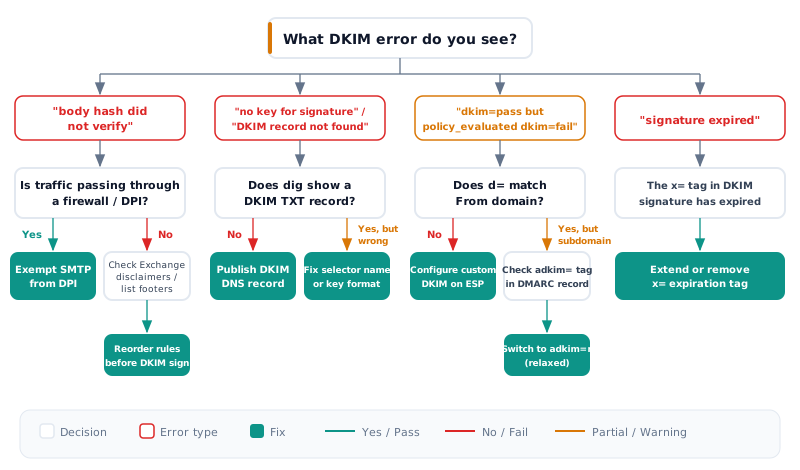
When you see dkim=fail (body hash did not verify) or
dkim=neutral (body hash did not verify) in email headers, it means the email
body was modified after the DKIM signature was applied. The bh= tag in the
DKIM-Signature header contains a Base64-encoded hash of the canonicalized
message body, computed at signing time. The receiving server recomputes this
hash; if the body changed in transit, the hashes do not match.
This is one of the hardest DKIM failures to diagnose because the modification often happens silently in your mail infrastructure.
Four Infrastructure Causes and Their Fixes
| Cause | Symptom in Header | Diagnostic Step | Fix |
|---|---|---|---|
| Firewall DPI (Watchguard, Barracuda, Sophos) | dkim=neutral (body hash did not verify) | Bypass firewall, send test directly | Exempt outbound SMTP from deep packet inspection |
| Exchange / M365 disclaimer mail flow rules | dkim=fail (body hash did not verify) alongside dkim=pass for another signature | Check transport rule order in Exchange Admin Center | Move disclaimer rule before DKIM signing, or use inline signatures |
| Mailing list or DL footer injection | dkim=fail only on list-distributed copies | Compare original signed message with distributed copy | Re-sign after list processing, or implement ARC |
| Character re-encoding (non-ASCII content) | dkim=fail only on messages with non-ASCII characters | Send test with ASCII-only body | Enforce UTF-8 encoding before DKIM signing; test simple vs relaxed canonicalization |
Real-World Case: Firewall DPI Breaks All Outbound DKIM
In a
documented case on the Proxmox forum,
an organization running Exchange 2016 with Proxmox Mail Gateway configured DKIM
signing correctly. Every online validator confirmed the DNS record was valid. But
every email sent to Gmail returned dkim=neutral (body hash did not verify).
The root cause: their Watchguard firewall’s SMTP deep packet inspection was
modifying the email body after DKIM signing. Even with header-level inspection
disabled, body-level modifications invalidated the bh= hash. Disabling all
DPI, SMTP inspection, and application-layer checks for outbound email traffic
resolved the issue. DKIM pass rate went from 0% to 100%.
A similar pattern occurs with Exchange Online mail flow rules. When disclaimer or footer rules execute after DKIM signing, the body hash becomes invalid. The fix is to reorder transport rules so disclaimers are added before DKIM signing.
Diagnostic Command
To verify a body hash manually, extract the message body and compute the hash:
# Compute the SHA-256 body hash for comparison against the bh= tag
openssl dgst -sha256 -binary < message-body.eml | openssl enc -base64
Compare the output against the bh= value in the DKIM-Signature header. If
they differ, something modified the body between signing and delivery. Trace the
mail flow path to find the modification point. The specification for body hash
computation is in RFC 6376 Section 3.7.
How to Fix “No Key for Signature” and Missing DKIM Records
When a receiving server returns dkim=fail (no key for signature) or the DKIM
record is not found, it means the DNS lookup for the DKIM public key at
selector._domainkey.yourdomain.com returned NXDOMAIN or an empty result. If
you are standing up DKIM from scratch rather than repairing an existing key,
start with the step-by-step DKIM setup guide and
come back here when a signature fails.
Five Causes and Fixes
-
DNS record never created. The CNAME or TXT record for
selector._domainkey.yourdomain.comwas never published. This happens when DKIM is enabled in the ESP dashboard but the corresponding DNS records are not added. Fix: copy the exact CNAME or TXT record from your ESP’s DKIM setup page and add it to your DNS. -
DNS propagation delay. After creating or rotating a DKIM record, DNS changes can take 24-48 hours to propagate fully. Fix: verify the record is visible with
digbefore sending production email through the new key. -
Wrong selector name. The
s=tag in the outgoing DKIM-Signature header does not match the selector name published in DNS. Fix: compare thes=value in a sent email’s headers with the actual DNS record name. -
DNS provider outage. If nameservers are unreachable, receiving servers cannot retrieve the public key. In February 2026, Clerk.com experienced a DNS provider outage that prevented DKIM and SPF resolution for all authentication emails. Their DNS caching (long TTLs) limited the impact to under 5% of traffic, but the incident highlights why DNS redundancy matters.
-
2048-bit key split incorrectly. TXT records exceeding 255 characters must be split into multiple quoted strings. A missing quote, extra whitespace, or truncated key breaks validation.
Diagnostic Commands
# Look up the DKIM public key for a specific selector
dig txt selector1._domainkey.yourdomain.com +short

# Verify the key contains a valid DKIM record
dig txt selector1._domainkey.yourdomain.com +short | grep "p="
A healthy response looks like this:
"v=DKIM1; k=rsa; p=MIGfMA0GCSqGSIb3DQEBAQUAA4GNA..."If you get no output or NXDOMAIN, the record is missing. If you see a
truncated p= value or malformed quotes, the 2048-bit key was split
incorrectly. Republish the full key, ensuring each quoted string segment is
under 255 characters with proper concatenation.
DKIM Fails with Third-Party Senders — Platform Fix Guide
Third-party senders — ESPs, CRMs, marketing platforms — are the number one cause
of DKIM alignment failure. By default, they sign outbound email with their own
domain in the d= tag. The DKIM signature is valid (verification passes), but
the DKIM signature is not aligned with your From domain — meaning DMARC treats
it as if DKIM authentication failed entirely.
The fix is to configure custom DKIM signing so each platform signs with your
domain’s d= tag. Here is the setup method for the five most common platforms:
| Platform | DKIM Setup Location | DNS Record Type | Default d= Domain | Custom DKIM? |
|---|---|---|---|---|
| Google Workspace | Admin Console > Apps > Gmail > Authenticate email | TXT or CNAME | google.com (before setup) | Yes (built-in) |
| Microsoft 365 | Defender > Email authentication > DKIM | CNAME (selector1, selector2) | .onmicrosoft.com | Yes (built-in) |
| Mailchimp | Authenticated domains > Verify | CNAME | mailchimp.com | Yes |
| SendGrid | Settings > Sender Authentication > Domain Authentication | CNAME | sendgrid.net | Yes |
| HubSpot | Settings > Domain & URLs > Email sending domains | CNAME | hubspot.com | Yes |
The Office 365 Default DKIM Pitfall
To fix this, configure custom DKIM in Microsoft Defender by publishing CNAME
records for selector1._domainkey.yourdomain.com and
selector2._domainkey.yourdomain.com pointing to Microsoft’s DKIM key
infrastructure.
The Dual Signature Pitfall
Some ESPs apply two DKIM signatures per message — one aligned with your domain, one with the ESP’s domain. Most receiving servers evaluate the aligned signature and pass DKIM. However, in a case documented by Validity, three mailbox providers evaluated only the unaligned ESP signature, causing approximately 30% of all emails to fail DKIM alignment over a one-week period. After working with the ESP to prioritize the aligned signature, the alignment pass rate rose from roughly 70% to over 99%.
Verify Custom DKIM Is Active
After configuring custom DKIM on your ESP, verify alignment is working:
# Check that your custom DKIM record is published
dig txt selector1._domainkey.yourdomain.com +short
# Expected: CNAME pointing to your ESP's DKIM key, or a TXT record with v=DKIM1; p=...How to Read DKIM Results in DMARC Aggregate Reports
DMARC aggregate reports contain the data you need to identify DKIM failures across all your sending sources. Understanding how to read DKIM results in these reports is essential for DKIM troubleshooting when you are failing DMARC.
Here is a real-world pattern from a DMARC aggregate report XML. This example shows a common scenario: 523 messages from SendGrid where DKIM verification passes but DKIM alignment fails.
<record>
  <row>
    <source_ip>198.51.100.1</source_ip>
    <count>523</count>
    <policy_evaluated>
      <disposition>none</disposition>
      <dkim>fail</dkim>  <!-- DKIM alignment failed -->
      <spf>pass</spf>
    </policy_evaluated>
  </row>
  <identifiers>
    <header_from>yourdomain.com</header_from>
  </identifiers>
  <auth_results>
    <dkim>
      <domain>sendgrid.net</domain>  <!-- Signed with ESP domain, not yours -->
      <result>pass</result>          <!-- Signature is cryptographically valid -->
      <selector>s1</selector>
    </dkim>
  </auth_results>
</record>
The critical distinction is between two fields:
auth_results > dkim > result = pass: The DKIM signature is cryptographically valid. Verification passed.policy_evaluated > dkim = fail: The signing domain (sendgrid.net) does not match theFromheader domain (yourdomain.com). Alignment failed.
This pattern — verification pass, alignment fail — tells you exactly what to
fix: configure custom DKIM on SendGrid so it signs with d=yourdomain.com
instead of d=sendgrid.net. The report schema is defined in RFC 7489
Appendix C.
When your DMARC report shows hundreds or thousands of messages with this
pattern, the sending source IP address and the <domain> tag in auth_results
tell you which ESP or service needs custom DKIM configuration.
What to Do With These Results
Once you identify the sending source from the report, follow this triage process:
- If
auth_results > dkim > result = passbutpolicy_evaluated > dkim = fail: This is an alignment problem. The sender signs with its own domain. Configure custom DKIM signing on that ESP sod=matches yourFromdomain. - If
auth_results > dkim > result = failwith “body hash did not verify”: The message body was modified in transit. Check for firewalls, disclaimers, or mail flow rules in the delivery path. - If
auth_results > dkim > result = failwith “no key for signature” or “DKIM record not found”: The DNS record for the signing selector is missing or misconfigured. Verify the record withdig. - If no
<dkim>block appears inauth_results: The sending source is not signing with DKIM at all. Enable DKIM signing on the sender.
ARC — The Fix for Forwarding-Related DKIM Failures
When email is forwarded, mailing lists or intermediaries may modify headers or
the message body, causing the original DKIM signature to fail verification. You
see dkim=fail (signature did not verify) in headers, and there is nothing
wrong with your DKIM configuration — the signature was valid when you sent the
message but broke during forwarding.
ARC (Authenticated Received Chain), defined in RFC 8617, was designed to solve this problem. It preserves the original authentication results through a chain of custody across forwarding hops:
- Original sender signs the email with DKIM.
- Forwarder (mailing list, auto-forward rule) receives the message, records the original authentication results, and adds an ARC seal attesting to the authentication status at the time of receipt.
- Final receiver (Gmail, Microsoft, Yahoo) evaluates the ARC chain and can honor the original DKIM pass result even though the DKIM signature broke during forwarding.
Gmail, Microsoft 365, and Yahoo all support ARC evaluation. When these receivers see a trusted ARC chain, they can override a broken DKIM signature and accept the message based on the original authentication results.
When ARC Does Not Help
ARC cannot fix every forwarding scenario. If no intermediary applies ARC sealing, there is no chain to evaluate. And if the receiving server does not trust the ARC results from a particular intermediary, the chain is ignored. ARC is a trust-based protocol — it works when all parties in the forwarding path participate.
If you are seeing DKIM failures specifically on forwarded messages, check whether your forwarder supports ARC signing. DMARCguard is one of the few platforms offering ARC chain analysis as a built-in feature, allowing you to trace authentication results across each forwarding hop.
Frequently Asked Questions
What is the difference between DKIM alignment and DKIM verification?
DKIM verification checks whether the cryptographic signature in the email header
matches the public key in DNS — confirming the message was not altered. DKIM
alignment checks whether the domain in the DKIM signature d= tag matches the
From header domain. A message can pass verification but fail alignment. DMARC
requires alignment, not just verification.
Why does DKIM fail with “body hash did not verify”?
The email body was modified after the DKIM signature was applied. Common causes include firewall deep packet inspection appending scan results, Exchange mail flow rules adding disclaimers, mailing list software injecting footers, and character encoding changes during transit. Disable body-modifying processes or reorder them before DKIM signing.
Does Office 365 enable DKIM by default?
Yes, but it signs with your .onmicrosoft.com domain, not your custom domain.
This means DKIM verification passes but DKIM alignment fails under DMARC. You
must configure custom DKIM in Microsoft Defender by publishing CNAME records for
selector1._domainkey and selector2._domainkey pointing to Microsoft’s key
infrastructure.
Can DMARC pass if DKIM fails?
Yes. DMARC requires either SPF alignment OR DKIM alignment to pass — not both. If SPF is aligned and passes, DMARC passes even with a DKIM failure. However, relying on SPF alone is risky because SPF breaks when emails are forwarded. Having both SPF and DKIM aligned is the strongest configuration.
How do I check if my DKIM record exists?
Use the dig command: dig txt {selector}._domainkey.yourdomain.com +short.
Replace {selector} with your DKIM selector (common values: selector1,
selector2, google, s1, k1). You should see a TXT record starting with
v=DKIM1; containing your public key. No result means the record is missing or
the selector name is wrong.
Why does DKIM fail after key rotation?
DNS propagation takes time. If you remove the old key record before all queued messages using that selector are delivered, receivers cannot verify those in-flight messages. Always publish the new key first, wait 48-72 hours for full propagation and queue drain, then remove the old key. M3AAWG recommends rotating DKIM keys every six months.
Does email forwarding break DKIM?
It depends on what the forwarder does. If the forwarder modifies the message body or signed headers, the DKIM signature becomes invalid. Many mailing lists and auto-forwarders alter content.
ARC (Authenticated Received Chain) was designed to solve this — it preserves authentication results across forwarding hops. Check if your forwarder supports ARC signing.
Conclusion
DKIM failures fall into two categories: verification errors (broken signatures,
missing keys, expired hashes) and alignment errors (domain mismatches between
the DKIM d= tag and the From header). Each has specific diagnostic steps and
fixes — from exempting firewalls from DPI to configuring custom DKIM on your ESP
to switching from strict to relaxed alignment mode.
When DKIM fails, the fix depends on the failure type. Start by reading your DMARC aggregate reports to determine whether the issue is verification or alignment. Then follow the diagnostic path for your specific error.
The data underscores why this matters: with only 22.7% of domains showing detectable DKIM records, and 43% of DMARC-enabled domains relying on SPF alone, fixing DKIM is one of the highest-impact improvements you can make to your email authentication posture (DMARCguard State of Email Authentication 2026).