EasyDMARC Alternative: Why Teams Are Switching in 2026
EasyDMARC used to be the go-to choice for DMARC monitoring. A generous free plan — 10,000 emails per month, unlimited domains — made it the default recommendation on Reddit, Hacker News, and MSP forums. Then, between late 2023 and early 2024, that free plan was gutted to 1,000 emails and a single domain. No announcement on the EasyDMARC blog. No migration path. Just a 90% reduction.
If you are searching for an EasyDMARC alternative, you are not alone. G2 reviewers now cite “Expensive” as a recurring theme — 6 mentions in their pros-and-cons aggregate plus echoes across multiple Trustpilot complaints about the pricing restructure. Meanwhile, EasyDMARC raised a $20M Series A in September 2024, signaling a pivot toward enterprise — and away from the SMBs and IT teams that built its early user base.
This guide compares the best EasyDMARC alternatives on protocol coverage, pricing, free tier viability, and one thing no other comparison article covers: how to actually migrate without losing your data.
Disclosure: DMARCguard is our product. We built it and we are obviously biased toward it. We have included it in this comparison alongside competitors, with the same honest treatment we give every tool. Where we fall short, we say so.
Why Teams Are Looking for an EasyDMARC Alternative
Three issues keep coming up when IT managers and email admins explain why they are evaluating replacements.
Free Plan Gutted Without Warning
EasyDMARC’s original free plan allowed 10,000 emails per month across unlimited domains. The current free plan allows 1,000 emails per month on a single domain — a 90% reduction in email volume and elimination of multi-domain support.
No official blog post or announcement accompanied the change. Users discovered the new limits when they logged in and found their domains locked. One Trustpilot reviewer wrote:
“EasyDMARC recently changed their plans, and capped the maximum number of domains from unlimited to 1 on free accounts. No warning, no emails about this, nothing. How drastic is this change? Massive! I have moved all domains to a competitor and deleting the whole account with them.” — Joel M, Trustpilot (May 2023)
Another reviewer noted that even paid users were affected: “They simply crippled any account that was using it, blocking all access to your domains, even if you also had domains on a paid plan” (Trustpilot, June 2023). Both reviews are approximately 2.5 years old, but the restrictive free tier has not been reverted.
Pricing That Doesn’t Scale for SMBs
EasyDMARC’s paid tiers start at $35.99/mo billed annually ($44.99 monthly) for the Plus plan, which covers 2 domains with 3-month report history and 1 invited user. The Premium plan at $71.99/mo billed annually ($89.99 monthly) covers 4 domains, 1-year history, and unlimited invited users.
For comparison, PowerDMARC starts at $12/mo billed annually ($15 monthly) for 5 domains with 1-year history, and dmarcian starts at $19.99/mo billed annually ($24 monthly) for 2 domains. A small business managing 5 domains — a primary domain, a marketing subdomain, a transactional sender, and a couple of legacy domains — would actually exceed EasyDMARC’s Premium plan (capped at 4 domains) and need to contact sales for an Enterprise quote. That same organization fits inside PowerDMARC’s Basic plan at one-sixth the price.
As one G2 reviewer put it: “I find the product a bit expensive, and customer loyalty does not seem to be strongly reflected in the pricing model” (G2, December 2025).
Protocol Gaps That Matter
EasyDMARC covers DMARC, SPF (with EasySPF flattening at Premium+), DKIM, BIMI, MTA-STS, and TLS-RPT. EasySPF flattening, Hosted MTA-STS policy, Managed DKIM, and TLS-RPT parsed reports are all gated to the Premium plan ($89.99/mo, or $71.99 billed annually) — basic record validators for those protocols are available on lower tiers.
But EasyDMARC does not cover ARC (Authenticated Received Chain) or DANE/TLSA at any tier. EasyDMARC’s own webinar Q&A states ARC “is primarily managed by the receiving email servers and intermediaries, and it’s not something you directly control.” G2 reviewers have also reported unresolved bugs: “DKIM key verification and SPF/DKIM alignment mode display showing ‘relaxed’ when configured as ‘strict’. The bug remains unresolved” (G2, October 2025).
PCI DSS v4.0 Section 5.4.1 became mandatory on March 31, 2025, requiring DMARC, SPF, and DKIM as recommended anti-phishing controls. If your DMARC monitoring tool cannot tell you whether your TLS encryption is failing or whether forwarded mail is breaking your authentication chain, you are missing signals during an enforcement era.
What to Look for in an EasyDMARC Replacement
Before comparing individual tools, establish what matters for your organization. Check your current DMARC record with our DMARC checker before evaluating alternatives — it helps you benchmark what your next tool needs to improve. These nine criteria separate DMARC monitoring tools that work from those that frustrate.
-
Protocol coverage — Does it go beyond DMARC? A complete email authentication platform should cover SPF, DKIM, BIMI, MTA-STS, TLS-RPT, ARC, and DANE. Tools that only monitor DMARC leave blind spots in your email security posture.
-
Transparent pricing — Watch for per-domain pricing models that punish multi-domain organizations. Check whether volume limits are based on processed reports or DMARC-compliant emails. Read the fine print on data retention.
-
Free tier viability — A free plan should give you enough capacity to evaluate the tool with real data, not just a demo with one domain and two weeks of history. If you cannot run a proper trial, you cannot make an informed decision.
-
Report history — Three months of DMARC aggregate report history is not enough to spot seasonal patterns, measure the impact of DNS changes, or build a case for enforcement. Look for 12 months minimum.
-
Migration path — Can you run both tools in parallel during the transition? Can you import historical data? Switching providers should not mean losing months of baseline data.
-
Human-readable sender identification — Your DMARC reports should show “Mailchimp” and “Google Workspace,” not raw IP addresses. If your tool cannot name your sending sources, troubleshooting takes longer than it should.
-
Remediation guidance — Knowing that something failed is not enough. Your tool should tell you what to change, in which DNS record, and why. Look for actionable next steps on every alert — not just pass/fail indicators.
-
Data portability — Can you export your data as CSV or JSON? Is there API access? Switching tools should not mean losing your reporting history. Vendor lock-in is a red flag.
-
Multi-domain support — SMBs typically manage 5 to 10 domains. If your DMARC monitoring tool charges per domain, costs escalate fast.
Top EasyDMARC Alternatives in 2026
We evaluated the three most viable EasyDMARC alternatives based on protocol coverage, pricing, and real user feedback from G2, Capterra, and Trustpilot. We cross-referenced published reviews with our own scan of 5.5 million domains and verified each tool’s protocol coverage claims against their documentation. Each tool serves a different audience well.
DMARCguard
Best for: Teams who want full protocol coverage with actionable remediation
DMARCguard covers 9 core email authentication protocols: DMARC, SPF, DKIM, ARC, TLS-RPT, BIMI, MTA-STS, DANE/TLSA, and ARF. It is the only DMARC monitoring tool with ARC chain analysis and DANE support — protocols that no other SaaS competitor offers.
Named sender identification shows you “Mailchimp” or “Google Workspace” in your
reports — not raw IP addresses like 52.24.128.5. Every failing source comes
with specific remediation guidance: not just what failed, but what to change and
why. The platform is built around the principle that a dashboard showing 47
failures without next steps is not monitoring — it is noise.
The free tier includes 2 domains and monitors 7 of the 9 protocols. Pro adds DANE and ARF for the complete stack at $29/mo including 2 domains (founding members pay 50% less) — undercutting EasyDMARC’s Plus plan while covering significantly more protocols.
Where it falls short: DMARCguard is newer than the established players. It does not yet have the review volume on G2 or Capterra that EasyDMARC and PowerDMARC have accumulated over years. If you need a tool with a long public track record, that is worth considering.
dmarcian
Best for: DMARC purists who value simplicity and heritage
Founded in 2012 by a co-author of the DMARC specification, dmarcian is the longest-running DMARC monitoring platform. It earned B Corporation certification and publishes regular DMARC adoption research.
dmarcian covers DMARC, SPF (via SPF Surveyor), DKIM (via DKIM Inspector), and TLS-RPT on all plans. Pricing starts at $24 per month for the Basic plan (2 domains, 100,000 emails). The free Personal tier allows 2 domains and 1,250 emails but is restricted to personal, non-business use — and dmarcian audits compliance.
Where it falls short: dmarcian has the narrowest protocol coverage of any major competitor. No BIMI, no MTA-STS, no SPF flattening, no ARC, no DANE. A G2 reviewer noted: “Its operation has not simplified my experience with email authentication. Made my job hectic. The less user friendly interface makes navigating tough” (G2, Dec 2023). A Capterra reviewer reported unexpected billing: “I thought it was free, but then randomly saw that we were being billed double digits” (Capterra, July 2022). For a full dmarcian comparison, see our dedicated page.
PowerDMARC
Best for: MSPs and consultants needing white-label multi-tenant monitoring
PowerDMARC offers the broadest protocol coverage among established SaaS competitors: hosted DMARC, SPF (PowerSPF flattening), DKIM, BIMI (PowerBIMI), MTA-STS, TLS-RPT, and DNSSEC checking. The Basic plan starts at $15 per month for 5 domains with up to 2M DMARC-compliant emails and 1-year history — the lowest entry price in the market.
PowerDMARC was named G2 Leader for 4 consecutive quarters in 2025 and holds SOC2 Type 2 and ISO 27001 certifications. It is founded in 2020, bootstrapped with no external funding.
Where it falls short: G2 reviewers consistently mention UI challenges: “The user interface is not overly intuitive and finding root causes of issues not always that easy” (G2, Nov 2025). No ARC or DANE support. Pricing can be “higher than I would like” for MSPs once you need more than the Basic tier (G2, Jan 2025). For a full PowerDMARC comparison, see our dedicated page.
Honorable Mentions
- Valimail — Enterprise-grade DMARC automation with strong enforcement workflows. Pricing is opaque (starts at $5,000+/year for Enforce) and targets large organizations, not SMBs.
- Red Sift OnDMARC — AI-powered email security with automatic source identification. Per-user pricing ($249-619/user/month) makes it prohibitively expensive for small teams.
- Postmark DMARC — Free weekly DMARC digest emails with no signup friction. No dashboard, no enforcement tools, and no protocol coverage beyond basic DMARC. Good for awareness, not monitoring.
- Cloudflare DMARC Management — Part of the broader Cloudflare ecosystem (currently in beta). Useful if you are already a Cloudflare customer; limited as a standalone DMARC platform.
Feature Comparison Table
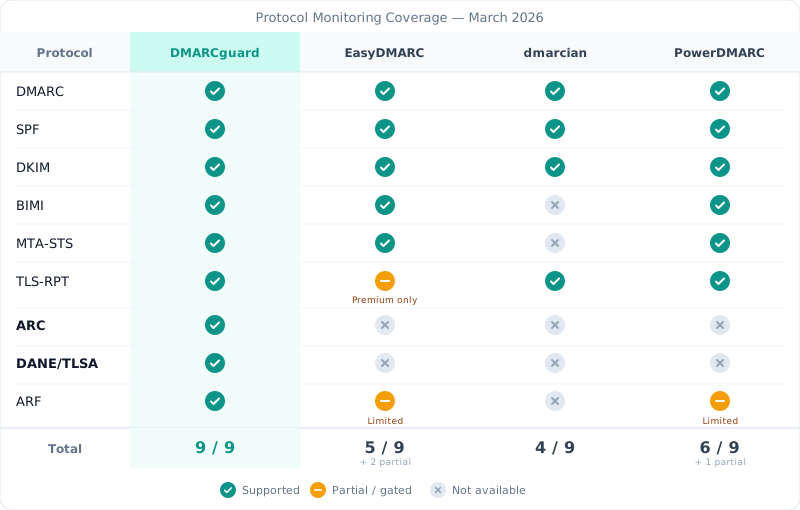
The table below compares protocol coverage, pricing, and key capabilities across the four primary alternatives. Data reflects March 2026 pricing and feature sets.
| Feature | DMARCguard | EasyDMARC | dmarcian | PowerDMARC |
|---|---|---|---|---|
| DMARC monitoring | Yes | Yes | Yes | Yes |
| SPF flattening | Yes | Yes (EasySPF) | No | Yes (PowerSPF) |
| DKIM management | Yes | Yes | Yes (Inspector) | Yes (hosted) |
| BIMI | Yes | Yes | No | Yes (PowerBIMI) |
| MTA-STS | Yes | Yes | No | Yes (hosted) |
| TLS-RPT | Yes | Premium+ only | Yes (all plans) | Yes |
| ARC | Yes | No | No | No |
| DANE/TLSA | Yes | No | No | No |
| ARF forensic | Yes | Yes | Yes | Yes |
| Free tier | 2 domains, 7 protos | 1 domain, 1K/mo | 2 domains (personal) | Limited |
| Lowest paid plan | $14.50/mo* | $44.99/mo | $24/mo | $15/mo |
| Named senders | Yes (170+) | Yes | Yes | Yes |
| Data export | CSV/JSON/PDF + API | Limited | CSV | PDF/CSV |
DMARCguard pricing is quoted net: excl. VAT & sales tax. Competitor prices are shown as each vendor publishes them.
* Founding rate, including 2 domains (first 25 customers, price locked 24 months). Regular rate: $29/mo including 2 domains, then $15/domain (3–10) and $10/domain (11+).
For deeper dives into individual tools, see our detailed EasyDMARC comparison, full dmarcian comparison, and full PowerDMARC comparison.
Your Data Stays Yours
Most DMARC monitoring tools lock your data inside their platform. Export options are limited or nonexistent. Switching providers means starting over. That is not a technical limitation — it is a business decision.
DMARCguard takes the opposite approach. Full CSV and JSON export on every paid plan. API access for automation and integration. Zero vendor lock-in by design. We earn your loyalty through quality, not lock-in.
For compliance-sensitive organizations — healthcare under HIPAA, financial services under PCI DSS, government agencies — data portability and export capabilities are procurement requirements, not nice-to-haves. DMARCguard’s CSV, JSON, and PDF export plus full API access address both.
Free Tiers That Actually Work
A free DMARC monitoring tier should give you enough capacity to evaluate the tool with your real production data. If you can only monitor one domain for 14 days, you are making a purchasing decision based on a demo, not an evaluation.
| Provider | Domains | Emails/mo | History | Restrictions |
|---|---|---|---|---|
| DMARCguard | 2 | No cap | 30 days | 7 of 9 protocols (DANE and ARF Pro-only) |
| EasyDMARC | 1 | 1,000 | 14 days | No TLS-RPT parsed reports, no Hosted MTA-STS, no Managed DKIM |
| dmarcian | 2 | 1,250 | 1 month | Personal use only (audited) |
| PowerDMARC | 1 | 10,000 | 10 days | ”Personal Domains Only” eligibility |
| Postmark | Unlimited | Unlimited | Weekly only | No dashboard, no alerts |
| Cloudflare | Unlimited | Unlimited | 30 days | Beta, no dashboard |
EasyDMARC’s free tier — 1 domain, 1,000 emails, 14-day history — is barely enough to validate that the tool receives reports. It is not enough to assess whether the platform handles your sending sources correctly or whether the remediation guidance is actionable. EasyDMARC’s free tier does include their SPF/DKIM/DMARC/BIMI generators and checkers, Aggregate Reports (RUA), and Managed BIMI; what’s gated to Premium+ is TLS-RPT parsed reports, Hosted MTA-STS, EasySPF flattening, and Managed DKIM.
dmarcian’s free Personal tier is more generous at 2 domains and 1,250 emails, but the personal-use restriction means you cannot legally use it for business. dmarcian audits this — a free evaluation that turns into an unplanned invoice is a real risk.
Postmark stands out for zero-friction entry: unlimited domains, no signup required. But Postmark only sends weekly email digests with basic pass/fail data. There is no dashboard, no drill-down, and no path to enforcement.
DMARCguard’s free tier includes 2 domains with 7 of the 9 core protocols — everything except DANE and ARF, which are Pro-only. Limits are based on domains and retention (30 days), not per-email volume. The difference between free and paid is capacity, retention, DANE/ARF, and the automation and evidence layer — channel integrations, DNS history, look-alike and discovery scans, compliance reports, and API access.
How to Switch from EasyDMARC
No existing “EasyDMARC alternative” article explains how to actually migrate. Here is the process. It takes about 30 minutes of DNS work and 2 to 4 weeks of parallel monitoring.
Migration from EasyDMARC to a new DMARC monitoring tool
-
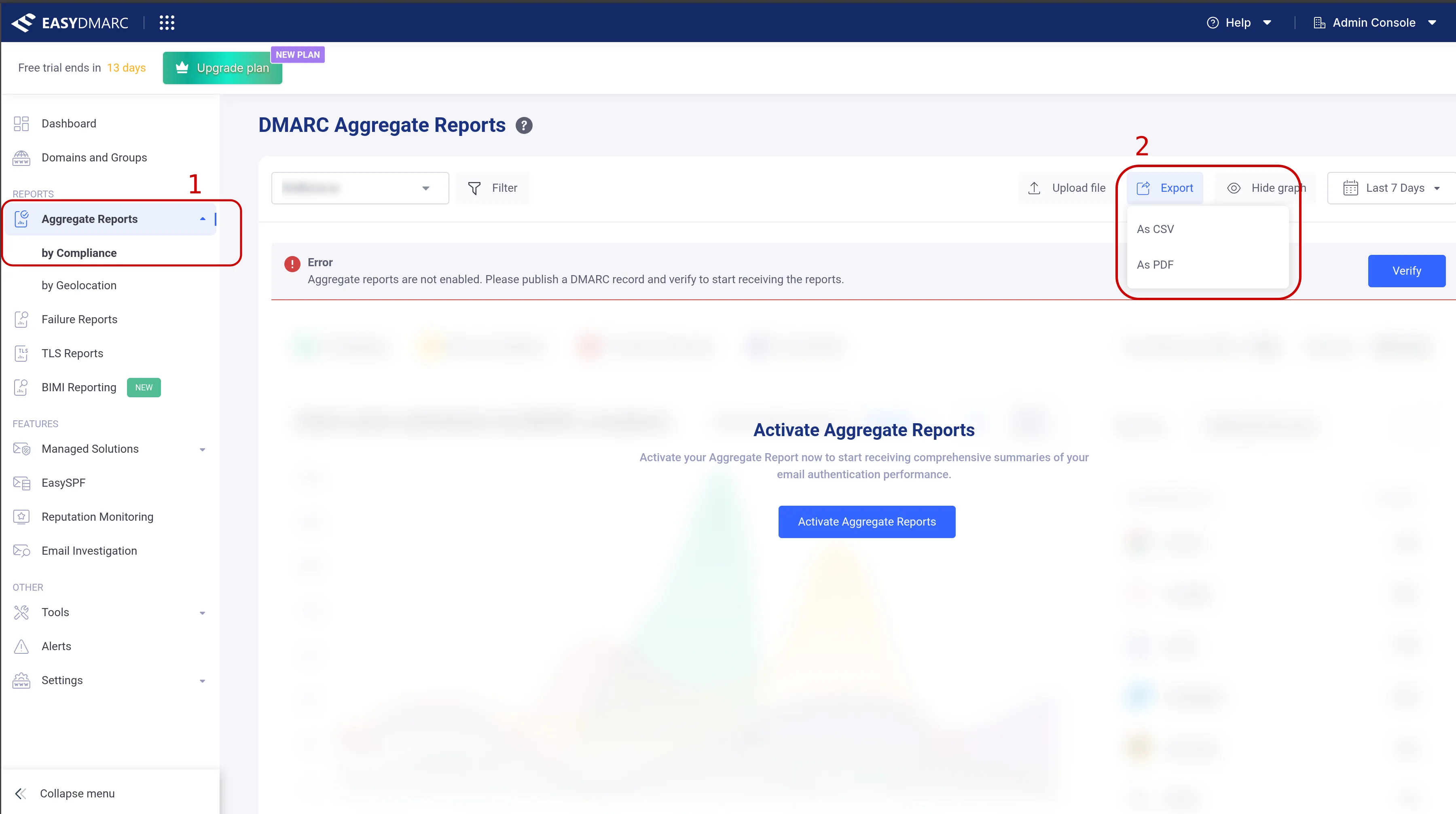
Export your current data — Log in to your dashboard and navigate to the “Aggregate Reports”, “by Compliance”, then “Export as CSV”. Download DMARC aggregate reports from EasyDMARC before your retention window expires. Plus plans retain 3 months of history; Premium retains 1 year. Once your account is closed or downgraded, that data is gone.
How to export your data from EasyDMARC dashboard -
Add your new tool’s RUA address — Update your DMARC DNS record to include the new tool’s reporting address alongside the existing one. A DMARC record supports multiple
rua=mailto:addresses separated by commas. Both tools will receive reports simultaneously. -
Run dual monitoring for 2-4 weeks — Let both tools process reports in parallel. This overlap period lets you verify that the new tool correctly identifies your sending sources, parses reports without errors, and triggers the same alerts.
-
Compare sending source identification — Check that every legitimate sending source detected by EasyDMARC also appears in the new tool. Look for services like Google Workspace, Microsoft 365, Mailchimp, SendGrid, and any internal mail servers.
-
Remove EasyDMARC’s RUA address — Once you have confirmed parity, update your DNS record to remove EasyDMARC’s reporting address. Only your new tool’s address should remain.
-
Reconfigure MTA-STS and BIMI if applicable — If you used EasyDMARC’s managed MTA-STS hosting or BIMI record management, these need to be configured through your new tool or set up independently. MTA-STS requires a web-hosted policy file; BIMI requires a DNS record and potentially a VMC certificate.
If you see unexpected DMARC failures after switching, it is almost certainly unrelated to the migration. Check our troubleshooting guide for the 7 most common causes.
The Market Is Moving — Why Now?
Three shifts since 2024 have raised the stakes for DMARC monitoring tool selection.
Adoption is growing, but enforcement lags far behind. In our
February 2026 scan of 5.5 million domains
from the Tranco Top Sites list, only 30.4% had a DMARC record — and just 12.8%
enforced it at p=quarantine or p=reject. SPF fared better at 56%, but DKIM
signing sat at just 22.7%. Among the top 10,000 sites, DMARC adoption reached
62.5%, showing that the largest organizations have moved — but the long tail has
not. External reports from industry vendors confirm similar gaps across their
own datasets.
Compliance mandates have teeth. PCI DSS v4.0 Section 5.4.1 became mandatory on March 31, 2025, requiring anti-phishing processes including DMARC, SPF, and DKIM as recommended controls.
Mailbox providers are enforcing. Google and Yahoo required bulk senders to implement DMARC starting February 2024 (Google, Oct 2023). Gmail tightened enforcement in November 2025 with outright rejections. Microsoft followed for Outlook on May 5, 2025.
Choosing a monitoring tool that covers the full protocol stack — not just basic DMARC — positions your organization for the compliance requirements that are coming, not just the ones already here.
Frequently Asked Questions
Is EasyDMARC still good in 2026?
EasyDMARC remains functional for basic DMARC monitoring with a strong G2 rating (4.8/5 on G2) and a credible 2026 release cadence (Slack alerts shipped February 4, BIMI Reporting February 10, OVHcloud DNS connector February 18). However, the gutted free tier, premium-only TLS-RPT parsed reports, premium-only Hosted MTA-STS, and missing ARC/DANE support make it less competitive for teams needing full protocol coverage or managing multiple domains on a budget. If you only need DMARC, SPF, and DKIM monitoring for 1-2 domains and are willing to pay $44.99/mo ($35.99 billed annually) or more, it remains a reasonable choice — particularly for MSPs who value EasyDMARC’s ConnectWise/HaloPSA/Autotask/Syncro/Acronis/Gradient PSA integration depth.
What is the best free DMARC monitoring tool?
It depends on your needs. Postmark DMARC offers unlimited free weekly digests but no dashboard or enforcement tools. dmarcian’s free tier allows 2 domains but is restricted to personal, non-commercial use. DMARCguard offers a free tier with 2 domains and 7 of 9 protocols monitored. For basic awareness, Postmark is fine. For serious evaluation, you need a tool that lets you monitor your actual domain portfolio.
How do I move from p=none to p=reject safely?
Start by monitoring your DMARC aggregate reports at p=none for 2 to 4 weeks.
Identify all legitimate sending sources and verify they pass SPF or DKIM
alignment. Move to p=quarantine and add t=y (test mode), so receivers apply
the policy one level weaker while you confirm legitimate mail still passes. Once
clean, move to p=reject, keeping t=y until confident, then drop it. The
legacy pct tag is deprecated in RFC 9989 but still honored by major receivers
if you need a percentage rollout. A good DMARC monitoring tool makes this
progression visible with clear pass/fail trends over time.
Can I use multiple DMARC monitoring tools at the same time?
Yes. Add multiple rua=mailto: addresses in your DMARC DNS record, separated by
commas. Receiving mailbox providers like Gmail, Outlook, and Yahoo will send
aggregate reports to all listed addresses. This is the recommended approach when
migrating between tools — run both in parallel for 2 to 4 weeks before cutting
over.
Is DMARC monitoring necessary if I already have SPF and DKIM?
Yes. SPF and DKIM authenticate individual messages, but without DMARC monitoring you have no visibility into whether authentication is actually working across your sending sources, which services are failing alignment, or whether anyone is actively spoofing your domain. DMARC ties SPF and DKIM together with an enforcement policy and a reporting mechanism. Without monitoring, you are publishing a policy but never checking whether it is doing its job.
Which DMARC tool is best for MSPs managing multiple domains?
PowerDMARC and DMARCguard both offer multi-tenant capabilities suited for MSPs. PowerDMARC has the most established white-label program with dedicated MSP/MSSP plans and SOC2/ISO 27001 certifications. DMARCguard adds broader protocol coverage — including ARC and DANE — plus named sender identification and remediation guidance on every alert. The right choice depends on whether certifications or protocol depth matter more to your clients.
Choosing Your Next DMARC Monitoring Tool
The EasyDMARC alternative you choose should solve the problems that made you leave: restrictive free tiers, per-domain pricing that punishes growth, and protocol gaps that leave you blind to TLS failures, forwarding chain issues, and DNS-based certificate validation.
If protocol coverage is your priority, DMARCguard is the only tool covering all 9 email authentication protocols, including ARC and DANE. If lowest price is what matters, PowerDMARC’s $15 per month Basic plan is hard to beat. If heritage and DMARC-specific expertise matter most, dmarcian’s founding team wrote the specification.
Whatever you choose, do not stay on a tool that no longer serves your needs just because migrating feels hard. As we outlined above, switching DMARC monitoring takes 30 seconds of DNS work and 2 to 4 weeks of parallel monitoring. Your email flow is never affected.