How to Read a DMARC Aggregate Report (XML, Field by Field)
Most domains that publish DMARC never read their reports. Of every domain
DMARCguard scans with a working DMARC record, only
16.3% publish a working rua= URI — the
other 83.7% fly blind, with enforcement on and telemetry off. This guide
walks every field of a real DMARC aggregate report XML, shows the same
record rendered in DMARCguard’s report drawer, and gives you a four-pattern
field guide for telling ESP rotation apart from real spoofing.
DMARC aggregate reports arrive in your rua= mailbox daily from Google,
Microsoft, Yahoo, Mail.ru, and a long tail of boutique receivers as .gz
or .zip attachments full of XML. By the end of this article you will be
able to extract the attachment, name every element of <feedback> from
<report_metadata> down to <auth_results>, tell ESP rotation apart from
forwarder breakage apart from a real spoofing run, and jump straight to a
one-click verdict in the DMARCguard report drawer.
What is a DMARC aggregate report?
A DMARC aggregate report (the rua report) is a daily, machine-readable
summary one receiving mail provider sends to one policy domain owner. The
schema is defined in
RFC 7489 §7.2
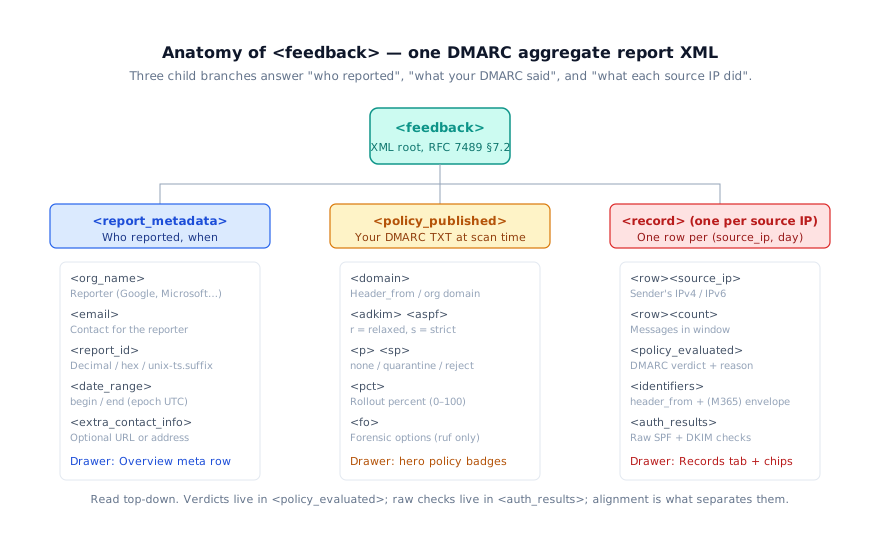
and consists of a single <feedback> XML root with three branches: who
reported and when (<report_metadata>), what your DMARC TXT record said
at scan time (<policy_published>), and one <record> per
(source_ip, day) roll-up. That last branch is where the verdicts live.
Cadence is roughly daily; transport is plain SMTP back to the address in
your rua= tag. Most receivers compress the XML — Google .zip,
Microsoft .xml.gz, Yahoo .zip, Mail.ru .gz. The aggregate report is
distinct from the forensic (ruf) report — RFC 7489 mandates aggregate,
but forensic is optional and most receivers do not emit it for privacy
reasons.
The 2015 RFC 7489 schema is superseded by
RFC 9990 (May 2026). RFC 9990
adds <np> for non-existent subdomains, <discovery_method> (values psl
or treewalk), and relaxes <envelope_from> from required to optional; it removes forwarded and
sampled_out from the <reason><type> enumeration and adds the
policy_test_mode enum value. Most production receivers still emit RFC 7489
shapes, so the walkthrough below treats the 2015 schema as the floor and
flags where RFC 9990 adds surface. See our
day-one DMARCbis analysis for the full
field list, and the
RFC 9990 aggregate report anatomy for the
new schema walked element by element.
Step 1 — Extract the .gz or .zip attachment
Almost every guide skips this step. The XML inside the email is
compressed, and the filename embeds the reporter, the policy domain, and
the window — Google ships
google.com!example.com!1747008000!1747094400.zip, Microsoft ships
enterprise.protection.outlook.com!example.com!1747008000!1747094400.xml.gz.
A Hacker News discussion
in December 2025 captured the underlying confusion: recipients literally
treat the attachment as suspected malware and never open it.
The decompression step is one line per format:
gunzip *.gz       # Microsoft, Mail.ru
unzip '*.zip'     # Google, Yahoo
Inside each archive is one XML file — the <feedback> document this guide
walks. DMARCguard ingests both formats automatically (zip support shipped
in commit 8aa5c12 on 2026-04-27); forward the email or
paste the XML into the free DMARC report analyzer
and the verdicts come back without the file dance.
The 7 sections of a DMARC report
Every <feedback> XML document has the same seven sections. Each maps
cleanly to a row, badge, or chip in the DMARCguard report drawer, which
is what makes the side-by-side reading possible. This is the canonical
DMARC report explained, top to bottom.
| XML element | What it tells you | Where it surfaces in the drawer |
|---|---|---|
<report_metadata> | Who reported, when, the report ID | Overview meta row |
<policy_published> | Your DMARC TXT record at scan time | Hero policy badges |
<record><row> | One source IP’s daily roll-up | Records tab — one row per source |
<row><policy_evaluated> | The DMARC verdict after alignment | Verdict chips on each record |
<identifiers> | header_from (always); envelope to/from (M365) | Record sub-row |
<auth_results><spf> | Raw SPF check before alignment | SPF chip |
<auth_results><dkim> | Raw DKIM check before alignment | DKIM chip |
The two columns that confuse first-time readers are <auth_results> and
<policy_evaluated>. The first is the raw SPF/DKIM result the receiver
saw on the wire. The second is the DMARC verdict after the receiver
checked alignment between the authenticated domain and your header_from.
You will see the difference clearly in the field-by-field walk below.
Reading the XML — field by field
The cleanest way to learn the format is on a real document. The snippet
below is the same minimal <feedback> document DMARCguard’s
DMARC failure guide uses; it captures the
most common shape — one record, one source IP, the characteristic ESP
“DKIM aligned, SPF unaligned” pattern.
<feedback>
  <policy_published>
    <domain>example.com</domain>
    <p>quarantine</p>
    <sp>none</sp>
    <pct>100</pct>
  </policy_published>
  <record>
    <row>
      <source_ip>198.51.100.42</source_ip>
      <count>1523</count>
      <policy_evaluated>
        <disposition>none</disposition>
        <dkim>fail</dkim>
        <spf>fail</spf>
      </policy_evaluated>
    </row>
    <identifiers>
      <header_from>example.com</header_from>
    </identifiers>
    <auth_results>
      <spf>
        <domain>bounces.esp.com</domain>
        <result>pass</result>
      </spf>
      <dkim>
        <domain>esp.com</domain>
        <result>pass</result>
      </dkim>
    </auth_results>
  </record>
</feedback>
Walk it section by section.
<report_metadata> — who reported, when, what window
The metadata block names the reporter, gives you a contact, and stamps
the report window in epoch seconds (UTC). Every reporter emits the four
required fields — org_name, email, report_id, date_range — but
each reporter shapes <report_id> differently, which is your first
fingerprint for telling them apart.
| Reporter | <report_id> shape | Example |
|---|---|---|
| 16-19 digit decimal integer | 9391651994964116463 | |
| Microsoft | 32-character lowercase hex (UUID, no dashes) | 6d61656ef72841079dab98de42510b9e |
| Yahoo | <unix-ts>.<6-digit-suffix> | 1560820250.881400 |
| Mail.ru | ~29 digits ending in the <begin> timestamp | 87811006382192030281681084800 |
Sources:
Google Workspace Help
2026-03; Microsoft Learn 2025-2026;
parsedmarc #86 for
Yahoo; URIports cross-receiver analysis 2024-04. Microsoft aligns
date_range to UTC midnight exactly; Google and Yahoo anchor a 24-hour
rolling window to the receiver’s pipeline cut.
<policy_published> — what your DMARC said at scan time
This block is a structured echo of your DMARC TXT record at the moment
the receiver evaluated mail. The spec lists domain, adkim, aspf,
p, sp, pct, and fo, but field presence is messier in practice:
URIports’ April 2024 audit confirmed Google, Yahoo, and LinkedIn all omit
<fo> despite the XSD requiring it, because their reporters were coded
against the pre-2013 draft and never refreshed.
The adkim and aspf values are r (relaxed, the default) or s
(strict). Relaxed lets a subdomain of header_from align;
strict requires an exact match. pct is a rollout knob,
not a verdict modifier. DMARCbis adds <np> for the policy that applies
when an attacker spoofs a non-existent subdomain.
<record><row> — one source IP, one day
The <record> is where the verdicts live. One <record> covers one
(source_ip, header_from, day) combination, and <count> is the number
of messages that combination saw in the window. Critically, the verdicts
in <policy_evaluated> are not the raw SPF and DKIM checks — they are
the DMARC verdict after the receiver applied alignment to header_from.
A <reason><type> element appears when the receiver overrode the policy.
RFC 7489 §6.7 defines six values: forwarded, sampled_out,
trusted_forwarder, mailing_list, local_policy, other. DMARCbis-32
removes forwarded and sampled_out and adds policy_test_mode. The
most useful override in practice is local_policy with
<comment>arc=pass</comment> — Gmail emits this reliably when an ARC seal
validated the upstream chain; M365 emits it only when the seal’s domain
is in the tenant’s Set-ArcConfig -ArcTrustedSealers list, which Microsoft
documents with no default entries. Mimecast’s Email Security Cloud
Integrated registers itself there automatically
(new tenants from 2024-03-13); Cloud Gateway tenants add
dkim.mimecast.com themselves.
<identifiers> — what address space
<header_from> is always populated and is the domain whose DMARC record
the verdict applies to (the RFC5322 From). Microsoft is effectively alone
among major receivers in also populating <envelope_to> and
<envelope_from> (the RFC5321 envelope identifiers, emitted starting
March 2023). Google, Yahoo, and Mail.ru omit them. That single difference
is one of the cleanest fingerprints for telling a Microsoft report from a
Google one without looking at the <report_id>.
<auth_results><spf> — raw SPF alignment check
The <spf> block is the raw SPF check the receiver ran. domain is the
SPF authentication domain (typically Return-Path), result is
pass/fail/softfail/neutral/none/temperror/permerror, and
scope is mfrom or helo. Yahoo and Mail.ru historically omit
<scope> entirely.
If you see <auth_results><spf><result>pass</result> paired with
<policy_evaluated><spf>fail, that is textbook ESP rotation — the ESP’s
own SPF passes for the ESP’s domain, but the customer’s header_from
does not align.
<auth_results><dkim> — raw DKIM alignment check
The <dkim> block is the raw DKIM verification. domain is the DKIM
d= value, selector is s=, and result mirrors SPF’s enumeration.
Multi-signature messages produce one <dkim> element per signature;
OVH-related reporters have been observed double-emitting identical pairs
(parsedmarc #539).
Yahoo did not emit <selector> until May 2021.
DMARC’s DKIM column passes when at least one signature with d= aligned
to header_from validates. This is the alignment that survives
forwarding.
Variant callout — Microsoft vs Google fingerprint
To identify a reporter from the wire alone, Microsoft vs Google is the
cleanest contrast. The Microsoft flavor below is schema-faithful:
xmlns:xsd/xmlns:xsi on the root, an explicit <version>1.0</version>,
populated envelope identifiers, SPF <scope>, and <fo>0</fo>.
<?xml version="1.0" encoding="UTF-8"?>
<feedback xmlns:xsd="http://www.w3.org/2001/XMLSchema"
          xmlns:xsi="http://www.w3.org/2001/XMLSchema-instance">
  <version>1.0</version>
  <report_metadata>
    <org_name>Enterprise Outlook</org_name>
    <email>dmarcreport@microsoft.com</email>
    <report_id>6d61656ef72841079dab98de42510b9e</report_id>
    <date_range>
      <begin>1747008000</begin>
      <end>1747094400</end>
    </date_range>
  </report_metadata>
  <policy_published>
    <domain>example.com</domain>
    <adkim>r</adkim>
    <aspf>r</aspf>
    <p>quarantine</p>
    <sp>none</sp>
    <pct>100</pct>
    <fo>0</fo>
  </policy_published>
  <record>
    <row>
      <source_ip>40.92.10.42</source_ip>
      <count>318</count>
      <policy_evaluated>
        <disposition>none</disposition>
        <dkim>pass</dkim>
        <spf>fail</spf>
      </policy_evaluated>
    </row>
    <identifiers>
      <envelope_to>contoso.com</envelope_to>
      <envelope_from>bounces.esp.com</envelope_from>
      <header_from>example.com</header_from>
    </identifiers>
    <auth_results>
      <spf>
        <domain>bounces.esp.com</domain>
        <scope>mfrom</scope>
        <result>pass</result>
      </spf>
      <dkim>
        <domain>example.com</domain>
        <selector>s1</selector>
        <result>pass</result>
      </dkim>
    </auth_results>
  </record>
</feedback>
<!--
Schema-correct illustrative example. No captured Microsoft RUA is checked
into this repository; this snippet reproduces Microsoft's documented
fingerprint (xmlns:xsd / xmlns:xsi on the root, explicit <version>1.0</version>,
<envelope_to> + <envelope_from> populated, <fo>0</fo>, SPF <scope>mfrom</scope>,
DKIM <selector>) as described on Microsoft Learn (2025-2026) and the URIports
2024-04 cross-receiver compliance analysis.
-->
This is a schema-correct illustrative example — no captured Microsoft RUA
is checked into this repository; the XML reproduces the fingerprint
described on Microsoft Learn (2025-2026) and the URIports April 2024
analysis. A real Google <feedback> document is the inverse: no
<version>, no XSD namespaces, no envelope identifiers, numeric
<report_id>.
Live demo — same XML in the DMARCguard report drawer
This is the asset every other guide skips. The DMARCguard report drawer
opens directly from the reports list, deep-links via ?report=<id> for
sharing inside teams, and answers the three questions every dashboard
owes the user — how am I doing, what should I do, show me the details —
without leaving the page. The drawer shipped to production on 2026-04-27.
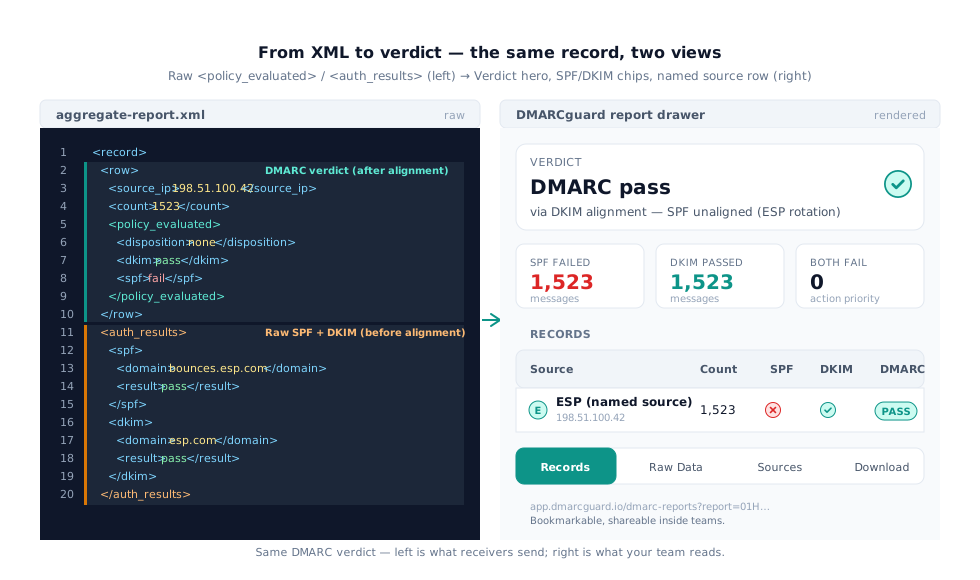
The drawer renders the same <feedback> document the previous section
walked in three layers. The verdict hero answers how am I doing? —
sourced from <policy_published> plus an aggregation across Records[],
with one badge per policy element. The failure-summary stat cards answer
what should I do? — three small cards counting records where SPF fails,
DKIM fails, and both fail; the combined-fail count is the action
priority. The Records and Raw Data tabs answer show me the details,
with one row per source IP named where DMARCguard recognizes the sender,
and the raw XML on demand. The Download XML button serves
Content-Type: application/xml.
Paste your own XML into the analyzer to
try it; nothing leaves your browser.
Failure-pattern interpretation gallery
After a few weeks of reading reports, four patterns cover most of what
shows up in your <record> blocks. Each XML signature is distinct enough
to recognize at a glance.
Healthy ESP rotation (Amazon SES, SendGrid, HubSpot)
ESPs send mail from large shared IP pools and authenticate against their
own SPF domain. The XML signature is many low-<count> rows in an ESP
CIDR — AWS SES 23.249.208.0/20, SendGrid 167.89.0.0/17, HubSpot’s
hubspotemail.net. <auth_results><spf><domain> is the ESP’s bounce
subdomain — raw SPF passes but does not align with
<header_from>customer.com. <auth_results><dkim><domain> is the
customer’s domain when DKIM CNAMEs are correct, and DKIM aligns. Net
<policy_evaluated><dkim>pass</dkim><spf>fail</spf> — DMARC passes via
DKIM alone.
This looks alarming the first time you see it; it is harmless and dominant in any production report. The fix on Amazon SES or SendGrid is a custom MAIL FROM subdomain so the SPF authentication domain becomes relaxed-aligned. HubSpot’s shared pool offers no such path without a dedicated-IP add-on, so DKIM-only enforcement is the design.
Mailing-list and ARC breakage (Mailman 3, Google Groups, Microsoft sealers)
Mailing lists rewrite Subject lines and append unsubscribe footers, which
breaks the original DKIM signature. The signature is a list MTA in
<source_ip>, <auth_results><spf><domain> matching the list’s own
domain with result=pass, and <auth_results><dkim><domain> matching
the original sender with result=fail. Both <policy_evaluated> columns
fail. Where the list ARC-seals and the receiver trusts the seal, the
override appears as
<reason><type>local_policy</type><comment>arc=pass</comment></reason>.
Debian bug #1086707
(2024-11) documented Mailman 3’s default: no DMARC mitigation. Fix:
dmarc_mitigate_action = munge_from in Postorius. Google Groups rewrites
From only at p=quarantine or stricter — at p=none, list traffic emits
the broken pattern unmodified, which is why the February 2024 bulk-sender
mandates created a wave of new list breakage in everyone’s reports.
Forwarder breakage (Princeton, MIT, Fastmail, iCloud relay)
A forwarder rewrites the envelope but ideally leaves the body and DKIM
signature untouched. Princeton’s @alumni.princeton.edu, MIT’s
@alum.mit.edu, and Fastmail’s relay all behave that way — so the
signature is the forwarder’s egress IP in <source_ip>,
<auth_results><spf> unaligned but passing for the forwarder’s domain,
and <auth_results><dkim> for the original sender still passing. Net
<policy_evaluated><dkim>pass</dkim><spf>fail</spf> — DMARC pass via
DKIM. Princeton shut down its forwarding service for exactly this DMARC
reason in mid-2024.
The contrast case is iCloud Hide My Email and DuckDuckGo Email
Protection. These normalize MIME and re-sign as d=icloud.com (or strip
the original signature entirely), which breaks DKIM. With no consumable
ARC seal at the external receiver, DMARC fails — typically with
<reason><type>forwarded</type></reason> per RFC 7489 §6.7 (DMARCbis-32
drops this enum and reaches the same conclusion via local_policy). There is no
sender-side fix. Design enforcement so forwarder rows do not block
legitimate streams: exclude them from p=reject decisions, rely on ARC
where available.
Real spoofing (Microsoft 2026-01-06, GlockApps 2025-03)
Spoofing has a distinct shape. Microsoft Threat Intelligence’s
January 2026 write-up
captured it: source IPs from an unfamiliar ASN (OVH 51.89.59.188,
DigitalOcean), <auth_results><spf>fail</spf> for the spoofed brand, no
<auth_results><dkim> block at all because the message is unsigned,
<header_from> matching the brand under attack, and high <count>
values. There is no <reason> block. If you see this pattern, it is
real.
Fix: validate every legitimate connector, then ratchet p=none to
quarantine to reject. Continue auditing weekly for new ASNs reusing
your header_from. The
GlockApps 2025-03 case study
caught a spoofing run via RUA volume the moment new IPs appeared.
Cheatsheet
| Pattern | <source_ip> clue | <auth_results><spf><domain> | <auth_results><dkim><domain> | <policy_evaluated> | <reason> |
|---|---|---|---|---|---|
| ESP rotation | Many low-count rows in ESP CIDRs | ESP subdomain (pass) | Customer domain (pass, aligned) | dkim=pass / spf=fail | none |
| List / ARC | Single list MTA, high count | List’s own domain (pass) | Original sender (fail) | both fail | sometimes local_policy arc=pass |
| Forwarder OK | Forwarder egress (66.111.4/24, EXO, etc.) | Forwarder’s domain (pass) | Original sender (pass) | dkim=pass / spf=fail | forwarded (RFC 7489) |
| Spoofing | Unfamiliar ASN (OVH 51.x, DO, residential) | fail or unaligned | absent or fail | both fail | none — if you see this, it is real |
To go deeper on a specific failure mode and what to change in your DNS or your sending pipeline, the DMARC failure troubleshooting guide walks each cause with platform-specific fixes for Google Workspace, Microsoft 365, SendGrid, Mailchimp, and Amazon SES.
Tools that parse DMARC XML — feature parity matrix
There are roughly seven serious tools in this category. The matrix below summarizes paste-XML support, multi-domain dashboarding, free domain quotas, named-sender enrichment, ARC analysis, RUF (forensic) support, export formats, and AI remediation. Vendor pages move, so re-check before you cite.
| Tool | Paste XML | Multi-domain | Free domains | Named senders | ARC | RUF | Export | AI remediation |
|---|---|---|---|---|---|---|---|---|
| dmarcian | Yes | Yes | 2 | Yes | — | Yes | — | — |
| MXToolbox | Yes | Yes | — | Partial | Partial | — | — | — |
| Postmark | No | No | — | Yes | — | — | Partial | No |
| EasyDMARC | Partial | Yes | 1 | Yes | — | Yes | — | — |
| Valimail | No | Yes | — | Yes | — | Partial | Partial | — |
| DMARCguard | Yes | Yes | 2 | Partial | Yes | Partial | Partial | Yes |
| parsedmarc (OSS) | Yes (CLI) | Partial | Unlimited | Yes | No | Yes | Yes | No |
DMARCguard is our product — to be transparent, we differentiate on paste-XML that runs in the browser (nothing uploaded), ARC chain analysis where every other commercial tool is silent or partial, and AI-driven remediation where competitors stop at static recommendations. We do not win on every cell. parsedmarc is open-source and free for unlimited domains; dmarcian has a more mature multi-tenant platform built over a decade of work.
Pricing snapshot (2026-04-29, billed annually where shown): MXToolbox $129/mo; Postmark DMARC Digests free; EasyDMARC $35.99/mo for 2 domains; Valimail Monitor free with paid tiers starting at $5,000/year; DMARCguard $29/mo for 2 domains (Pro), or $14.50/mo on the locked-in founding rate; parsedmarc free and self-hosted. For a line-by-line pricing and feature breakdown against DMARCguard, see the EasyDMARC pricing comparison, the dmarcian pricing comparison, and the Valimail pricing comparison. None of this changes the wire format — paste your XML into the analyzer and compare the output to whatever tool you use today.
From one report to monitoring 30 a week
Reading one DMARC report is a skill. Reading the 30 your reporters will
send you next week is a workflow. The drawer + deep-link + digest emails
take you from unzip + grep to clicking through a ?report=<id> link
from an alert. The Records tab names sources where DMARCguard recognizes
them, the failure-summary stat cards put the action priority above the
fold, and the deep-link URL means alerts and digest emails can drop a
teammate straight onto the same view.
If you are running this for multiple clients, the multi-tenant model needs different scaffolding — separate billing, per-client digest emails, role-based drawer access, and a way to keep one client’s report data out of another’s view. The follow-up DMARC for MSPs guide walks the multi-tenant patterns from pricing to channel integrations to the buyer-journey objections specific to consultancies. To review the DMARC protocol fundamentals before you take the workflow on at scale, the protocol guide covers RFC 7489 and DMARCbis end to end.
FAQ
How do I read a DMARC report?
Extract the .gz or .zip attachment to reveal a <feedback> XML
document. Read top-down: <report_metadata> (who, when),
<policy_published> (your DMARC TXT), then each <record> for source
IP, count, and verdict. Each <auth_results> shows raw SPF/DKIM;
<policy_evaluated> shows DMARC after alignment.
Do I need to read DMARC reports?
Yes if you want enforcement to work. Operators sometimes argue small senders can skip them, but blind enforcement is how legitimate streams break silently. DMARCguard’s research shows 83.7% of DMARC-publishing domains never read their telemetry. A managed analyzer with a free tier removes the manual XML burden.
What should I do with DMARC reports?
Three jobs: confirm legitimate sources align, spot unfamiliar ASNs
reusing your header_from, and ratchet p=none to quarantine to
reject only after legitimate streams pass. Reports without action are
noise. Use a tool that names sending sources (Mailchimp, SendGrid)
instead of raw IPs and surfaces alignment failures by source.
What is the difference between aggregate (rua) and forensic (ruf) reports?
Aggregate reports summarize daily traffic per source IP — counts and verdicts only. Forensic (failure) reports send a redacted copy of one failing message in ARF format. RFC 7489 mandates aggregate; forensic is optional and most receivers do not send it for privacy reasons.
Why does my DMARC report show SPF fail but DMARC pass?
DMARC passes if either SPF or DKIM passes and is aligned with
header_from. ESPs commonly send mail with their own SPF authentication
domain (unaligned) and a customer-domain DKIM signature (aligned). The
<policy_evaluated> block reflects that combined verdict — spf=fail,
dkim=pass, DMARC pass.
Are DMARC report IPs personal data under GDPR?
RFC 9990 §7.2 (Privacy
Considerations) says aggregate reports contain no personal data. The 2018
ECO/CSA legal
analysis treats source IPs as personal data but lawfully processable as
traffic data. No DPA has issued DMARC-specific guidance. Pointing rua=
to a SaaS aggregator engages GDPR Article 28 controller-processor
obligations.
What is a free DMARC report analyzer?
A tool that parses the XML and renders it as readable verdicts.
DMARCguard’s analyzer at /tools/dmarc-report-analyzer/ runs in your
browser — paste XML, see verdicts, no signup, nothing uploaded.
dmarcian’s converter and parsedmarc (open-source) are alternatives; see
the matrix above for feature parity.
Conclusion
If only 16.3% of DMARC adopters publish a working rua= URI, the
difference between enforcement and theatre is the skill you just learned.
Every <feedback> document has the same seven sections, receivers vary
at the edges (Microsoft schema-faithful, Google minimal, Yahoo and Mail.ru
pre-2013-draft), and four failure patterns — ESP rotation, list and ARC
breakage, forwarder breakage, real spoofing — cover most of what shows
up in the wild. Knowing how to read a DMARC report turns every <record>
block into a decision.
Paste your next aggregate report into the free DMARC report analyzer to see the rendered verdicts in your browser, no signup. When you are ready to monitor instead of audit, the Hobbyist plan covers two domains free with seven of nine protocols. If you run this for clients, the DMARC for MSPs guide is the next step.