Microsoft DMARC Enforcement: Setting Up DMARC for Office 365 and Microsoft 365
603,854 domains — 19.6% of every SPF-enabled domain in our 5.5 million-domain
scan — route their mail through spf.protection.outlook.com. When Microsoft
started enforcing DMARC for bulk senders to Outlook.com on May 5, 2025, it
reshaped compliance for the largest email footprint on the internet
(DMARCguard SPF Supply Chain Study, 2026;
Microsoft Defender for Office 365 Blog, 2025-04-30).
Microsoft DMARC is not one thing but two: a sender-side enforcement regime for
anyone emailing Outlook.com consumer mailboxes, and a tenant-side configuration
burden for every Microsoft 365 Global Administrator. Miss either, and mail to
@outlook.com, @hotmail.com, @live.com, and @msn.com lands in Junk
or bounces with 550 5.7.515 Access denied. If you are already seeing that rejection, the
Microsoft 550 5.7.515 Diagnostic scores
your domain against Microsoft’s high-volume sender requirements and surfaces
the exact records to publish.
By the end of this guide you will have a published DMARC record, a working SPF and DKIM stack in the Microsoft Defender portal, and a clear picture of how Microsoft, Google, and Yahoo treat DMARC differently in 2026.
Why Microsoft DMARC changed in 2025 (and what that means in 2026)
On April 2, 2025, Microsoft’s Defender for Office 365 team announced new
bulk-sender requirements: domains sending more than 5,000 messages per day to
Outlook.com consumer mailboxes must pass SPF, pass DKIM, and publish a DMARC
record with at least p=none aligned to SPF or DKIM. The first draft routed
failing mail to the Junk folder.
The version 4.0 update on April 30, 2025 announced the decision to reject
non-compliant mail, but staged it: “After May 5th, 2025, Outlook will begin
routing messages from high volume non-compliant domains to the Junk folder,”
with full rejection at a “date to be announced.” Microsoft’s words for
rejected mail: “The rejected messages will be designated as 550; 5.7.515 Access denied, sending domain [SendingDomain] does not meet the required authentication level.”
(Microsoft Tech Community, 2025-04-30).
The scope is narrower than most operators assume. The May 5, 2025 rule governs
Outlook.com consumer inbound only — outlook.com, hotmail.com, live.com,
and msn.com. Exchange Online tenant-to-tenant mail runs on a separate
default, rolled out July 2023: inbound mail with p=reject is rejected with
550 5.7.509 when the recipient’s MX points to Office 365, governed by the
tenant’s anti-phishing policy HonorDmarcPolicy toggle
(Microsoft Learn, DMARC configure, 2025-05-07).
Between June 2025 and April 2026, Microsoft did not publish a follow-on escalation. The Outlook.com Postmaster Policies page (updated March 3, 2026) still anchors on the May 5, 2025 date and the 5,000-per-day threshold. Any domain sending commercial volume to Microsoft consumer mailboxes now treats DMARC as blocking, not optional.
Microsoft DMARC requirements at a glance
There are two audiences for Microsoft DMARC, and they are not the same.
Senders TO Outlook.com consumers. If your domain sends more than 5,000
messages per day to @outlook.com, @hotmail.com, @live.com, or @msn.com,
you must publish SPF (aligned), DKIM (aligned), and DMARC at least p=none.
Non-compliant mail is rejected with 550 5.7.515. Smaller senders are
“strongly recommended” but not mandated
(Outlook.com Postmaster, 2026-03).
Administrators OF Microsoft 365 tenants. Your outbound domains need SPF,
DKIM, and DMARC so mail reaches every destination — Microsoft, Google, Yahoo,
and the long tail. Inbound enforcement is governed by the anti-phishing
policy’s Honor DMARC toggle; HonorDmarcPolicy=$true with
DmarcRejectAction=Reject is the new-tenant default, but legacy tenants may
still carry MoveToJmf.
“M365 DMARC” and “Microsoft 365 DMARC” are the same thing — M365 is Microsoft’s internal abbreviation. Setup, DNS, and enforcement are identical regardless of which phrasing your vendor documentation uses.
| Requirement | Bulk sender to Outlook.com (>5,000/day) | Exchange Online tenant (outbound) | Exchange Online tenant (inbound) |
|---|---|---|---|
| SPF published | Mandatory, must pass | Mandatory for every sending domain | Evaluated against sender domain |
| DKIM signing | Mandatory, must pass | Mandatory for custom domains | Evaluated against sender domain |
| DMARC policy | At least p=none, aligned | Start p=none, progress to p=reject | Honored per anti-phishing policy |
| ARC | Recommended | Recommended for forwarders | Trusted ARC sealers opt-in |
| Non-compliance NDR | 550 5.7.515 | Dependent on destination | 550 5.7.509 for p=reject |
| Threshold | 5,000 messages/day | Any volume | Any volume |
How do I set up DMARC in Microsoft 365? (step-by-step)
The fastest path to set up DMARC in Office 365 is the same order Microsoft uses in its own documentation: publish SPF, enable DKIM signing in the Defender portal, then publish DMARC. Microsoft is explicit that the order matters — “Configure SPF, DKIM, and DMARC records (in that order) for all custom Microsoft 365 domains” (Microsoft Learn, MDO deployment guide).
Before you start. You need Global Administrator in Microsoft Entra plus
Organization Management or Security Administrator in Exchange Online to access
the Email authentication settings blade — Security Administrator in Entra
alone cannot open it. The custom domain must already be verified in Microsoft
365; confirm with Get-AcceptedDomain.
Three facts to anchor in your head before you edit DNS:
- SPF must
include:spf.protection.outlook.comfor any domain sending through Exchange Online. - DMARC lives at
_dmarc.yourdomain.comas a TXT record startingv=DMARC1; p=none;. - Policy progression is
p=none→p=quarantine→p=reject, not “turn on reject immediately.”
Step 1 — Publish the SPF TXT record for Exchange Online
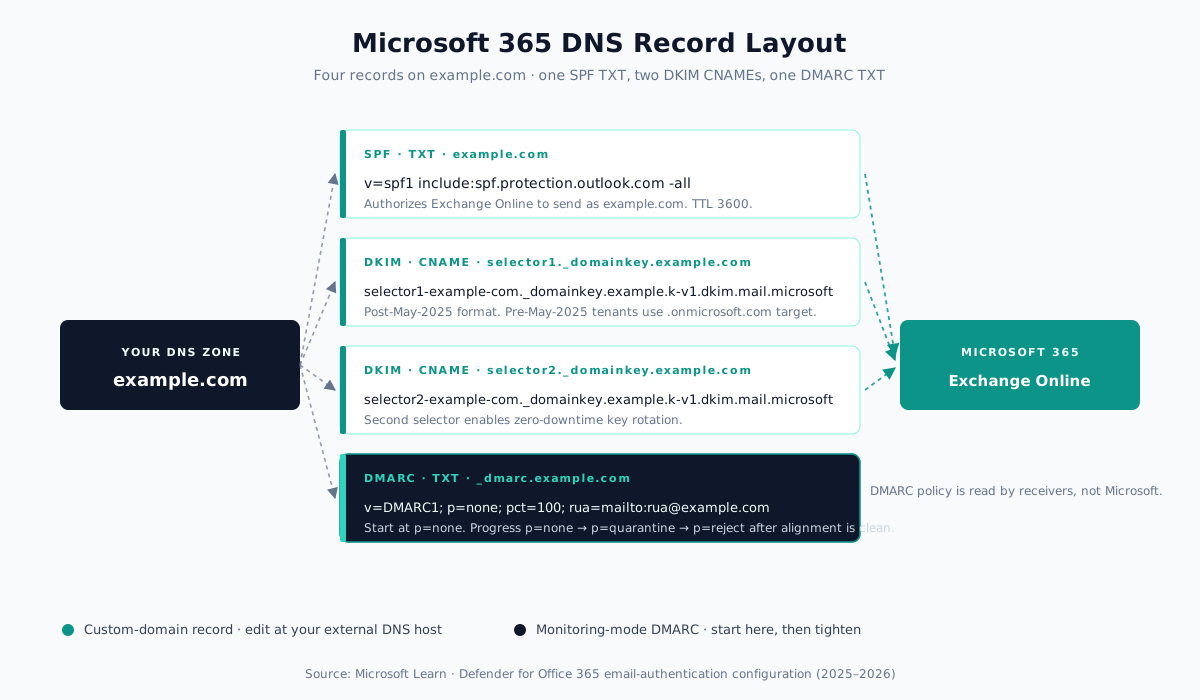
For a custom domain that sends only through Exchange Online (commercial or GCC), publish this single TXT record at the root of your sending domain:
example.com. IN TXT "v=spf1 include:spf.protection.outlook.com -all"TTL: 3600 seconds (one hour) minimum, per Microsoft’s guidance to avoid DNS
lookup timeouts
(Microsoft Learn, SPF configure, 2025-09-17).
Use -all (hard fail) — Microsoft explicitly recommends it because DKIM and
DMARC catch legitimate misalignments.
For hybrid Exchange environments, add IP literals or additional include:
mechanisms alongside the Microsoft include:
example.com.             IN  TXT  "v=spf1 ip4:192.0.2.10 include:spf.protection.outlook.com -all"
marketing.example.com.   IN  TXT  "v=spf1 include:servers.mcsv.net include:spf.protection.outlook.com -all"
GCC High / DoD tenants use include:spf.protection.office365.us; 21Vianet
tenants use include:spf.protection.partner.outlook.cn.
Watch the 10-DNS-lookup ceiling. Each include: costs at least one DNS
lookup, and multi-vendor stacks (Microsoft 365 + Mailchimp + Salesforce +
SendGrid + HubSpot) are routinely close to the limit. 148,655 domains in our
5.5 million-domain scan already exceed it and silently SPF-fail.
Step 2 — Enable DKIM signing in the Microsoft Defender portal
DKIM management lives in the Microsoft Defender portal at
https://security.microsoft.com. Navigate: Email & collaboration →
Policies & rules → Threat policies → Email authentication settings → DKIM
tab. Shortcut: https://security.microsoft.com/authentication?viewid=DKIM
(Microsoft Learn, DKIM configure, 2026-01-31).
Select your custom domain, locate the toggle labeled “Sign messages for this domain with DKIM signatures” (default: Disabled), and publish the two CNAME records the flyout shows at your external DNS host.
For newly onboarded custom domains, the May 2025 format change means CNAMEs
now target .dkim.mail.microsoft with a dynamic partition (k-v1, r-v1):
selector1._domainkey.example.com.   IN   CNAME   selector1-example-com._domainkey.example.k-v1.dkim.mail.microsoft.com.
selector2._domainkey.example.com.   IN   CNAME   selector2-example-com._domainkey.example.k-v1.dkim.mail.microsoft.com.
TTL: 3600. Pre-May-2025 tenants still use the legacy format with
.onmicrosoft.com:
selector1._domainkey.example.com.   IN   CNAME   selector1-example-com._domainkey.contoso.onmicrosoft.com.
selector2._domainkey.example.com.   IN   CNAME   selector2-example-com._domainkey.contoso.onmicrosoft.com.
Copy the CNAME target exactly as the portal shows it. A common 2025–2026
failure mode: following a third-party walkthrough that predates the May 2025
selector format and using .onmicrosoft.com targets for a domain Microsoft
now expects on .dkim.mail.microsoft
(Microsoft Q&A, 2025-09-08).
After CNAMEs resolve, flip the toggle back to Enabled. Default key size is
2048-bit RSA; valid -KeySize values are 1024 or 2048. Rotation is
admin-triggered through the “Rotate DKIM keys” button or
Rotate-DkimSigningConfig in Exchange PowerShell. The .onmicrosoft.com
MOERA domain has no automatic rotation cadence in 2026 — rotate it on the
same schedule you rotate custom-domain keys.
Step 3 — Publish the DMARC TXT record
Microsoft cannot publish custom-domain DMARC from any admin portal — you edit
your external DNS. The Defender portal and M365 admin center publish DMARC
only for .onmicrosoft.com
(Microsoft Learn, DMARC configure, 2025-05-07).
Microsoft’s recommended monitoring record for a custom subdomain:
_dmarc.example.com. IN TXT "v=DMARC1; p=none; pct=100; rua=mailto:rua@example.com; ruf=mailto:ruf@example.com"Microsoft documents only v, p, pct, rua, and ruf; for sp=,
adkim=, aspf=, and fo=, Microsoft defers to RFC 9989. The default for
pct is 100. Note that pct is deprecated in RFC 9989 (superseded by t=y
test mode), though Microsoft still documents and honors it.
Need one generated for your own domain? Generate a Microsoft-ready DMARC record — pick your tenant type, paste your rua mailbox, and the generator outputs a record you can paste into your DNS host.
Two operational notes:
- Point
rua=at a dedicated mailbox or Microsoft 365 Group, never a user’s personal mailbox. Aggregate reports arrive as gzipped XML attachments. - Do not rely on
ruf=. Microsoft 365 never emits forensic reports, regardless of whether a validruf=mailto:address exists in your record.
Step 4 — Walk p=none to p=quarantine to p=reject
Microsoft recommends a gradual rollout. Start with p=none and a valid rua=
destination. Read aggregate reports for two to four weeks, identifying every
legitimate sender that currently fails DMARC alignment. Fix those at the
source — custom DKIM for your ESP, SPF include for your CRM, subdomain
delegation for your transactional provider.
When the failing-source list is empty of legitimate mail, tighten the policy.
The standards-current way to stage this is t=y (test mode), which tells
receivers to apply your policy one level weaker while you confirm legitimate
mail still passes, then drop it once reports are clean. The legacy pct= tag is
deprecated in RFC 9989 but still documented and honored by Microsoft if you need
a percentage rollout: Microsoft’s documented progression is pct=10, pct=25,
pct=50, pct=75, pct=100 at each stage.
At each step, measure two metrics: alignment rate (percentage of your mail passing SPF or DKIM aligned to the From domain) and failing-source count. Enforcement is only safe when alignment is above 99% and every failing source is known and intentional.
Step 5 — Protect MOERA and every parked domain
Microsoft auto-signs DKIM and auto-publishes SPF for *.onmicrosoft.com, but
does not publish a DMARC TXT record for your tenant’s MOERA subdomain by
default. Attackers spoof user@contoso.onmicrosoft.com and headers show
dmarc=none because there is nothing to enforce
(Microsoft Learn, MOERA step-by-step, 2025-09-04).
Close it. In the M365 admin center under Settings → Domains → your
.onmicrosoft.com domain → DNS records, publish:
_dmarc.contoso.onmicrosoft.com. IN TXT "v=DMARC1; p=reject; rua=mailto:rua@contoso.com"Apply the same p=reject posture on every registered-but-unused custom
domain. Pair it with SPF v=spf1 -all and no DKIM record. Parked domains
cost nothing to protect.
Microsoft-specific DMARC gotchas the official docs will not tell you
Most setup guides stop at the DNS record. The failures happen after that.
compauth reason codes change the delivery verdict. Microsoft stamps a
composite authentication result in every Authentication-Results header.
compauth=fail reason=000 means explicit DMARC fail on a p=quarantine or
p=reject sender — the actual delivery outcome is set by DmarcRejectAction
/ DmarcQuarantineAction in your anti-phishing policy, not the DNS record.
compauth=pass reason=130 means an ARC sealer rescued a genuine DMARC fail —
the only reliable signal that ARC chain validation was
load-bearing. compauth=none reason=905 means DMARC was silently skipped
because complex routing hid the originating IP
(Microsoft Learn, message headers, 2025-10).
Tenant-level HonorDmarcPolicy vs the policy you published. Verify with
Get-AntiPhishPolicy | fl Name,HonorDmarcPolicy,DmarcQuarantineAction,DmarcRejectAction.
New tenants default to $true, Reject, Quarantine. Legacy tenants may
still carry MoveToJmf — your published p=reject becomes silent
Junk-foldering instead of a 550 5.7.509 rejection.
sp= on a subdomain record is silently ignored. DMARC’s sp= tag is
read only on the organizational domain. Publishing
v=DMARC1; p=none; sp=reject on mail.example.com does nothing. For a
specific subdomain, publish an explicit _dmarc.<sub> TXT with its own p=.
Outbound mail silently signs with .onmicrosoft.com and breaks
alignment. If you miss Step 2 for any custom domain, Exchange Online signs
with your tenant’s MOERA domain. The DKIM signature is valid but does not
align with the custom From — DMARC fails the moment you move past p=none.
Verify received mail shows dkim=pass header.d=<customdomain>.
Third-party gateway fronting EOP breaks DMARC without Enhanced Filtering
for Connectors. With MX pointed at Mimecast, Proofpoint, or Barracuda, the
last hop EOP sees is the gateway IP. Without EFC
(Set-InboundConnector -EFSkipLastIP $true plus -EFSkipIPs populated with
gateway egresses), SPF and DMARC evaluate against the gateway and fail on
legitimate mail. Add the gateway as a Trusted ARC Sealer if it modifies
messages. If Mimecast is the gateway and it holds inbound mail as “DNS
Authentication: DMARC Fail”, the
Mimecast DMARC fail fix decodes that verdict.
If your gateway vendor also pitches its own DMARC product, see
Proofpoint’s DMARC offering compared.
Microsoft only sends rua reports when MX points directly at Microsoft 365,
and never sends ruf. Hybrid routing and SEG-fronted routing both suppress
Microsoft-originated aggregate reports. If your MX is pointed at anything
other than *.mail.protection.outlook.com, rely on aggregated reporting from
every other receiver (Google, Yahoo, Proofpoint) that your rua address
collects.
Catching these in production takes a DMARC monitor, not a one-off check.
Microsoft vs Google vs Yahoo: the 2026 DMARC enforcement side-by-side
The three providers share direction — mandatory SPF, DKIM, DMARC for bulk senders — but differ on dates, thresholds, and exactly which SMTP code you see when mail fails.
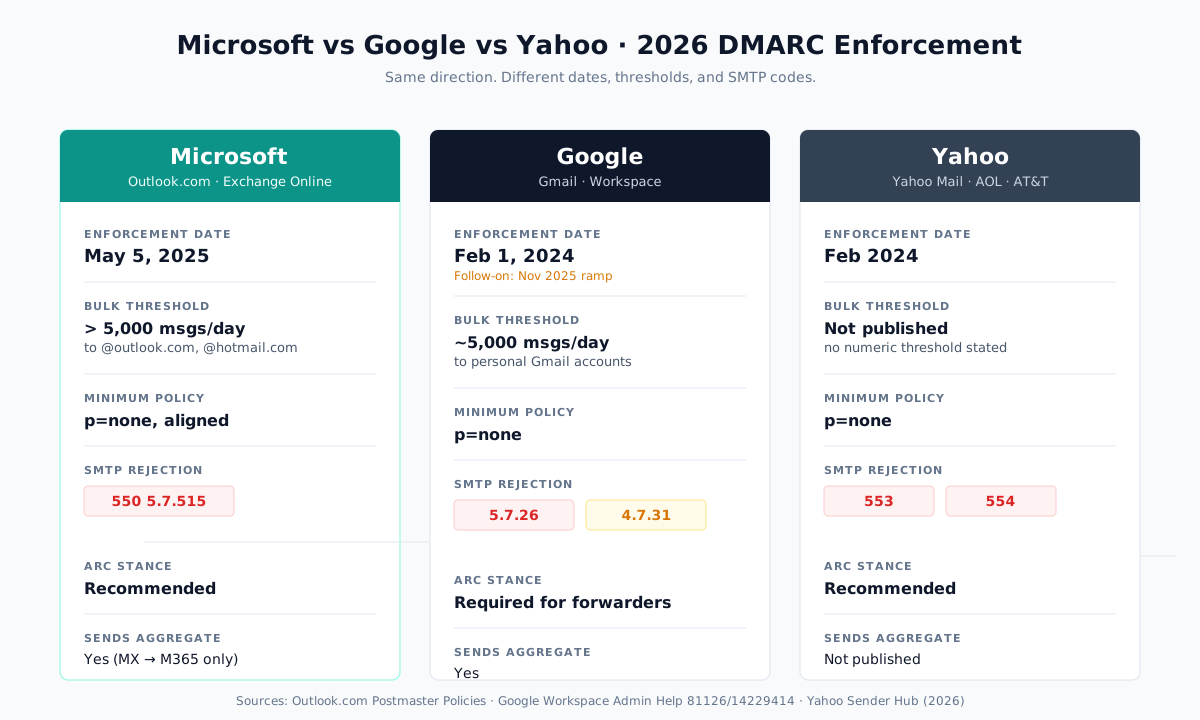
| Area | Microsoft (Outlook.com) | Google (Gmail / Workspace) | Yahoo (Yahoo Mail / AOL / AT&T) |
|---|---|---|---|
| Initial enforcement date | May 5, 2025 | February 1, 2024 | February 2024 |
| Follow-on escalation | None dated after May 2025 | November 2025 ramp | None published |
| Bulk-sender threshold | >5,000/day to Outlook.com | ~5,000/day to personal Gmail | No numeric threshold published |
| Minimum DMARC policy | At least p=none, aligned | At least p=none | At least p=none |
| SPF + DKIM both required (bulk) | Both must pass individually | Both required, either aligned | Both required |
| ARC stance | Recommended | Required for forwarded mail | Recommended |
| Exact SMTP rejection code | 550 5.7.515 | 550 5.7.26 / 550 5.7.40; 421 4.7.26 / 421 4.7.40 deferrals (the sender FAQ lists the DMARC deferral as 4.7.31) | 553/554, no enhanced code published |
| One-click unsubscribe mandated | Not mandated by name | Yes, since June 1, 2024 | Yes, since June 2024 |
| Spam complaint threshold | Not published | 0.10% target / 0.30% ceiling | Below 0.3% |
| Sends DMARC aggregate (rua) | Yes, when MX points at M365 | Yes | Not published |
| Sends DMARC forensic (ruf) | No | Not published | Not published |
Sources: Outlook.com Postmaster Policies (2026-03), Google Email sender guidelines 81126 and FAQ 14229414, Yahoo Sender Hub Best Practices, Yahoo Sender Hub FAQs.
Notes and conflicts. Microsoft’s Postmaster index (updated March 3, 2026)
and the April 30, 2025 Tech Community revision both describe Junk-routing
from May 5, 2025 — the revision leaves full rejection at a “date to be
announced” — while the 550 5.7.515 support article documents live
rejections for authentication failures: the announced blanket action is
Junk, and the NDR is the documented per-failure rejection. Google phrases its threshold differently between
pages: “more than 5,000 messages per day” (81126) versus “close to 5,000
messages or more … within a 24-hour period” (14229414). For a deeper
operator-level walkthrough, see our companion guide on
Google and Yahoo’s sender requirements.
How DMARCguard monitors Microsoft 365 DMARC results
Microsoft’s reporting stops where your environment leaves the Microsoft network. A DMARC monitor closes the gap.
- Named sender identification on Microsoft 365 outbound. Rua reports show
spf.protection.outlook.comas a sending source; DMARCguard resolves that to “Exchange Online” so you are not triaging IP literals. - Aggregate report ingestion from every receiver. When your MX does not point at Microsoft 365, Microsoft does not send rua — but Google, Yahoo, and a hundred smaller receivers still do. DMARCguard collects all of them at one rua mailbox.
- ARC chain visibility.
compauth=pass reason=130means an ARC sealer rescued a DMARC fail. DMARCguard flags those so you know which forwarders are load-bearing and which are waste.
Frequently asked questions
What is Microsoft DMARC?
Microsoft DMARC describes how Microsoft’s two email footprints implement the DMARC standard (RFC 9989): Outlook.com consumer mailboxes enforce DMARC at the edge for bulk senders, and Exchange Online tenants honor inbound DMARC through anti-phishing policy and sign outbound DKIM for custom domains. Both run on the same protocol — the difference is where the enforcement lives. For the underlying standard, see our DMARC primer.
Does Microsoft 365 use DMARC?
Yes. Microsoft 365 honors sender DMARC on inbound mail when the recipient MX points to Exchange Online, signs outbound DKIM for custom domains once enabled, and sends DMARC aggregate (rua) reports to domains with a valid rua mailbox. Microsoft 365 never sends forensic (ruf) reports.
When did Microsoft enforce DMARC?
Microsoft enforced DMARC for Outlook.com consumer inbound on May 5, 2025, for
domains sending more than 5,000 messages per day. Non-compliant mail is
rejected with 550 5.7.515. Exchange Online tenant inbound has honored
p=reject / p=quarantine by default since July 2023, using NDR code
550 5.7.509.
How do I set up DMARC in Office 365?
Publish an SPF TXT record with include:spf.protection.outlook.com, enable
DKIM signing in the Defender portal by publishing the two portal-generated
CNAMEs, then add a _dmarc.yourdomain.com TXT starting
v=DMARC1; p=none; pct=100; rua=mailto:rua@yourdomain.com. Monitor aggregate
reports for two to four weeks, then progress p=none to p=quarantine to
p=reject.
What is the difference between Microsoft 365 DMARC and M365 DMARC?
They are the same thing. M365 is Microsoft’s abbreviation; setup steps, DNS records, and enforcement behavior are identical regardless of which label vendor documentation uses.
Does Microsoft send DMARC aggregate reports?
Yes — to domains that publish a valid rua mailbox, but only when the recipient’s MX record points directly to Microsoft 365. Hybrid routing and SEG-fronted routing (Mimecast, Proofpoint, Barracuda fronting EOP) suppress Microsoft-originated rua generation. Microsoft 365 never sends forensic (ruf) reports.
Where to go from here
Microsoft DMARC is not a one-day project. The DNS records take an hour; the
alignment work — matching every legitimate sending source against SPF or
DKIM — takes weeks. Bulk senders to Outlook.com are out of time: since
May 5, 2025, non-compliant mail is routed to Junk, a blanket rejection date
is still unannounced, and 550 5.7.515 rejections are documented for DMARC
failures.
Start with a baseline: publish a record at p=none with a rua mailbox, and
let two weeks of aggregate reports tell you what your environment actually
looks like. If you also send to Gmail and Yahoo, pair this guide with the
companion walkthrough on Google and Yahoo’s sender requirements linked in
the comparison section above — the three providers converge on the same
endpoint, but the operational details diverge enough to matter.