MXToolbox Alternatives for DMARC: Beyond Basic Checks in 2026
MXToolbox’s free SuperTool is the default bookmark for DNS, MX, and blacklist checks, and it earned that reputation honestly. The trouble starts when teams hit a DMARC (RFC 7489) rollout, a compliance audit, or a Google or Microsoft rejection bounce and discover that an on-demand lookup cannot tell them which senders are aligned, which IPs are forwarding, or whether their policy is actually being enforced. If you are searching for an MXToolbox alternative for DMARC, you are part of a large cohort hitting the same wall in 2026.
DMARC rides on two older standards: SPF (RFC 7208) publishes which mail servers are allowed to send for your domain, and DKIM (RFC 6376) cryptographically signs each outbound message. A modern DMARC monitoring tool is really three overlapping evaluators, which is why point-in-time lookups miss so much.
This post covers what MXToolbox’s free and paid tiers actually do, what they miss for continuous DMARC monitoring, how the DMARC-specialist landscape compares on protocol depth and price, and how to migrate without losing historical data.
Why MXToolbox Works for Lookups but Falls Short for DMARC
MXToolbox runs on a split reputation. The free SuperTool — DNS, MX, blacklist, SPF/DKIM/DMARC record lookups, and header analyzer — is one of the most recommended diagnostic tools on r/sysadmin, Hacker News, and G2. The paid Delivery Center has a harder time: Trustpilot sits at 3.7 out of 5, and the dominant one-star theme across every major review platform is billing and cancellation friction around the “risk-free” trial, per aggregated reviews across Trustpilot, G2, and Prospeo’s 2026 aggregation. That split — loved free, contested paid — frames every honest comparison.
The numbers behind the DMARC-adoption gap make the split matter more than it
used to. In our scan of 5.49 million domains
from the Tranco list (2026-02-27), only 30.4% of domains publish a DMARC record
and just 12.8% enforce it at p=quarantine or p=reject. MXToolbox’s one-shot
/dmarc.aspx query can tell you whether your DMARC record exists. It cannot
tell you whether you are sitting inside the 17.6% of domains stuck at p=none,
or whether the sending source that failed alignment yesterday is Mailchimp,
Salesforce, or a spoofing attempt.
On the free tier, MXToolbox offers an on-demand DMARC record lookup plus a standalone manual-upload DMARC XML parser. Continuous RUA aggregation, DMARC compliance dashboards, inbox-placement testing, and SPF flattening all sit behind paid Delivery Center at $129 per month (5 domains) or Delivery Center Plus at $399 per month per MXToolbox’s products matrix and G2’s syndicated pricing.
What MXToolbox Gets Right (and Wrong) for DMARC
MXToolbox gets several things right. The free SuperTool covers DNS, MX, PTR, SPF, DKIM, DMARC, BIMI, MTA-STS, and TLS-RPT lookups in one bar, plus the Network Tools catalog covering header analysis and blacklist scans across 100+ DNSBLs per MXToolbox’s Network Tools index. Inside paid Delivery Center, MXToolbox identifies sending sources by vendor name (Mailchimp, SendGrid, Google G Suite, Salesforce, Office 365) and surfaces SPF/DKIM authentication and alignment as distinct pass/fail grades in the DMARC Performance view per MXToolbox’s knowledge base.
The free-tier DMARC story is where the gap opens. The /dmarc.aspx checker
parses your published DMARC record and nothing else. Aggregate (RUA) XML
reports — the ones mailbox providers send every 24 hours — are not parsed at
scale on the free tier. There is no continuous monitoring, no forensic
visibility, no per-sender breakdowns, no historical trend chart, and the DMARC
Performance UI caps the retention filter at 90 days per the same knowledge base
page.
Reviewer trust in the paid tier is fragile. A Trustpilot customer wrote that they “did a trial for MxToolbox and 2 years down the line realised they were still charging us… At $99 per month that adds up (nearly $2.5k!)” (Trustpilot, 2022). Prospeo’s 2026 aggregation called billing and cancellation the “#1 complaint” across platforms. The diagnostics work — the commercial experience is what reviewers mistrust.
The multi-tenant story also breaks down. Delivery Center caps the base plan at 5 domains, offers no multi-tenancy, no white-label, and no dedicated MSP program per PowerDMARC’s MXToolbox review. For consultants or MSPs managing 15 to 20 client domains, the per-domain economics stop working fast.
DMARC Checker Tools That Go Beyond One-Shot Lookups
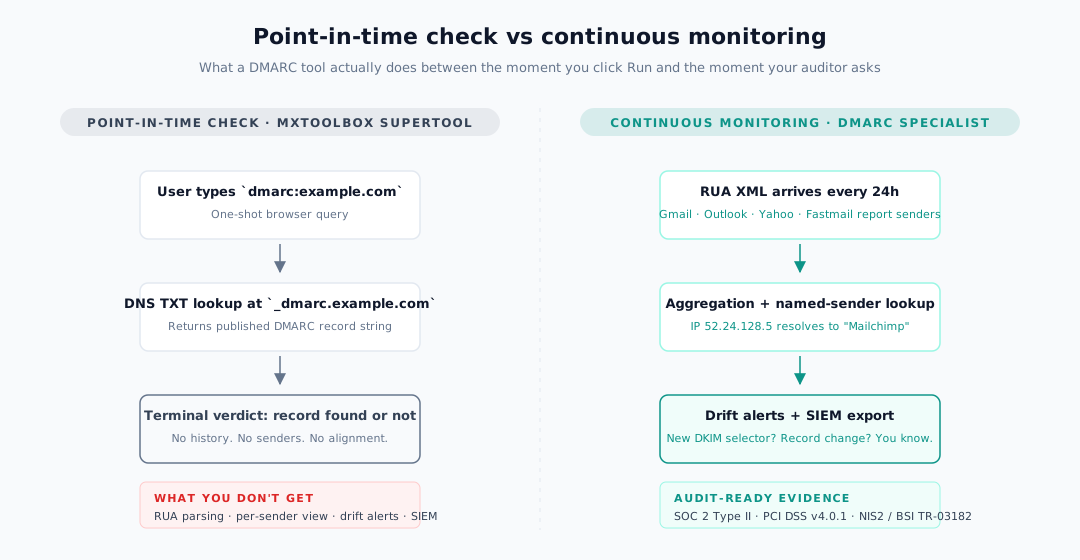
The DMARC market in 2026 has split into two distinct categories. One is one-off DNS lookup utilities — what Red Sift’s 2030 free-tools guide calls “any lookup tool.” The other is continuous DMARC monitoring platforms that ingest aggregate reports, translate raw IPs into named services, and alert you when something drifts.
Four capabilities repeatedly separate the two tiers, and buyer posts across vendor marketing and r/sysadmin both name them in nearly the same order:
- Aggregate (RUA) XML parsing at scale. EasyDMARC’s Aggregate XML Report Analyzer page concedes that “without proper analysis, XML reports can be overwhelming due to the sheer volume of raw data.” Continuous parsing is table stakes once you pass a handful of sources.
- Per-message SPF/DKIM alignment breakdown. Valimail Monitor exposes per-domain DMARC disposition including which domains are passing and failing DMARC, aligned SPF, aligned DKIM, and overall disposition per Valimail’s Monitor product page.
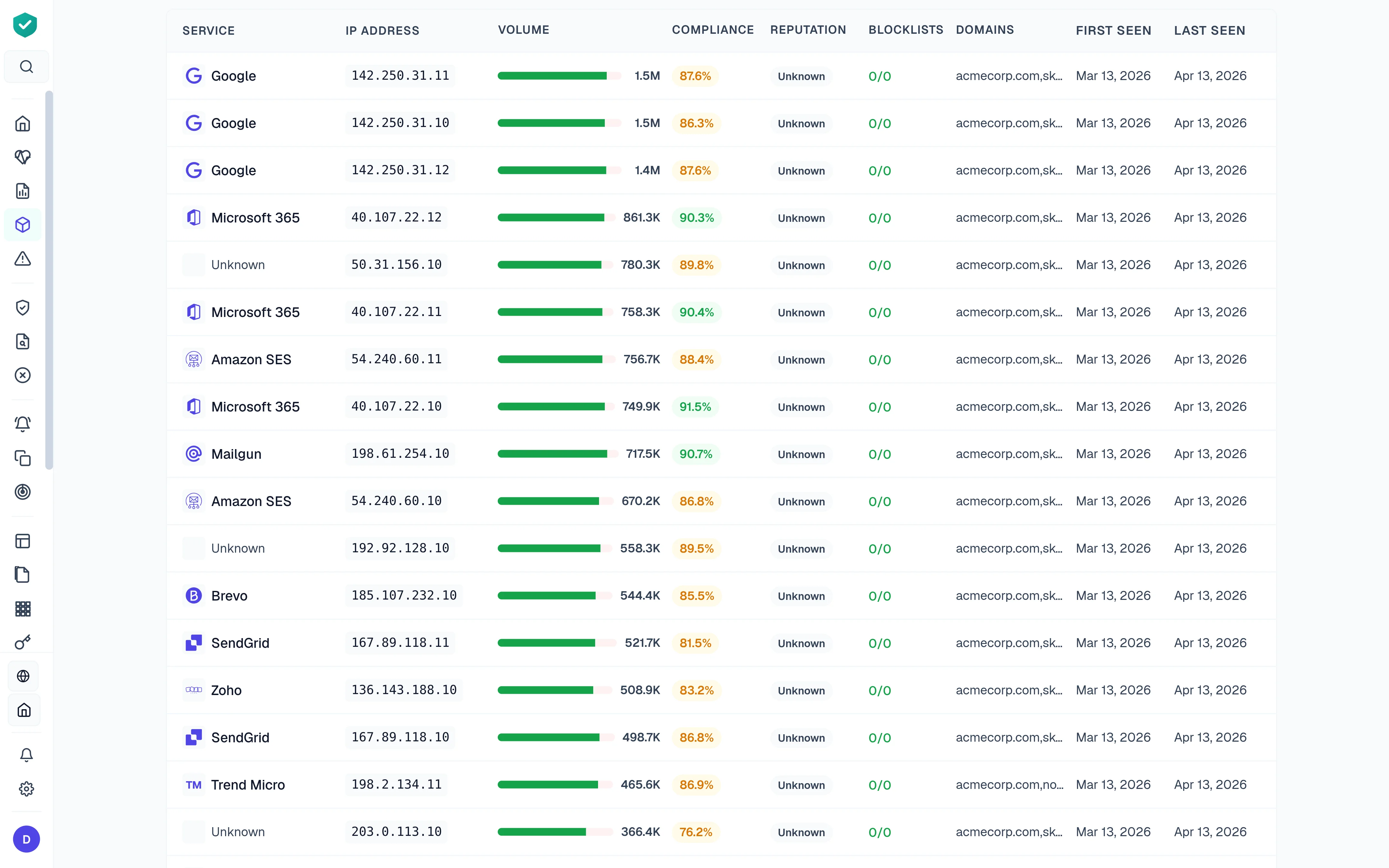
- Named-sender identification. Instead of seeing “Email from 52.24.128.5,” you see “Mailchimp sending your newsletter” or “Salesforce handling customer communications” per Valimail’s analyzer write-up. DMARCguard ships this across 170+ services.
- Drift and change alerts on DMARC, SPF, and DKIM records. dmarcian’s Alert Central fires when a new DKIM selector or DNS record change is detected, per dmarcian’s Alert Central overview.
MXToolbox’s own DMARC Report Analyzer page concedes the point: “DMARC Aggregate XML reports… include valuable data such as message volumes seen, SPF/DKIM Authentication rates, actions taken on the message (quarantine/reject), and more. The un-parsed reports themselves are hard to decipher and contain non-aggregated data” (MXToolbox). The free SuperTool does not parse them. That is the line between “DMARC checker” and “DMARC monitoring tool.”
If you want to run a continuous DMARC check on your domain without a signup, DMARCguard’s free tool ingests a record and returns alignment, policy, reporting, and remediation guidance in one pass.
Continuous DMARC Monitoring vs. Point-in-Time Checks
The difference between a point-in-time check and continuous monitoring is not academic — mailbox providers, auditors, and cyber-insurance carriers have all made it the minimum viable posture in 2026.
Mailbox providers are rejecting non-compliant mail. Google’s
Email sender guidelines FAQ
documents rate-limit code 4.7.31 for missing DMARC records — the
Gmail SMTP errors reference
lists the same deferral as 421 4.7.40, with 550 5.7.40 as its permanent
counterpart — and 5.7.x permanent rejections against senders over 5,000
messages per day. Microsoft’s Outlook began routing the same traffic to Junk on
May 5, 2025, with 550; 5.7.515 Access denied as the documented rejection and
no blanket rejection date, per
Microsoft Tech Community
— and that post explicitly directs senders to analyze their DMARC RUA reports
for ongoing visibility. Yahoo’s
Sender Hub FAQ confirms continuous
evaluation as the operative model.
Auditors and insurers want evidence over months, not screenshots. Linford & Co.’s SOC 2 practitioner guidance notes that the AICPA added monitoring activities to the Trust Services Criteria specifically to enforce ongoing operating effectiveness. PCI DSS v4.0.1 Requirement 5.4.1 requires anti-phishing controls, and its guidance lists DMARC, SPF, and DKIM as examples, per the PCI DSS v4.0.1 standard. Coalition’s platform docs confirm that Control “actively scans policyholder domains for SPF/DMARC posture” as part of ongoing underwriting per Coalition’s help center — not a one-time bind check.
MXToolbox’s Delivery Center caps its DMARC Performance retention filter at “1 day or up to 90 days” per its own knowledge base. That window cannot cover a SOC 2 Type II audit period, and it cannot produce the evidence window that insurance-renewal contingencies or PCI assessors now routinely ask for.
Protocol Coverage: 9 Protocols vs. MXToolbox’s Basic Set
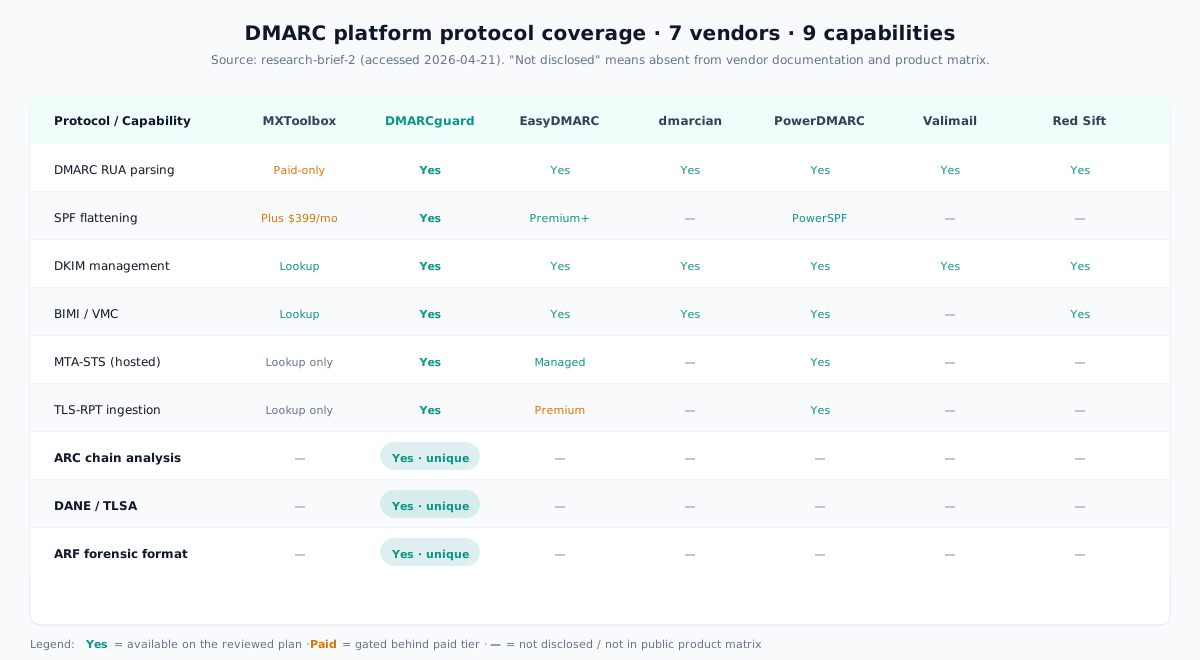
The cleanest way to see where MXToolbox stops and a purpose-built DMARC platform begins is a protocol matrix. Across the DMARC-specialist landscape — MXToolbox, DMARCguard, EasyDMARC, dmarcian, PowerDMARC, Valimail, and Red Sift OnDMARC — three protocols are marked Yes by DMARCguard and Not disclosed by every other surveyed vendor: ARC chain analysis, DANE/TLSA, and dedicated ARF forensic format support.
MXToolbox itself ships BIMI, MTA-STS, and TLS-RPT lookup tools but no hosted MTA-STS, no hosted TLS-RPT, no TLSA lookup, and no dedicated ARC chain analyzer per MXToolbox’s Network Tools index. A Security Boulevard review in April 2026 characterized MXToolbox as “lookup-only, not hosting, for these protocols” (Security Boulevard).
Why ARC, DANE, and TLS-RPT Matter in 2026
ARC, defined in RFC 8617, preserves authentication results across forwarders and mailing lists. DKIM signatures survive a forward only if the forwarder seals an ARC header chain — otherwise the receiving domain sees the message as a DMARC failure. Our post on ARC is the fix for DMARC failures on forwarded mail walks through the failure modes; to understand the protocol, learn how ARC preserves authentication across hops in our primer. Without ARC analysis, you cannot separate “benign forwarder” from “spoofing attempt” in your aggregate reports.
DANE/TLSA is a different axis. Germany’s BSI Technical Guideline TR-03182 requires that any domain publishing a DMARC policy must also receive DMARC reports and evaluate them “regularly and in a timely manner… by machine and in an automated manner,” per the BSI TR-03182 PDF. That recurring, automated evaluation language is the NIS2-aligned baseline many EU organizations now work against.
TLS-RPT closes the loop on MTA-STS. If you publish an MTA-STS enforce policy but a remote MTA silently fails STARTTLS, TLS-RPT is how you find out. Without it, MTA-STS enforcement is a black box.
What MXToolbox Misses (Enumerated)
Pulling the gaps into one list clarifies what a replacement needs to cover:
- No continuous RUA XML aggregation on the free tier. Manual upload only.
- No forensic visibility, per-sender breakdowns, or historical trend charts on paid Delivery Center per the Security Boulevard review and PowerDMARC’s analysis.
- No multi-tenancy, white-label, or dedicated MSP tier. The base plan caps at 5 domains.
- No automated enforcement journey from
p=nonetowardp=quarantineand on top=reject. - No dedicated ARC chain analyzer, no DANE/TLSA lookup tool in the Network Tools index.
- SPF flattening gated at Delivery Center Plus ($399 per month). If you need to flatten your SPF record for free, MXToolbox is not the tool.
- DMARC Performance retention capped at 90 days per MXToolbox’s own knowledge base, below typical audit windows.
- Reported DKIM signature-hash false negatives flagged by a sysadmin cited in Prospeo’s 2026 aggregation, plus UI described as “stuck in 2018” in G2 pros-and-cons coverage.
DMARCguard vs. MXToolbox: Feature Comparison
The table below compares MXToolbox against DMARCguard and the three DMARC-first competitors most often named alongside them. Figures reflect vendor public pricing pages.
| Feature | MXToolbox | DMARCguard | EasyDMARC | dmarcian | PowerDMARC |
|---|---|---|---|---|---|
| Free tier | Blacklist monitor + anonymous SuperTool | 2 domains, 7 of 9 protocols, 30-day retention | 1 domain, 1,000 emails, 14-day retention | 2 domains, 1,250 emails, personal-use only | 1 domain, 10K emails, 10-day retention |
| Entry paid plan | Delivery Center $129/mo | Pro $29/mo incl. 2 domains ($14.50 founding) | Plus $44.99/mo | Basic $24/mo | Basic $15/mo at 100K tier |
| Domains on entry plan | 5 | 2 domains included, then per domain (a third off from 11) | 2 | 2 | 5 |
| DMARC RUA parsing | Paid-only | Yes | Yes | Yes | Yes |
| ARC chain analysis | Not disclosed | Yes | Not disclosed | Not disclosed | Not disclosed |
| DANE / TLSA | Not disclosed | Yes | Not disclosed | Not disclosed | Not disclosed |
| Hosted MTA-STS | Not disclosed | Yes | Yes (Managed MTA-STS) | Not disclosed | Yes |
| Named-sender identification | Partial | Yes (170+ services) | Yes | Yes | Yes |
| SPF flattening | Plus tier ($399/mo) | Yes (Hosted DNS add-on, $12/domain) | Yes (Premium+) | Not disclosed | Yes (PowerSPF) |
| MSP / white-label | None advertised | Enterprise white-label | MSP Program | MSP Program | Partner Program (white-label) |
| Data export | API; CSV/JSON/PDF not disclosed | CSV, JSON, PDF, API | API (Enterprise), XML | API (Enterprise) | CSV, XML, PDF; API (Enterprise+) |
DMARCguard pricing is quoted net: excl. VAT & sales tax. Competitor prices are shown as each vendor publishes them.
The directional read matches the review-corpus consensus: MXToolbox built a diagnostics product and a thin paid monitoring add-on. DMARC specialists built monitoring products first and treat diagnostics as a byproduct. If you need both, a specialist plus MXToolbox’s free SuperTool in your bookmarks is the pragmatic answer. For a head-to-head on the two DMARC specialists most often weighed against each other, compare DMARCguard and EasyDMARC side by side.
How to Migrate from MXToolbox to DMARCguard (or Anywhere Else)
Switching DMARC monitoring tools is a DNS change, not a mail-flow change. Your email keeps flowing exactly as it did yesterday. The steps below take about 30 minutes of DNS work plus two to four weeks of parallel monitoring.
- Export historical Delivery Center data while your subscription is active. Once an account is cancelled or downgraded, support-ticket access closes and the data is effectively gone — a pattern documented across Trustpilot reviews. Download the DMARC aggregate exports, inbox-placement reports, and any mailflow summaries you want to keep.
- Add your new tool’s RUA address alongside the MXToolbox one. DMARC
records support multiple
rua=mailto:addresses separated by commas. A valid dual-monitor record forexample.comlooks like this:
_dmarc.example.com. TXT "v=DMARC1; p=none; rua=mailto:dmarc@reports.mxtoolbox.com, mailto:TOKEN@reports.dmarcguard.io; fo=1"- Run dual monitoring for two to four weeks. Both tools will receive the same aggregate reports in parallel. This is your baseline period to verify sender parity and alerting behavior.
- Verify named-sender parity. Confirm that every legitimate sender you see in MXToolbox (Google Workspace, Microsoft 365, Mailchimp, SendGrid, internal relays) also appears under the same name in your new tool. If you see raw IPs in one place and named senders in the other, the reconciliation belongs here.
- Remove MXToolbox’s RUA address. Once you are confident in parity, drop
the old
mailto:from your DMARC record. Only the new tool’s reporting address should remain. - Reconfigure MTA-STS, TLS-RPT, and BIMI if they were managed by MXToolbox. Delivery Center’s SPF Hosting Integration and BIMI management features do not auto-migrate. Rehost the MTA-STS policy file and republish any BIMI records through your new provider.
If something breaks after the cutover, it is almost certainly unrelated to the RUA change — DMARC reporting and mail delivery are independent paths.
Who Should Stay on MXToolbox
MXToolbox’s free tools earned their reputation, and a balanced comparison
should say so. The SuperTool is the right default for free one-off DNS, MX,
PTR, and blacklist checks — no DMARC monitoring tool beats a URL-bar command
like blacklist:example.com. It is also the right call for teams that only
need weekly blacklist monitoring on a single domain with no plan to move toward
DMARC enforcement, and for organizations already on Delivery Center Plus that
bundle SPF flattening, BIMI management, and inbox-placement testing into one
vendor and find $399 per month acceptable.
For anyone outside those cases — MSPs, teams crossing the 5-domain cap,
organizations facing PCI or SOC 2 audit windows, and any team whose mailbox
provider already returns 5.7.515 rejections — a DMARC-specialist platform is the
better fit.
Frequently Asked Questions
Is there a free MXToolbox alternative?
Yes. DMARCguard’s free tier covers 2 domains and 7 of 9 email authentication protocols with 30-day report retention. Postmark sends unlimited weekly DMARC digests, dmarcian’s free Personal tier is restricted to personal-use only, and EasyDMARC’s free plan allows 1 domain, 1,000 emails, and 14-day retention. MXToolbox’s own free tier is a single-domain weekly blacklist monitor plus the anonymous SuperTool — no DMARC analytics.
What does Reddit recommend instead of MXToolbox?
r/sysadmin consensus keeps MXToolbox SuperTool bookmarked for free DNS, MX, and blacklist lookups. For paid DMARC work, reviewers point to EasyDMARC, PowerDMARC, dmarcian, or the open-source parsedmarc project. A Hacker News thread flags that small teams often cobble four paid tools (Cronitor, Hookdeck, MXToolbox, BetterStack) into a stack that costs as much as one purpose-built SaaS.
Does MXToolbox parse DMARC aggregate (RUA) reports?
Not on the free SuperTool. /dmarc.aspx only parses the published DMARC policy
record. Aggregate XML parsing requires either a manual upload to MXToolbox’s
standalone free parser or paid Delivery Center ingestion at $129 per month.
MXToolbox’s own Report Analyzer page concedes that the un-parsed XML is the
actionable evidence layer.
Is MXToolbox enough for PCI DSS or SOC 2 compliance?
Probably not on its own. PCI DSS v4.0.1 Requirement 5.4.1 requires anti-phishing controls, and its guidance lists DMARC, SPF, and DKIM as examples. SOC 2 Type II auditors ask for evidence over months, not point-in-time screenshots. A one-shot MXToolbox lookup captures configuration state, not operating effectiveness over the audit window — continuous RUA ingestion and multi-month retention are what auditors accept.
How much does MXToolbox Delivery Center cost compared to DMARC specialists?
MXToolbox jumps from free SuperTool to $129 per month for Delivery Center (5 domains), then $399 per month for Delivery Center Plus (SPF flattening). DMARCguard Pro is $29/mo including 2 domains, then $15/domain (3–10) and $10/domain (11+) — $29 + 8 × $15 = $149/mo for the same ten domains. EasyDMARC Plus is $44.99 per month (2 domains), dmarcian Basic is $24 per month (2 domains), and PowerDMARC Basic starts at $15 per month on the 100K-volume tier. Valimail Enforce is public-only-on-request and multiple third-party reviewers report a $5,000-per-year entry point.
Can I use MXToolbox and a DMARC monitoring tool at the same time?
Yes. A DMARC record supports multiple rua=mailto: addresses separated by
commas, and receiving mailbox providers deliver aggregate reports to all
listed addresses. Teams migrating between tools commonly run both in parallel
for two to four weeks. It is also a reasonable steady state for teams that want
to keep MXToolbox’s SuperTool bookmarked for one-off checks while a
purpose-built DMARC monitor handles RUA ingestion.
Choosing Your MXToolbox Alternative
The right MXToolbox alternative depends on what pushed you off MXToolbox in the first place. If the free tier’s lack of continuous RUA aggregation is the blocker, almost any DMARC specialist clears that bar on their free plan. If the $129 jump to Delivery Center is out of budget for five domains, PowerDMARC and DMARCguard both sit well below it. If ARC chain analysis, DANE/TLSA coverage, or ARF forensic support matter for your compliance posture, DMARCguard is the only tool in the surveyed landscape that marks all three Yes.
Whatever you pick, keep the free SuperTool bookmarked for one-off lookups. It still does that job better than anything else. For the DMARC rollout, the enforcement journey, and the evidence window your auditor will ask for, a purpose-built monitoring platform is the right category.