SPF PermError: What Causes It and How to Fix It Step-by-Step
In our SPF Supply Chain Study, we scanned 5,499,028 domains and found 148,655 with SPF configurations that exceed the 10-lookup limit — the most common trigger for SPF PermError. If your emails are silently failing authentication, an invalid SPF record is one of the most likely culprits.
SPF PermError is a permanent Sender Policy Framework evaluation failure that cascades into DMARC failure, causing legitimate email to land in spam or get rejected outright. Most domain administrators do not know they have one until email deliverability drops and recipients stop receiving messages.
The root cause is a supply chain problem: every SaaS email service you add — marketing automation, CRM, support desk, HR platform — adds include: mechanisms to your SPF record and pushes you closer to the RFC-defined limit. The failure is silent. There is no bounce notification or error log on the sending side. The only way to discover a PermError is to check your record with a tool or notice the impact in DMARC aggregate reports.
This guide covers every cause of PermError, how to diagnose it with free tools, and step-by-step fixes with real DNS record examples. Whether you manage a single domain or hundreds, you will leave with a clear action plan.
What Is SPF PermError?
SPF PermError is a permanent error returned when a receiving mail server cannot evaluate your SPF record. Unlike a temporary DNS timeout, PermError means your SPF record itself is broken — and every email sent from your domain fails SPF authentication until you fix it.
RFC 7208 Section 2.6.7 defines PermError as a result code meaning “the domain’s published records could not be correctly interpreted.” This is not a judgment on whether the sender is authorized — it means the record is unreadable. The receiving server cannot make any determination at all.
Understanding how SPF evaluation works clarifies why PermError is distinct from other results. When a receiving server gets an email, it queries the Return-Path (envelope sender) domain’s DNS TXT record, walks the entire include chain, and returns one of seven results: Pass, Fail, SoftFail, Neutral, None, TempError, or PermError.
PermError is not the same as SPF Fail. A Fail (-all) means the sending server is explicitly unauthorized. A PermError means the SPF record is so broken that the server cannot even determine whether the sender is authorized or not.
| Result | Meaning | Record Is Valid? | DMARC Treatment |
|---|---|---|---|
| PermError | Record cannot be interpreted | No | Treated as “fail” |
| Fail | Sender is explicitly not authorized | Yes | Treated as “fail” |
| SoftFail | Sender is not authorized but accept mail | Yes | Treated as “fail” |
How Common Is SPF PermError? (DMARCguard Research Data)
SPF PermError is more common than most administrators realize. Our first-party research data quantifies the scale of the problem across the internet.
DMARCguard’s SPF Supply Chain Study (2026) scanned 5,499,028 domains from the Tranco Top Sites list, walking every SPF include chain to count actual DNS lookups. Of the 3,077,219 domains with valid SPF records, 148,655 exceeded the 10-DNS-lookup limit — the most common PermError trigger. That is 4.8% of all SPF-enabled domains, or 2.7% of all domains scanned.
Independent research confirms the scale. A 2024 analysis by DMARC Checker / Wulfsoft of the top 1 million domains found approximately 2% with invalid SPF setups, with approximately 13,000 (1.3%) having multiple SPF records — an instant PermError trigger.
The underlying cause is a supply chain problem. Every SaaS email service you add — marketing, CRM, support, HR — adds include: mechanisms to your SPF record and pushes you closer to the 10-lookup ceiling.
Our study found that the include mechanism accounts for 32.3% of all SPF mechanisms across 5.5 million domains. Microsoft 365 is the #1 SPF include (19.6% of domains), Google Workspace #2 (13.6%).
Vendor-reported data from AutoSPF (2025) across 1,200 onboarded domains breaks down the causes: 62% of PermErrors were caused by multiple SPF records, 24% by exceeding the 10-lookup limit, 8% by malformed syntax, and 6% by modifier errors. The average lookup count before remediation was 9.6 — just under the limit (vendor-reported; sample skewed toward domains with existing SPF issues).
What Causes SPF PermError? (5 Root Causes)
SPF PermError has five distinct root causes. Each one triggers the same result — a broken, unreadable SPF record — but each requires a different fix.
Cause 1: Too Many DNS Lookups (The 10-Lookup Limit)
RFC 7208 Section 4.6.4 limits SPF evaluation to 10 DNS-querying mechanisms. The mechanisms that count toward this limit are: include, a, mx, redirect, exists, and ptr (deprecated). Exceeding 10 total lookups triggers PermError.
Mechanisms that do not count: ip4, ip6, all, and the exp modifier. These are resolved locally without DNS queries.
The problem compounds quickly with real-world email stacks. Most major providers use flat ip4:/ip6: ranges with no nested includes, so each include: costs exactly 1 DNS lookup. Google Workspace (1), Microsoft 365 (1), Mailchimp (1), SendGrid (1), HubSpot (1), and Zendesk (1) all cost 1 lookup each. The exception is Salesforce, whose _spf.salesforce.com record uses an exists: macro that adds a second lookup (2 total). With 9 services you hit the ceiling — and enterprise email stacks routinely exceed that count.
Our study confirms the pressure: the include mechanism accounts for 32.3% of all SPF mechanisms across 5.5 million domains — making it the single biggest lookup consumer.
| Mechanism / Modifier | Counts as DNS Lookup? | Why |
|---|---|---|
include: | Yes | Triggers DNS query for another SPF record |
a / a: | Yes | Triggers DNS A record lookup |
mx / mx: | Yes | Triggers DNS MX record lookup |
redirect= | Yes | Triggers DNS query for replacement record |
exists: | Yes | Triggers DNS A record existence check |
ptr (deprecated) | Yes | Triggers reverse DNS lookup |
ip4: | No | Contains literal IP — no DNS query needed |
ip6: | No | Contains literal IP — no DNS query needed |
all | No | Catch-all mechanism — no DNS query needed |
exp= | No | Explanation modifier — evaluated post-match |
Here is an example of an SPF record that exceeds the 10-lookup limit:
; SPF record with 11 DNS lookups — triggers PermError
v=spf1 include:_spf.google.com           ; 1 lookup — corporate email
      include:spf.protection.outlook.com ; 1 lookup — corporate email
      include:sendgrid.net               ; 1 lookup — transactional email
      include:servers.mcsv.net           ; 1 lookup — email marketing (Mailchimp)
      include:_spf.salesforce.com        ; 2 lookups — CRM (1 include + 1 exists macro)
      include:mktomail.com               ; 1 lookup — marketing automation (Marketo)
      include:_spf.hubspotemail.net      ; 1 lookup — marketing automation (HubSpot)
      include:mail.zendesk.com           ; 1 lookup — customer support
      include:spf.mandrillapp.com        ; 1 lookup — transactional email (Mandrill)
      include:amazonses.com              ; 1 lookup — transactional email (Amazon SES)
      ~all
; Total: 11 lookups — PermError (limit is 10)
Cause 2: Multiple SPF Records on One Domain
RFC 7208 Section 3.2 states that a domain MUST NOT have more than one SPF record. If a receiving server finds two v=spf1 TXT records on the same domain, it returns PermError for all email from that domain.
This is the #1 cause of PermError by frequency. Vendor-reported data from AutoSPF attributes 62% of PermErrors to multiple SPF records (sample is domains onboarded to AutoSPF).
How it happens: different teams or vendors each add their own SPF record instead of merging into the existing one. During an email provider migration, the IT team adds a new SPF record for the new provider without removing the old one. In a documented case, an e-commerce company experienced a 30% deliverability drop from dual SPF records during a provider migration (Infraforge, citing Mailforge Blog, 2023).
The error is silent. You will not see a bounce or error message. Emails simply fail SPF authentication at the receiver, and the only way to discover it is to check with a tool or see the impact in DMARC reports.
# Example: dig reveals two v=spf1 records — instant PermError
$ dig TXT example.com +short
"v=spf1 include:_spf.google.com ~all"
"v=spf1 include:spf.protection.outlook.com ~all"

# Fix: merge into a single record
"v=spf1 include:_spf.google.com include:spf.protection.outlook.com ~all"
Cause 3: SPF Syntax Errors
Malformed SPF records trigger PermError because the receiving server cannot parse the record. Common syntax errors include typos, spacing issues, and invalid mechanism formatting.
| Error | Wrong | Correct |
|---|---|---|
| Space in version tag | v=spf 1 | v=spf1 |
| Space in CIDR notation | ip4:192.168.1.0 /24 | ip4:192.168.1.0/24 |
| Double qualifier at end | ~all -all | ~all or -all not both |
Missing v=spf1 prefix | include:... ~all | v=spf1 include:... ~all |
Colon after all | all: | -all |
Vendor-reported data attributes 8% of PermErrors to malformed syntax (AutoSPF, 2025).
SPF Record Syntax Quick Reference
A valid SPF record follows this structure: v=spf1 [mechanisms] [qualifier]all. The v=spf1 prefix is mandatory and must be the first element. Each mechanism authorizes a set of senders; the trailing all mechanism with a qualifier sets the default policy for unlisted senders.
| Element | Syntax Example | Purpose |
|---|---|---|
include: | include:_spf.google.com | Authorize all IPs in another domain’s SPF record |
ip4: | ip4:192.0.2.0/24 | Authorize an IPv4 address or CIDR range |
ip6: | ip6:2001:db8::/32 | Authorize an IPv6 address or CIDR range |
a | a or a:mail.example.com | Authorize the A record IP(s) of a domain |
mx | mx or mx:example.com | Authorize the MX record IP(s) of a domain |
redirect= | redirect=_spf.example.com | Replace this record with another domain’s SPF record |
exists: | exists:%{i}._spf.example.com | Pass if DNS A record exists (advanced macro use) |
+ (Pass) | +all | Default qualifier — authorize the sender |
- (Fail) | -all | Explicitly reject unlisted senders |
~ (SoftFail) | ~all | Mark unlisted senders as suspicious but accept |
? (Neutral) | ?all | No assertion — treat as if no SPF exists |
Cause 4: Void Lookup Limit Exceeded
RFC 7208 Section 4.6.4 specifies that SPF evaluation must not produce more than 2 void lookups — DNS queries that return either NXDOMAIN (domain does not exist) or an empty answer. Exceeding this limit triggers PermError.
This happens when include: targets no longer exist. A vendor changed their SPF domain, a service was decommissioned, or there is a typo in the include target. Each of these dead references counts as a void lookup.
For example, if your SPF record contains include:old-vendor-spf.example.com and include:decomissioned.example.com, and neither domain has a DNS record, both queries return NXDOMAIN — hitting the 2-void-lookup ceiling and triggering PermError.
Cause 5: Infinite Loops and Circular Includes
If a.example.com includes b.example.com which includes a.example.com, the SPF evaluation enters an infinite loop and cannot terminate. Per RFC 7208, this produces PermError.
Circular includes are rare but devastating — they affect all email from the domain until the circular reference is resolved. They typically occur when DNS records are managed by multiple teams without coordination or when a redirect= modifier points to a domain that redirects back.
SPF Results Explained: Pass, Fail, SoftFail, PermError, TempError, None
Understanding all SPF result codes helps you distinguish PermError from other failures and determine the correct fix. Our study found that 53.6% of domains use softfail (~all), while 40.2% use hardfail (-all).
| Result | RFC Qualifier | Meaning | DMARC Treatment | Receiver Action |
|---|---|---|---|---|
| Pass | +all | Sender is authorized | SPF aligned (pass) | Accept |
| Fail | -all | Sender is explicitly not authorized | SPF not aligned | Reject or quarantine |
| SoftFail | ~all | Sender is probably not authorized | SPF not aligned | Accept but mark suspicious |
| Neutral | ?all | No assertion about sender | SPF not aligned | Accept (treat as if no SPF) |
| None | — | No SPF record found | SPF not aligned | Accept (no policy) |
| TempError | — | Temporary DNS failure | Retry later | Accept or defer |
| PermError | — | Record is broken and cannot be evaluated | Treated as “fail” | Accept or reject (receiver-dependent) |
The critical distinction: PermError is permanent (your record is broken and needs fixing), while TempError is transient (a DNS timeout or server issue that resolves on its own). DMARC treats PermError as a “fail” for alignment purposes, which means your SPF PermError cascades into the DMARC evaluation — the subject of the next section.
Why SPF PermError Breaks DMARC (The Cascade Effect)
A broken SPF record does not just fail SPF — it cascades into DMARC failure and can cause legitimate email to be quarantined or rejected.
Here is the chain reaction:
- SPF PermError — the receiving server cannot evaluate your SPF record
- DMARC treats SPF as “fail” — PermError means SPF alignment is not established
- DMARC falls back to DKIM — the only remaining authentication mechanism
- If DKIM also fails (key rotation, forwarding, misconfigured selector) — DMARC has no aligned authentication
- DMARC result = fail — email is quarantined or rejected per your domain’s DMARC policy
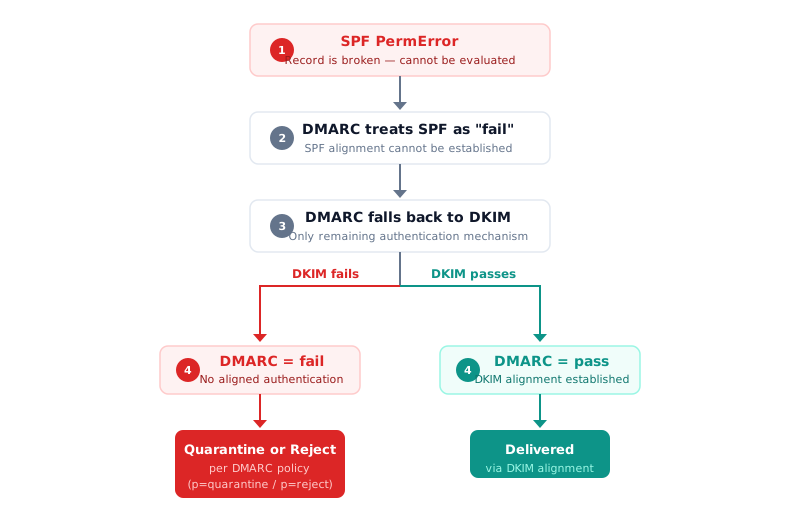
The business impact is measurable. Vendor-reported data from AutoSPF (2025) shows domains with duplicate SPF records or over-limit policies triggered PermErrors on up to 8.7% of messages. Domains with valid, lookup-budget-conscious SPF had 24-38% fewer spam-folder placements (vendor-reported).
A documented case illustrates the cascade at scale: a multi-vendor retailer using 11 third-party email senders accumulated 17 DNS lookups in their SPF record — 7 over the RFC 7208 limit. During peak sending hours, 6-12% of outbound messages failed SPF authentication. With DMARC enforcement, these cascaded into DMARC failures and spam-foldering (AutoSPF case study, 2025; vendor-reported).
The enforcement context makes this urgent. As reported in our Email Authentication Adoption Study 2026, Google’s 2024 DMARC enforcement push resulted in 265 billion fewer unauthenticated messages — a 65% reduction. Enforcement is tightening, and SPF PermError is no longer something receivers will silently tolerate.
How to Find SPF PermError
Before you can fix a PermError, you need to identify exactly what is broken. Follow these three diagnostic steps.
Step 1: Check Your SPF Record
Use DMARCguard’s free SPF record checker to see your full SPF record with syntax validation, lookup count, and any errors flagged. Paste your domain and the tool immediately shows whether you have a PermError condition.
Alternatively, check from the command line:
# Check your SPF record from the terminal
$ dig TXT your-domain.com +short | grep spf
"v=spf1 include:_spf.google.com include:sendgrid.net ~all"
If you see two lines starting with v=spf1, you have duplicate SPF records — an instant PermError (Cause 2).

Step 2: Count Your DNS Lookups
Walk the include chain manually or use the SPF checker to see your total lookup count. Each include, a, mx, redirect, and exists counts as one lookup. Each nested include within those counts as additional lookups.
Here is a manual walkthrough for a common configuration:
v=spf1 include:_spf.google.com include:sendgrid.net include:spf.protection.outlook.com ~all

Lookup 1: _spf.google.com
  → v=spf1 ip4:74.125.0.0/16 ip4:209.85.128.0/17 ip6:2001:4860:4864::/56 ... ~all
  → Flat IP ranges only — no nested includes

Lookup 2: sendgrid.net
  → TXT query costs 1 lookup

Lookup 3: spf.protection.outlook.com
  → v=spf1 ip4:40.92.0.0/15 ip4:40.107.0.0/16 ip4:52.100.0.0/15 ... -all
  → Flat IP ranges only — no nested includes

Total: 3 lookups — well under the limit
Most major providers resolve to flat ip4/ip6 ranges with no nested includes.
Each include: costs exactly 1 lookup regardless of how many IPs it contains.
For automated counting and optimization, use DMARCguard’s SPF flattener.
Step 3: Validate SPF Syntax
Check for the common syntax errors listed in Cause 3 above. Verify that only one v=spf1 TXT record exists (Cause 2). Confirm that all include targets actually resolve — dead includes count toward the 2-void-lookup limit (Cause 4).
For a comprehensive domain-level check that covers SPF, DKIM, DMARC, and more in a single scan, use the domain health check.
How to Fix SPF PermError (Step-by-Step)
Once you have identified the cause, apply the appropriate fix. Here are five fixes, ordered from most common to least common.
Fix 1: Remove Duplicate SPF Records
If dig TXT your-domain.com returns two v=spf1 records, merge them into one. Keep the record that contains the most authorized senders, and add any missing include: mechanisms from the second record.
; BEFORE: Two separate SPF records — instant PermError
Record 1: "v=spf1 include:_spf.google.com ~all"
Record 2: "v=spf1 include:spf.protection.outlook.com ~all"

; AFTER: Single merged record — valid
"v=spf1 include:_spf.google.com include:spf.protection.outlook.com ~all"
Delete the duplicate TXT record in your DNS provider’s dashboard. DNS changes may take up to 48 hours to propagate fully, though most propagate within 1-4 hours.
Fix 2: Reduce DNS Lookups with SPF Flattening
Replace include: mechanisms with their resolved ip4: and ip6: addresses to reduce your total lookup count below 10.
; BEFORE: 11 lookups — triggers PermError
v=spf1 include:_spf.google.com           ; 1 lookup
      include:spf.protection.outlook.com ; 1 lookup
      include:sendgrid.net               ; 1 lookup
      include:servers.mcsv.net           ; 1 lookup (Mailchimp)
      include:_spf.salesforce.com        ; 2 lookups (1 include + 1 exists)
      include:mktomail.com               ; 1 lookup (Marketo)
      include:_spf.hubspotemail.net      ; 1 lookup (HubSpot)
      include:mail.zendesk.com           ; 1 lookup (Zendesk)
      include:spf.mandrillapp.com        ; 1 lookup (Mandrill)
      include:amazonses.com              ; 1 lookup (Amazon SES)
      ~all
; Total: 11 lookups — PermError

; AFTER: Flatten 6 low-churn services to ip4: ranges — 4 lookups remaining
v=spf1 include:_spf.google.com           ; 1 lookup (keep — high IP churn)
      include:spf.protection.outlook.com ; 1 lookup (keep — high IP churn)
      include:_spf.salesforce.com        ; 2 lookups (keep — uses exists macro)
      ip4:205.201.128.0/20               ; Mailchimp (flattened)
      ip4:148.105.0.0/16                 ; Mailchimp (flattened)
      ip4:199.15.212.0/22                ; Marketo (flattened)
      ip4:185.28.196.0/22                ; Marketo (flattened)
      ip4:188.172.128.0/20               ; Zendesk (flattened)
      ip4:216.198.0.0/18                 ; Zendesk (flattened)
      ~all
; Total: 4 lookups + flattened ip4 entries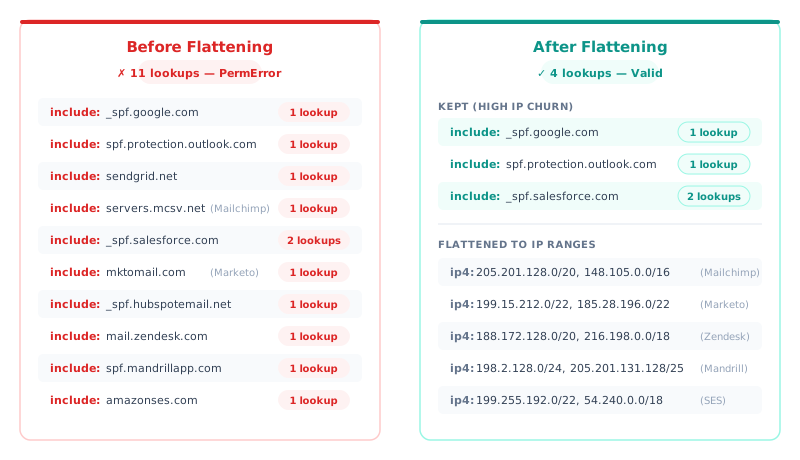
Use DMARCguard’s SPF flattener for automated flattening that tracks provider IP changes.
Fix 3: Use Subdomain Delegation
Move high-lookup senders to subdomains. For example, configure Mailchimp to send from marketing.your-domain.com and Salesforce from crm.your-domain.com. Each subdomain gets its own SPF record with its own 10-lookup budget via the Return-Path (MAIL FROM) domain.
This works with relaxed DMARC alignment (aspf=r), which is the default. It breaks with strict alignment (aspf=s), because the subdomain does not exactly match the organizational domain.
Subdomain delegation is the most scalable long-term solution for organizations with 5 or more email sending services. It avoids the fragility of static flattening and the maintenance burden of IP tracking.
Fix 4: Consolidate Unused Include Mechanisms
Audit your SPF record. Which includes are still active? Old CRM, decommissioned marketing tool, migrated email provider — remove them.
Over time, SPF records accumulate includes from services you no longer use. Each one costs at least one DNS lookup and serves no purpose. Vendor-reported data from AutoSPF shows that targeted cleanup and flattening reduced average lookups by 41% across 1,000+ managed domains (vendor-reported).
Fix 5: Fix Syntax Errors
Reference the common errors table from Cause 3. After every change, validate your record with an SPF checker to confirm it parses correctly.
If you need to generate a correct SPF record from scratch, use DMARCguard’s SPF record generator — select your email services and it builds a syntactically valid record.
| Fix | When to Use | Effort | Durability |
|---|---|---|---|
| Merge duplicate records | Two v=spf1 records on one domain | Minutes | Permanent |
| SPF flattening | Over 10 DNS lookups | Hours | Requires maintenance |
| Subdomain delegation | 5+ email sending services | Hours | Permanent (scalable) |
| Remove unused includes | Stale or decommissioned services | Minutes | Permanent |
| Fix syntax errors | Typos or malformed record | Minutes | Permanent |
Lookup Counts for Popular Email Services
Each email service’s include: mechanism consumes a different number of DNS lookups. Use this table to budget your 10-lookup limit.
| Service | Include Mechanism | Lookups | Notes |
|---|---|---|---|
| Google Workspace | include:_spf.google.com | 1 | Flat ip4/ip6 ranges, no nesting |
| Microsoft 365 | include:spf.protection.outlook.com | 1 | Flat ip4/ip6 ranges, no nesting |
| SendGrid (Twilio) | include:sendgrid.net | 1 | Costs 1 lookup |
| Mailchimp | include:servers.mcsv.net | 1 | Flat ip4 ranges, no nesting |
| Salesforce | include:_spf.salesforce.com | 2 | 1 include + 1 exists: macro |
| Marketo (Adobe) | include:mktomail.com | 1 | Flat ip4 ranges, no nesting |
| Mailchimp Transactional | include:spf.mandrillapp.com | 1 | Flat ip4 ranges, no nesting |
| Amazon SES | include:amazonses.com | 1 | Flat ip4 ranges, no nesting |
| HubSpot | include:_spf.hubspotemail.net | 1 | Flat ip4 ranges, no nesting |
| Zendesk | include:mail.zendesk.com | 1 | Flat ip4 ranges, no nesting |
Combination example: Most providers cost exactly 1 lookup each. Google Workspace (1) + Microsoft 365 (1) + SendGrid (1) + Mailchimp (1) + Salesforce (2) + HubSpot (1) + Zendesk (1) + Marketo (1) + Amazon SES (1) = 10 lookups. You are at the limit with 9 services. Add one more include: or an a/mx mechanism and you trigger PermError.
From our study: Microsoft 365 is the #1 SPF include, appearing in 19.6% of SPF-enabled domains. Google Workspace is #2 at 13.6%. Together, these two providers appear in roughly one-third of all SPF records across 5.5 million domains (DMARCguard SPF Supply Chain Study, March 2026).
Platform-Specific PermError Scenarios
These are real-world email stacks that commonly trigger PermError. Each scenario includes the full SPF record, annotated lookup count, and the recommended fix.
Enterprise Stack: 10 Services (At the Limit)
v=spf1 include:_spf.google.com           ; 1 lookup
      include:sendgrid.net               ; 1 lookup
      include:servers.mcsv.net           ; 1 lookup (Mailchimp)
      include:_spf.salesforce.com        ; 2 lookups (1 include + 1 exists macro)
      include:mktomail.com               ; 1 lookup (Marketo)
      include:_spf.hubspotemail.net      ; 1 lookup (HubSpot)
      include:mail.zendesk.com           ; 1 lookup (Zendesk)
      include:amazonses.com              ; 1 lookup (Amazon SES)
      a                                  ; 1 lookup (own mail server)
      ~all
; Total: 10 lookups — exactly at the limit
; Adding any include: or a/mx mechanism = PermErrorFix: Flatten low-churn services (Mailchimp, Marketo, Zendesk, Amazon SES) to ip4: ranges — each one saved frees a lookup. Or delegate marketing and transactional email to subdomains like marketing.your-domain.com and crm.your-domain.com, each with its own 10-lookup budget.
Growth-Stage SaaS: Microsoft 365 + 5 Services
v=spf1 include:spf.protection.outlook.com   ; 1 lookup (Microsoft 365)
      include:_spf.hubspotemail.net         ; 1 lookup (HubSpot)
      include:mktomail.com                  ; 1 lookup (Marketo)
      include:sendgrid.net                  ; 1 lookup
      include:servers.mcsv.net              ; 1 lookup (Mailchimp)
      include:mail.zendesk.com              ; 1 lookup (Zendesk)
      ~all
; Total: 6 lookups — under the limit, but 4 more services triggers PermError
This combination is safe today, but growth brings risk. Every new SaaS tool that sends email — HR onboarding, invoicing, project management — adds another include: to the budget. In a documented case, a marketing agency’s client sending newsletters through Marketo saw nearly 50% hard bounce rates when their SPF record either lacked Marketo’s include or exceeded the lookup limit from combining multiple service includes (SRPro Marketing, 2023).
Fix: If you need to add more services, delegate marketing email to a subdomain or start flattening low-churn services to IP ranges. If you manage SPF records across multiple client domains, the same patterns apply — audit each domain’s lookup budget independently.
Frequently Asked Questions
What is SPF PermError?
SPF PermError is a permanent error returned when a receiving mail server cannot evaluate your domain’s SPF record. It means the record itself is broken — due to syntax errors, too many DNS lookups, or duplicate records — and every email from your domain fails SPF authentication until the record is fixed. The result code is defined in RFC 7208 Section 2.6.7.
How do I fix SPF PermError?
Identify the cause first: check for duplicate v=spf1 records, count your DNS lookups (max 10), and validate syntax. The most common fix is merging duplicate records into one, followed by reducing lookups through SPF flattening or subdomain delegation. Use a free SPF checker to diagnose the specific issue.
Can I have two SPF records on one domain?
No. RFC 7208 Section 3.2 requires exactly one SPF record per domain. If a receiving server finds two v=spf1 TXT records, it must return PermError, failing SPF authentication for all email from that domain. Merge all authorized senders into a single SPF record.
How many DNS lookups does SPF allow?
SPF allows a maximum of 10 DNS-querying mechanisms per evaluation (RFC 7208 Section 4.6.4). The mechanisms that count are include, a, mx, redirect, exists, and ptr. The ip4, ip6, and all mechanisms do not count because they require no DNS resolution. Exceeding 10 lookups triggers PermError.
What is the difference between SPF PermError and TempError?
PermError is a permanent failure caused by a broken SPF record (syntax error, too many lookups, duplicate records). TempError is a temporary failure caused by a DNS timeout or server issue — the receiving server can retry later. DMARC treats PermError as “fail” but may retry on TempError. The distinction matters for troubleshooting: PermError requires you to fix your SPF record, while TempError typically resolves on its own.
What happens when SPF fails?
When SPF returns PermError or Fail, DMARC falls back to DKIM alignment. If DKIM also fails, the DMARC result is “fail,” and the receiving server applies the domain’s DMARC policy: quarantine (spam folder) or reject (bounce). With p=none, the email is delivered but flagged in DMARC reports. This cascade is why fixing SPF PermError is critical — it removes half of your DMARC authentication options.
Conclusion
SPF PermError is a permanent, record-level failure — not a transient DNS issue. Here are the five key takeaways:
- The 10-lookup limit and duplicate SPF records are the top two causes, accounting for 86% of PermError cases in vendor-reported data
- 148,655 domains in our 5.5-million-domain scan exceed the 10-lookup limit — placing them at PermError risk (SPF Supply Chain Study)
- PermError cascades into DMARC failure, directly impacting email deliverability when DKIM is also not aligned
- Fixes range from minutes to hours: merging duplicates takes minutes; SPF flattening and subdomain delegation take hours but provide long-term scalability
- Regular monitoring prevents recurrence as you add new email services over time
SPF PermError is preventable with the right tools and regular monitoring. Check your SPF record now with DMARCguard’s free SPF checker — no signup required.
If your DMARC is also failing, see our complete DMARC troubleshooting guide for a full walkthrough of DMARC authentication failures beyond SPF.