SPF Softfail vs Hardfail: A Data-Backed Decision Guide
53.6% of SPF-enabled domains use SPF softfail (~all). 40.2% use hardfail
(-all). Google recommends one. Microsoft recommends the other. Who is right?
The choice between SPF softfail and hardfail is a configuration decision that email administrators face on every domain they manage. The two largest mailbox providers give contradictory advice, and the consequences affect email deliverability for every message you send.
This guide resolves the debate with first-party data from our scan of 5.5 million domains, documented receiver behavior at Google, Microsoft, and Yahoo, and direct citations from the RFCs that define how Sender Policy Framework (SPF) works. By the end, you will know which qualifier to use, why, and how to migrate if you need to change.
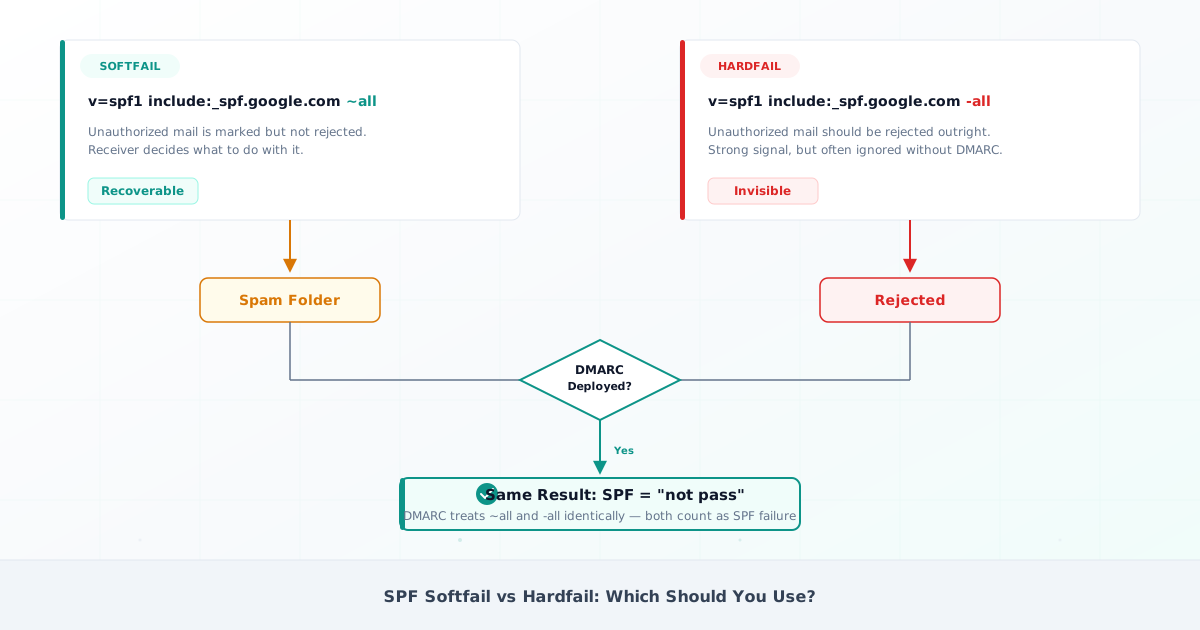
What Is SPF Softfail (~all)?
SPF softfail is the result returned when a sending IP address does not match any
mechanism in the domain’s SPF record, and the record ends with the ~all
qualifier. The SPF softfail meaning is specific: the ~ qualifier tells
receiving mail servers that the sender is “probably not authorized” but asks
them not to reject the message outright.
RFC 7208 Section 8.5 defines the softfail result precisely: receivers “SHOULD NOT reject the message based solely on this result, but MAY subject the message to closer scrutiny.” In practice, this means the message is accepted but may be routed to the spam folder based on additional signals.
An SPF record with softfail and the resulting email headers:
v=spf1 include:_spf.google.com include:sendgrid.net ~allWhen a receiving server evaluates this record and the sending IP does not match, the email headers show:
Received-SPF: softfail (google.com: domain of user@example.com
  does not designate 198.51.100.5 as permitted sender)
Authentication-Results: mx.google.com; spf=softfail smtp.mailfrom=example.com
The Received-SPF: softfail header and the spf=softfail entry in
Authentication-Results both indicate the same outcome. The message was not
rejected — the receiver accepted it and applied additional scrutiny.
Softfail became the industry default during SPF adoption because it preserves
email deliverability for misconfigured senders. A missing include: mechanism
results in spam-folder placement rather than outright rejection, giving
administrators time to diagnose and fix the issue.
What Is SPF Fail (Hardfail) with -all?
SPF hardfail is the result returned when a sending IP does not match any
mechanism in the domain’s SPF record, and the record ends with -all. The -
qualifier is what
RFC 7208 Section 8.5 calls an
“explicit statement” that the IP is not authorized to send email for the domain.
Unlike softfail, the SPF fail result gives receivers stronger grounds to reject the message. However, the RFC does not mandate rejection — it states that disposition is “a matter of local policy.” Different receivers handle hardfail differently:
- Google explicitly warns against hardfail: “A hyphen can be overly restrictive and cause delivery issues for legitimate email” (Google SPF setup guide).
- Microsoft’s Exchange Online Protection has an optional “SPF Hard Fail” ASF toggle that is off by default. Microsoft itself advises against using this toggle, recommending DMARC instead.
- RFC 7208 establishes no comprehensive normative requirement for handling any particular SPF result. Local policy decides.
An SPF record with hardfail and the resulting headers:
v=spf1 include:spf.protection.outlook.com -allReceived-SPF: fail (google.com: domain of user@example.com
does not designate 198.51.100.5 as permitted sender)
Authentication-Results: mx.google.com; spf=fail smtp.mailfrom=example.comThere is a critical operational difference that is often overlooked. As Al Iverson of Spam Resource points out, messages rejected at SMTP due to SPF hardfail never appear in DMARC aggregate reports. The domain owner cannot see the damage. With softfail, those messages at least reach the spam folder and show up in reporting — giving you visibility into what failed and why.
All Four SPF Qualifiers Explained
SPF defines four qualifiers in
RFC 7208 Section 4.6.2. Each
qualifier is a single character prepended to the all mechanism, and each tells
receivers something different about unauthorized senders.
| Qualifier | Syntax | SPF Result | Receiver Action | Recommendation |
|---|---|---|---|---|
| Pass | +all | Pass | Accept (all IPs authorized) | Never use for sending domains |
| Fail (Hardfail) | -all | Fail | May reject outright | Use for parked/non-sending domains |
| Softfail | ~all | Softfail | Accept, apply scrutiny | Recommended for sending domains |
| Neutral | ?all | Neutral | No assertion made | Avoid (except DMARC-only setups) |
The +all qualifier effectively disables SPF by authorizing every IP address on
the internet to send as your domain. According to a
2024 analysis by DMARC Checker App,
only 0.14% of domains use +all. It should never appear on a sending domain.
The SPF neutral qualifier (?all) means the domain owner makes no assertion
about whether the IP is authorized. Yahoo uses ?all on its own domain
(yahoo.com), delegating all enforcement decisions to DMARC. For most
organizations, this is not the right approach — ~all provides a signal to
receivers while still allowing DMARC alignment to make the
final decision.
SPF Softfail vs Hardfail: The Complete Comparison
The difference between SPF softfail and SPF hardfail matters less than most administrators think — because DMARC changes the equation entirely.
| Dimension | Softfail (~all) | Hardfail (-all) |
|---|---|---|
| Syntax | v=spf1 ... ~all | v=spf1 ... -all |
| RFC 7208 semantics | ”Probably not authorized” — SHOULD NOT reject | ”Not authorized” — local policy decides |
| Google handling | Accepted; may route to spam | Warns it “can be overly restrictive” |
| Microsoft handling | Accepted; may quarantine | ”Typically discarded” (ASF toggle, off by default) |
| DMARC interaction | Treated as “not pass” | Treated as “not pass” (identical) |
| Forwarding risk | Failed messages land in spam (recoverable) | Failed messages may be rejected outright (invisible) |
| DMARC report visibility | Full visibility — failures appear in aggregate reports | Partial visibility — pre-DMARC rejections are invisible |
| Adoption rate | 53.6% of SPF-enabled domains | 40.2% of SPF-enabled domains |
The key insight is this: DMARC treats softfail and hardfail identically. If your DMARC is failing, the qualifier you chose is not the cause. RFC 7489 Section 4.2 checks only for SPF “pass” plus domain alignment. Both softfail and hardfail produce “not pass.” There is no provision in the DMARC specification to distinguish between them.
RFC 7489 Section 6.7 reinforces this: DMARC-compliant receivers “typically disregard any mail-handling directive discovered as part of an authentication mechanism (e.g., SPF) where a DMARC record is also discovered that specifies a policy other than ‘none’.” In other words, when DMARC is present, receivers override SPF’s own enforcement signal.
The critical edge case is documented in RFC 7489 Section 10.1: “Some receiver architectures might implement SPF in advance of any DMARC operations. This means that a ’-’ prefix on a sender’s SPF mechanism, such as ‘-all’, could cause that rejection to go into effect early in handling, causing message rejection before any DMARC processing takes place.”
The successor standard,
DMARCbis (draft-ietf-dmarc-dmarcbis-41) Section 8.1,
retains this warning and explicitly references M3AAWG’s recommendation for
~all.
Microsoft’s documented exception deserves fair treatment. Their
SPF configuration guide
states: “DMARC policy is effectively ignored for SPF ~all failures if the
messages don’t also contain DKIM signatures.” This reasoning targets a specific
edge case — messages that fail SPF and also lack any DKIM
signature. If you have DKIM configured for all senders, this edge case does not
apply.
How Many Domains Use Softfail vs Hardfail?
DMARCguard’s SPF Supply Chain Study scanned 5,499,028 domains and analyzed 3,077,219 with valid SPF records. The data shows a clear industry preference for softfail.
The breakdown:
- 53.6% use softfail (
~all) - 40.2% use hardfail (
-all) - ~6% use neutral (
?all) or have noallmechanism
The pattern holds across domain sizes. Among the top 1,000 domains, 77% have SPF records. In the long tail beyond 1 million, that drops to 54% — but the softfail-to-hardfail ratio remains consistent.
The include mechanism accounts for 32.3% of all SPF mechanisms across 5.5
million domains, revealing deep ESP supply chain dependency. This SPF record
syntax pattern matters because every include: represents a third-party sender
whose configuration you depend on.
What major domains use:
google.com,apple.com,oracle.comend with~allfacebook.com,microsoft.comend with-allyahoo.comuses?all(delegating entirely to DMARC)
ESP default qualifier analysis: Of 13 major email platforms that specify a
qualifier in their documentation, 11 (84.6%) default to ~all. Only Microsoft
365 and Proofpoint default to -all. When the platforms that send the world’s
email overwhelmingly choose softfail, that is a signal worth following.
Which Should You Use? A Decision Framework
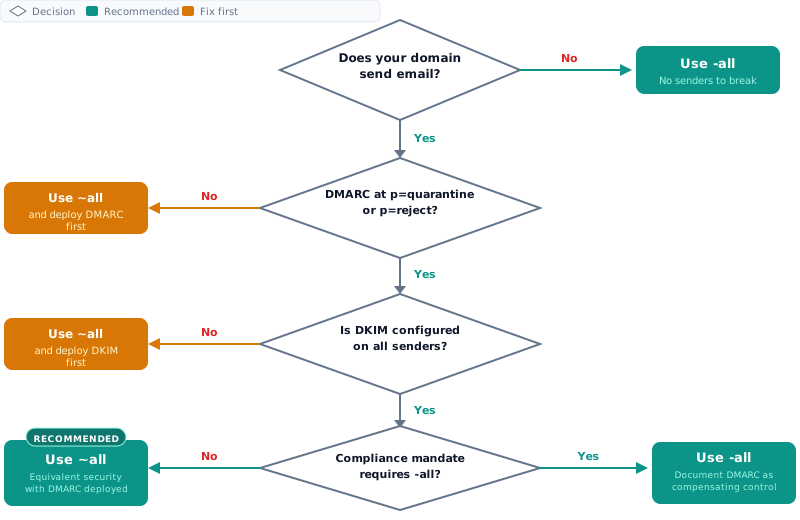
The recommendation is clear: use ~all with DMARC p=reject for sending
domains. Use -all for parked or non-sending domains.
This aligns with M3AAWG Email Authentication Best Practices (September 2020), Google Workspace documentation, and recommendations from Valimail, Mailhardener, Red Sift, and dmarcian. Microsoft is the sole major dissenter — and their reasoning targets a specific edge case that DKIM configuration resolves.
The industry consensus reasoning: DMARC provides equivalent security to hardfail without the forwarding collateral damage. Hardfail rejections are invisible in DMARC reports, making troubleshooting harder.
Use Softfail (~all) If…
- You use DMARC with
p=quarantineorp=reject(the recommended path for email authentication) - You have third-party senders (ESPs, CRMs, marketing platforms) in your SPF record
- You receive forwarded email or have users who forward to external addresses
- You want full visibility into authentication failures via DMARC aggregate reports
Use Hardfail (-all) If…
- The domain is parked or non-sending (no legitimate email should originate from it)
- You have fully audited every sending source and confirmed DKIM alignment for all of them
- A compliance mandate explicitly requires it —
CISA BOD 25-01 (M365 SCuBA Baselines)
states “Fail, as used in this baseline policy, refers to hardfail (i.e.,
-)” and ASD ISM-1183 mandates hardfail for Australian government agencies
The SecurityScorecard Question
SecurityScorecard
flags ~all as a Medium-severity finding (spf_record_softfail). This drives
many administrators to switch to hardfail unnecessarily.
The compensating control is documented: DMARC at p=quarantine or p=reject
resolves the finding. SecurityScorecard’s own documentation confirms this. If
your domain has DMARC enforcement, you can cite this to resolve the finding
without changing your SPF qualifier.
For additional context:
Red Sift’s published research
actually recommends ~all as best practice. The UK NCSC uses ~all in every
example in their guidance. The Netherlands government accepts both ~all and
-all as compliant.
How Email Forwarding Makes Hardfail Risky
Email forwarding is where the softfail vs hardfail choice has the most visible consequences. SPF validates the envelope sender (the Return-Path header), not the visible From address. When email is forwarded, the forwarding server’s IP address is not in the original sender’s SPF record — SPF fails regardless of the qualifier. The difference is what happens next.
With ~all, the forwarded message may reach the recipient’s spam folder. With
-all, it may be rejected outright at SMTP before the receiving server
evaluates DKIM or DMARC. The message vanishes, and the sender never knows.
Real-world case: GoDaddy forwarding to Gmail. Gmail returns a specific error that names hardfail as the reason:
550-5.7.26 The MAIL FROM domain has an SPF record with a hard fail
policy (-all) but it fails to pass SPF checks with the IP of the
sending MTA.
Gmail’s error message explicitly identifies -all as the blocking factor. With
~all, the same forwarded message would reach the spam folder instead.
Real-world case: Cloudflare Email Routing. Users forwarding email via
Cloudflare Email Routing experienced SPF failures
when senders used -all. Gmail rejected the forwarded messages because
Cloudflare’s IP was not in the sender’s SPF record. There was no fix — users had
to bypass Cloudflare forwarding entirely.
Real-world case: Columbia University. In February 2025, Columbia University discontinued alumni email forwarding, citing SPF, DKIM, and DMARC authentication failures as the reason. Email forwarding at institutional scale became untenable as more domains adopted strict authentication policies.
SRS adoption is inconsistent. Sender Rewriting Scheme (SRS) rewrites the envelope sender to fix SPF failures during forwarding. Microsoft 365 implements SRS by default. Gmail does not. Most hosting providers and domain registrars do not implement SRS either.
ARC is on a documented path to Historic status — but it still carries forwarded mail today. The IETF DMARC Working Group was rechartered on 16 April 2026 for the sole purpose of moving RFC 8617 to Historic, with a November 2026 milestone and a realistic earliest reclassification of Q1 2027. No mailbox provider has committed to a sunset date, so treat ARC as a local policy choice rather than a dead protocol — what the ARC reclassification actually changes covers the timeline in full. DKIM2 is the intended long-term replacement, but it is years from production deployment. In the meantime, forwarding remains a problem where softfail preserves deliverability better than hardfail.
How to Switch from Softfail to Hardfail Safely
If a compliance mandate requires hardfail, or you are configuring a parked domain, follow this migration path. Do not change your SPF qualifier without completing every step.
Step 1: Enable DMARC in monitor mode.
Publish a DMARC record with p=none and rua= reporting. This collects
aggregate reports without affecting mail delivery. Wait 2-4 weeks before
changing anything else.
v=DMARC1; p=none; rua=mailto:dmarc-reports@example.com; fo=1;Step 2: Audit all sending sources.
Review your DMARC aggregate reports to identify every IP address sending email as your domain. Cross-reference each IP against your SPF record to confirm coverage. Use an SPF record checker to validate that every legitimate sender is authorized.
Step 3: Confirm DKIM alignment for all senders.
Verify that every authorized sender has DKIM configured and passing with domain alignment. If DKIM passes for a sender, SPF hardfail will not affect the DMARC alignment outcome for that sender — DMARC passes when either SPF or DKIM aligns.
Step 4: Switch to -all.
Update your DNS TXT record to replace ~all with -all. Use an
SPF record generator to build the updated record and
verify the SPF record syntax before publishing.
v=spf1 include:_spf.google.com include:sendgrid.net -allDNS propagation takes up to 48 hours. Monitor closely during this window.
Step 5: Monitor DMARC reports for 2 weeks.
Watch for any new authentication failures in your DMARC aggregate reports. Pay close attention to sending sources that were not previously failing.
Step 6: Tighten DMARC policy.
Once you have confirmed that all legitimate senders pass authentication with
hardfail in place, move your DMARC policy from p=none to p=quarantine, then
to p=reject. Monitor reports at each stage before advancing. For a detailed
walkthrough of DMARC enforcement, see our guide on
DMARC policy enforcement.
Reading SPF Results in Email Headers
When troubleshooting delivery issues, check the email headers for the SPF result. Two headers contain this information.
The Received-SPF header shows the raw SPF evaluation result:
Received-SPF: softfail (google.com: domain of user@example.com
  does not designate 203.0.113.50 as permitted sender)
A softfail result means the sending IP was not authorized and the domain uses
~all. A fail result means the IP was not authorized and the domain uses
-all.
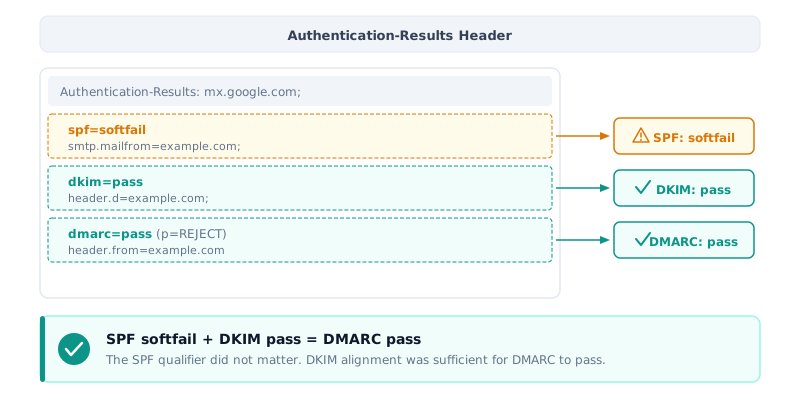
The Authentication-Results header provides a consolidated view of SPF, DKIM, and DMARC results:
Authentication-Results: mx.google.com;
  spf=softfail (google.com: domain of user@example.com does not
    designate 203.0.113.50 as permitted sender)
    smtp.mailfrom=user@example.com;
  dkim=pass header.d=example.com;
  dmarc=pass (p=REJECT) header.from=example.com
In this example, SPF returned softfail but DKIM passed — so DMARC passed. This is exactly the scenario where softfail and hardfail produce the same final outcome: DKIM alignment carries the DMARC pass.
Common SPF Mistakes That Override Your Qualifier Choice
The softfail vs hardfail decision is irrelevant if your SPF record is broken. These common mistakes cause SPF PermError or render your qualifier meaningless.
Multiple SPF records.
RFC 7208 requires exactly one
v=spf1 record per domain. Publishing two SPF TXT records triggers PermError —
every email fails SPF authentication regardless of qualifier.
Our SPF Supply Chain data
shows this remains one of the most common misconfiguration errors.
For a complete diagnosis and fix, see
SPF PermError: How to Find and Fix It.
Exceeding 10 DNS lookups. The include, a, mx, redirect, exists,
and ptr mechanisms all count toward the 10-lookup limit defined in
RFC 7208 Section 4.6.4.
Exceeding this limit triggers SPF PermError regardless of whether
you use ~all or -all. SPF flattening replaces
include: mechanisms with their resolved IP addresses to reduce your lookup
count.
Missing all mechanism. Approximately 6% of domains with valid SPF records
have no all mechanism at all
(SPF Supply Chain Study). Without an all
mechanism, SPF returns neutral by default — offering no protection against
unauthorized senders.
Using +all. According to
DMARC Checker App data (2024),
0.14% of domains use +all, which authorizes every IP address on the internet
to send email as the domain. This effectively disables SPF entirely.
FAQ
What is the difference between SPF softfail and hardfail?
SPF softfail (~all) tells receivers a sender is “probably not authorized” but
asks them not to reject outright. Hardfail (-all) is an explicit statement
that the sender is unauthorized. In practice, DMARC treats both identically as
“not pass.” The key difference is that hardfail can cause some receivers to
reject email before evaluating DKIM or DMARC, as documented in
RFC 7208 Sections 8.4-8.5 and
RFC 7489 Section 4.2.
Does it matter whether I use ~all or -all if I have DMARC?
With DMARC deployed and DKIM configured, the practical difference is minimal.
DMARC checks only for SPF “pass” — both softfail and hardfail are “not pass.”
However, hardfail introduces a risk of pre-DMARC rejection at receivers that
enforce SPF before evaluating DKIM. The industry consensus — M3AAWG, Google,
Valimail, Mailhardener — recommends ~all with DMARC p=reject, as documented
in the comparison section above.
Why does Microsoft recommend -all when everyone else says ~all?
Microsoft’s SPF configuration documentation
states that “DMARC policy is effectively ignored for SPF ~all failures if the
messages don’t also contain DKIM signatures.” Their recommendation targets a
specific edge case: messages failing SPF that also lack any DKIM signature. If
you have DKIM properly configured for all senders, this edge case does not
apply.
How do I fix SPF softfail?
SPF softfail means the sending IP is not in your SPF record. Check your SPF
record for the correct include: mechanism for your email provider, verify the
sending IP is covered, and ensure you have only one SPF record per domain. Use
an SPF record checker to validate your record after
changes.
SecurityScorecard penalizes my SPF softfail. Should I switch to hardfail?
Not necessarily.
SecurityScorecard’s own documentation
confirms that DMARC at p=quarantine or p=reject is a valid compensating
control that resolves the softfail finding. If you have DMARC enforcement, you
can cite this to resolve the finding without switching to hardfail.
What does SPF neutral (?all) mean?
SPF neutral (?all) means the domain owner makes no assertion about whether the
IP is authorized. Receivers treat it similarly to having no SPF record at all.
Yahoo uses ?all on its own domain, delegating all enforcement to DMARC. For
most organizations, ~all is the better choice — it provides a signal to
receivers while still allowing DMARC to make the final decision. See
RFC 7208 Section 8.3 for the
specification.
Conclusion
DMARC treats SPF softfail and hardfail identically — both are “not pass.” This single fact changes the entire decision framework.
The data confirms the industry direction: 53.6% of domains use softfail, and
84.6% of ESPs that specify a qualifier default to ~all
(SPF Supply Chain Study). The consensus from
M3AAWG, Google, Valimail, Mailhardener, and the DMARCbis standard is clear: use
~all with DMARC enforcement for sending domains.
Use -all for parked or non-sending domains where no legitimate email should
originate. Use it for compliance mandates like CISA BOD 25-01 or ASD ISM-1183
that explicitly require hardfail. For everything else, SPF softfail with DMARC
p=reject delivers equivalent security without the forwarding risk, invisible
failure problem, or email deliverability consequences.
If SecurityScorecard flags your softfail, DMARC enforcement is the documented compensating control. You do not need to change your qualifier.