SPF Flattening and the 10-Lookup Limit: How to Fix Too Many DNS Lookups
Out of 5,499,028 domains we scanned in our SPF Supply Chain Study, 148,655 exceed the SPF 10-lookup limit. That is 4.8% of all SPF-enabled domains running with broken email authentication right now. SPF flattening is the most commonly recommended fix, but it is not always the right one.
Every include: mechanism in a Sender Policy Framework DNS TXT
record triggers a DNS lookup. Add enough email services and the record silently
breaks, returning PermError and failing deliverability for every message from
your domain. There is no bounce notification on the sending side. The only
evidence is missing mail and failing DMARC reports.
This guide covers exactly which mechanisms cost lookups, how to count yours, and five ways to fix the problem — from the fastest fix to the most sustainable approach.
What Is the SPF 10 DNS Lookup Limit?
RFC 7208 Section 4.6.4 mandates a maximum of 10 DNS-querying mechanisms per SPF evaluation. The purpose is to prevent SPF from being abused as a denial-of-service amplification vector — without this cap, a single email could trigger hundreds of recursive DNS queries.
Not every SPF mechanism costs a lookup. The SPF lookup limit applies only to
mechanisms that require a DNS query. ip4:, ip6:, and all do not trigger
DNS queries and are exempt from the limit. This is a common misconception: many
administrators believe all mechanisms count, but replacing a DNS-querying
include: with an equivalent ip4: address removes it from the lookup budget
entirely.
Here is the complete cost breakdown:
| Mechanism / Modifier | DNS Lookups | Notes |
|---|---|---|
include: | 1 + nested | Each include triggers 1 query plus its tree |
a / a: | 1 | A/AAAA query |
mx / mx: | 1 + per-MX | MX query + A query per MX host |
ptr | 1 | Deprecated by RFC 7208; costs 1+ |
exists: | 1 | Single A query |
redirect= | 1 + nested | Replaces entire SPF evaluation |
ip4: / ip6: | 0 | No DNS query needed |
all | 0 | No DNS query needed |
The include: mechanism deserves special attention. Each include: costs 1
lookup plus every lookup in the included record. An include pointing to a
provider with 3 nested includes costs 4 lookups total, not 1. This recursive
counting is what makes the 10-lookup limit so restrictive in practice.
For a detailed comparison of the ~all and -all qualifiers and when to use
each, see our guide on
SPF softfail vs hardfail.
The Void Lookup Limit Most Admins Miss
RFC 7208 Section 4.6.4 defines a second, less-known limit: a maximum of 2 void lookups. A void lookup is any DNS query that returns NXDOMAIN (domain does not exist) or NODATA (domain exists but has no matching record). The RFC uses SHOULD language for this limit, while the 10-mechanism limit uses MUST — but in practice, most major receivers enforce both.
Exceeding 2 void lookups triggers PermError — the same result as exceeding the 10-lookup limit. Void lookups and mechanism lookups are tracked independently, but they overlap: every void lookup also counts as 1 of the 10 mechanism lookups.
The most common cause is stale include: entries pointing to a decommissioned
provider domain. When that domain returns NXDOMAIN, it counts as a void lookup.
Two such stale includes exhaust the void budget immediately.
Trend Micro documented this exact scenario in
KB article KA-0017579.
After migrating from their old Hosted Email Security (HES) to TMEMS, customers
who retained include:spf.hes.trendmicro.com in their SPF records experienced
email bounces. The deprecated DNS entry returned an empty result, triggering a
void lookup PermError. Removing the single stale include resolved the issue.
How Common Is This Problem?
The SPF 10-lookup limit is not a theoretical edge case. DMARCguard’s SPF Supply
Chain Study (2026) scanned 5,499,028 domains from the Tranco Top Sites list and
walked every SPF include chain to count actual DNS lookups. Of 3.1 million
SPF-enabled domains, 148,655 (4.8%) exceed the 10-lookup limit. These
domains risk PermError on every email they send.
The underlying cause is a supply chain risk: include is 32.3% of all SPF
mechanisms — the most common DNS-querying mechanism by a wide margin. The top 5
email providers control 44.8% of the email supply chain, meaning a handful of
include: additions can consume the entire budget.
Our scan also found 41,728 domains still using the deprecated ptr
mechanism, wasting lookups on a mechanism that RFC 7208 explicitly
discourages.
Vendor-reported data from AutoSPF (Apr, 2026) found that 41% of SPF failures across 187 fast-growing domains were caused by exceeding the 10-lookup limit. While this is a small, self-selected sample, it aligns with our broader findings: the more SaaS services an organization adopts, the faster the lookup budget runs out.
A related misconfiguration — having multiple SPF records on one domain — causes PermError regardless of lookup count. If you are troubleshooting PermError and are not sure whether lookups or duplicate records are the cause, see our SPF PermError guide for a step-by-step diagnosis.
What Causes Too Many DNS Lookups?
Four patterns account for the majority of lookup budget overruns. Understanding which one applies to your domain determines the right fix.
Nested Includes (Chains of Chains)
Each include: mechanism triggers 1 lookup plus all lookups in the included
record. When providers nest their own includes, a single include: in your
record can consume far more than 1 lookup.
A real-world example from
InteractiveWebs:
Xero’s SPF record consumed 9 DNS lookups due to deep nesting through Google,
SendGrid, Rackspace, and AWS sub-records. Combined with MailChannels (3 lookups)
and the domain’s own a and mx mechanisms, the total reached 16 lookups — 6
over the limit.
; SPF record with 16 DNS lookups — 6 over the limit
; Real-world scenario (2020, as reported by InteractiveWebs): Xero + MailChannels + own infrastructure

v=spf1 a mx include:xero.com include:mailchannels.com include:_spf.google.com -all

; Lookup count breakdown:
;   a                           → 1 lookup
;   mx                          → 1 lookup
;   include:xero.com            → 9 lookups (cited; deep nesting through Google, SendGrid, Rackspace, AWS sub-records — InteractiveWebs)
;   include:mailchannels.com    → 3 lookups (cited; InteractiveWebs)
;   include:_spf.google.com     → 2 lookup  (At the time reported by InteractiveWebs; currently 1 lookup)
;   -all                        → 0 lookups
;   ─────────────────────────────────────
;   TOTAL                       → 16 lookups ❌ PermError (limit: 10)
Multiple Email Services Stacking
Every SaaS email service — marketing automation, CRM, support desk, HR platform
— adds at least one include: to your SPF record. A sysadmin on
r/sysadmin
described the problem: “We have several systems sending emails ‘from’ us… our
SPF record has grown, and now exceeds the 10 DNS lookup limit.”
Providers That Are Lookup Budget Hogs
Not all providers are equal. Here are the lookup costs for major email services:
| Service | Include Mechanism | Lookups |
|---|---|---|
| Google Workspace | include:_spf.google.com | 1 |
| Microsoft 365 | include:spf.protection.outlook.com | 1 |
| SendGrid | include:sendgrid.net | 2 |
| Mailchimp | include:servers.mcsv.net | 1 |
| Amazon SES | include:amazonses.com | 1 |
| HubSpot | include:_spf.hubspotemail.net | 1 |
| HubSpot (shared.hubspot.com) | include:shared.hubspot.com | 2 |
| Salesforce (Sales/Service Cloud) | include:_spf.salesforce.com | 2 |
| Salesforce Marketing Cloud | include:cust-spf.exacttarget.com | 1 |
| Freshdesk | include:email.freshdesk.com | 7 |
| Mimecast (global) | include:_netblocks.mimecast.com | 9 |
| Mimecast (regional) | include:us._netblocks.mimecast.com | 1 |
| Postmark | include:spf.mtasv.net | 1 |
| Zendesk | include:mail.zendesk.com | 1 |
| Mailgun | include:mailgun.org | 5 |
| Zoho Mail | include:zoho.com | 5 |
| SparkPost | include:sparkpostmail.com | 2 |
| ActiveCampaign | CNAME-based | 0 |
| Intercom | CNAME-based | 0 |
Notice the range: Freshdesk alone consumes 7 of your 10 lookups, while Mailchimp costs just 1. Mimecast’s global include costs 9 lookups, but their regional include costs only 1 — a detail that can save your entire budget.
Unnecessary Includes That Waste Lookups
Many ESPs use their own domain as the envelope sender (MailFrom/Return-Path),
meaning their include: in your root domain SPF record is checked against a
domain that never matches. Mailchimp, HubSpot (shared IP), Brevo, and Constant
Contact all use their own Return-Path. Adding their includes wastes lookups for
zero benefit.
Similarly, using a, mx, or ptr mechanisms when ip4:/ip6: would suffice
costs lookups unnecessarily. Our study found that ip4 accounts for 21% of all
SPF mechanisms — and every one of them costs 0 lookups.
What Happens When You Exceed the Limit?
When the lookup count exceeds 10, SPF evaluation returns PermError — a permanent, unrecoverable failure. This is not a soft fail. The record is treated as broken and cannot be evaluated at all.
DMARC alignment treats PermError as equivalent to SPF fail. If DKIM also fails (and no ARC chain validates the forwarding path), the DMARC result is fail, and the receiving server applies the domain’s DMARC policy: quarantine (spam folder) or reject (bounce). Domains with full authentication (SPF + DKIM + DMARC) achieve 2.7x higher likelihood of inbox placement compared to unauthenticated emails (The Digital Bloom, B2B Email Deliverability Report, 2025 — vendor-reported). A broken SPF record removes half of your DMARC authentication options.
Diagnosis is where this gets tricky. SPF evaluates left-to-right and stops on
the first match. If the sending IP matches an include: early in the record,
the lookup limit may never be reached. If it matches late — or does not match
at all — the limit triggers. This produces intermittent delivery failures:
some emails pass SPF while others from the same domain fail, depending entirely
on which service sent them.
An Exchange admin on the Microsoft Tech Community asked whether the SPF PermError “can be ignored.” It cannot. Vendor-reported data from AutoSPF (Apr 2026) found that domains implementing automated SPF management saw 12-19% improvement in DMARC alignment pass rates within 30 days. For more on diagnosing DMARC failures caused by SPF issues, see our DMARC failure guide.
How to Count Your SPF Lookups
Before fixing anything, you need to know your current lookup count. Here is a step-by-step walkthrough using a real-world example.
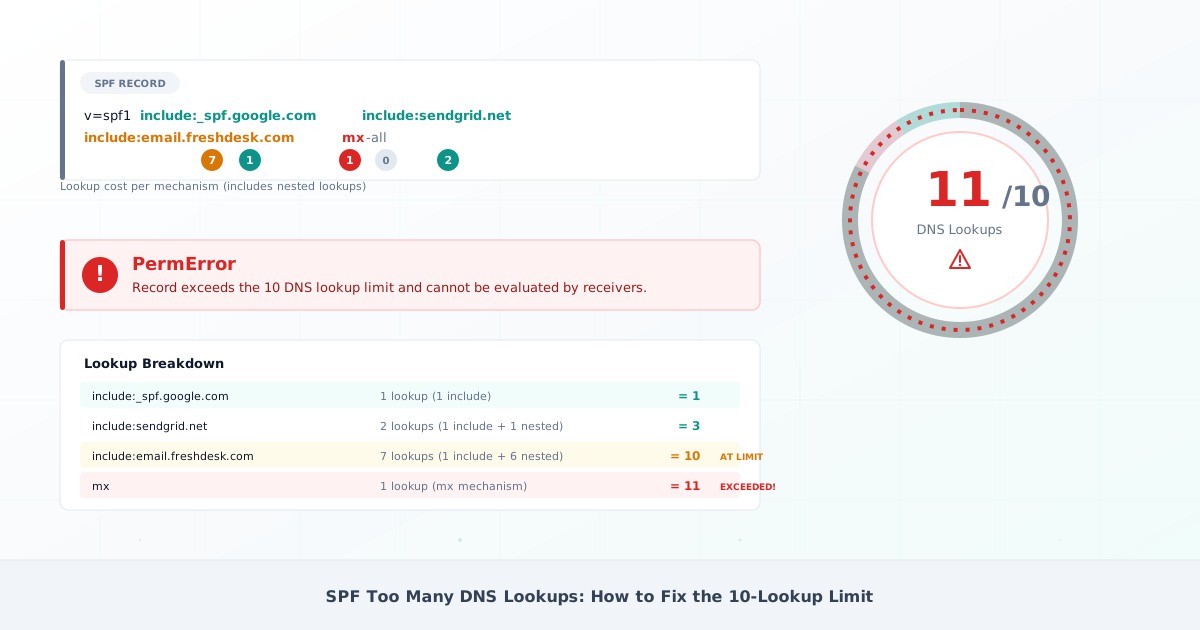
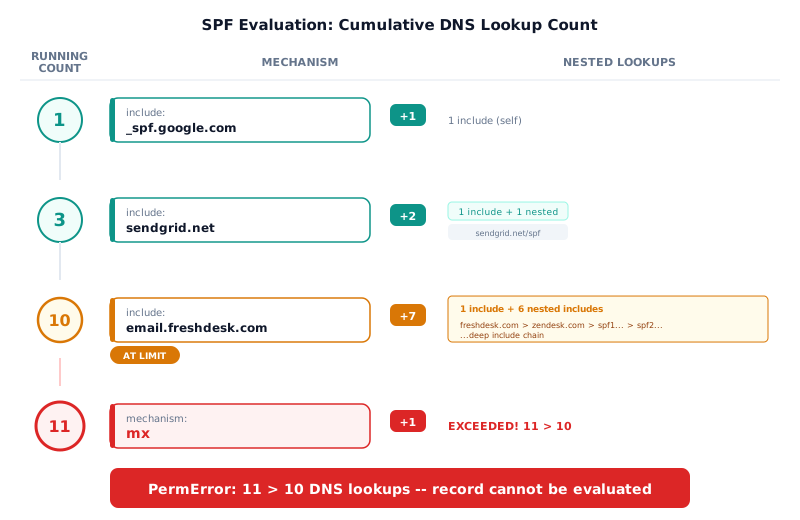
Consider this SPF record:
v=spf1 include:_spf.google.com include:sendgrid.net include:email.freshdesk.com mx -allCount each mechanism:
include:_spf.google.com— 1 lookup (Google flattened its record in December 2025)include:sendgrid.net— 2 lookups (1 for the include + 1 nested)include:email.freshdesk.com— 7 lookups (1 + deep nesting)mx— 1 lookup (MX query + A query per MX host)-all— 0 lookups- Total: 11 lookups — over by 1
One lookup over the limit is enough to trigger PermError. Use DMARCguard’s SPF record checker to automate this count — it walks every include chain and reports the total.
# Step 1: Query your domain's SPF record
dig TXT example.com +short | grep "v=spf1"

# Step 2: For each include mechanism, query recursively
dig TXT _spf.google.com +short
# → "v=spf1 ip4:74.125.0.0/16 ... ip6:2c0f:fb50:4864::/56 ~all"
# A flat ip4/ip6 list — 1 lookup total. Since December 2025 Google
# publishes no nested includes here; older guides still walk
# _netblocks{,2,3}.google.com, which are gone from the record.
# If an include returns further include: mechanisms, query each of
# those too — every nested include costs one more lookup.

# Step 3: Count every include, a, mx, redirect, exists, ptr
# Do NOT count ip4, ip6, or all — they cost 0 lookups
If you manage DNS in Cloudflare and see the warning “Your SPF record has exceeded 10 DNS lookups,” the steps below apply regardless of DNS provider. The SPF record lookup limit is defined by RFC 7208 and enforced by receiving mail servers, not by Cloudflare or any other DNS host.
How to Fix SPF Too Many DNS Lookups
Five fixes, ordered from quickest to most robust. Start at Fix 1 and move down only if needed.
Fix 1 — Remove Unnecessary Includes
Many ESPs do not need an include: in your root domain SPF record. If the ESP
uses its own domain as the envelope sender (MailFrom/Return-Path), SPF is
checked against their domain, not yours. Their include in your record is never
evaluated for SPF alignment.
ESPs where a root domain include is typically unnecessary:
- SendGrid — Domain Authentication sets up an
em####.<your-domain>CNAME, so the Return-Path is your subdomain (not your root) - Amazon SES — Return-Path is
amazonses.comby default, or your custom MAIL FROM subdomain when configured; either wayinclude:amazonses.comin your root SPF never aligns with yourFrom:header — use DKIM for DMARC alignment - Postmark — customers set a
pm-bounces.<your-domain>CNAME pointing topm.mtasv.net - Mailchimp — standard plans do not support custom MailFrom; bounces go to
*.mcsv.net, so DMARC must rely on DKIM - HubSpot (shared IP) — uses
hubspotemail.netas Return-Path; dedicated-IP plans differ - Brevo — uses a per-customer subdomain on
sender-sib.comas Return-Path - Constant Contact — uses
in.constantcontact.comas Return-Path - ActiveCampaign — CNAME-based authentication, no
include:needed (0 lookups)
Audit with DMARC aggregate reports: check which include: mechanisms actually
produce SPF pass results. If a service never appears in SPF pass data, the
include is wasted.
dmarcian’s SPF Record Cleanup Techniques documents that at least 8 major ESPs require subdomains for SPF alignment, making root domain includes redundant.
Fix 2 — Replace include with ip4/ip6
If a service sends from a small, stable set of IPs, replace its include: with
direct ip4: / ip6: mechanisms. These cost zero lookups.
This approach is viable only for services with dedicated IPs that rarely change. Shared IP pools change without notice — SendGrid’s documentation states that shared IP addresses can change without notification. Best candidates: your own mail servers, dedicated IP ESP plans, and on-premise appliances.
Fix 3 — SPF Flattening
What Is SPF Flattening?
SPF record flattening resolves all include: chains into their final ip4: and
ip6: addresses and hardcodes them in your SPF record. This reduces DNS lookups
to near zero.
SPF flattening is a quick fix when you need to stay under 10 lookups immediately and cannot restructure your sending infrastructure.
; BEFORE flattening — 13 DNS lookups (PermError)
v=spf1 include:_spf.google.com include:_spf.salesforce.com include:sendgrid.net include:email.freshdesk.com mx -all
; Lookups: 1 + 2 + 2 + 7 + 1 = 13 ❌ (limit: 10)

; AFTER flattening Google + SendGrid to ip4 — 10 DNS lookups (at the limit)
; The ip4 list is abbreviated to three ranges to show the count. A real flatten
; pastes every range the live records publish (SendGrid alone lists 15 today);
; generate it from /tools/spf-flattener/ rather than copying these three.
v=spf1 ip4:74.125.0.0/16 ip4:209.85.128.0/17 ip4:167.89.0.0/17 include:_spf.salesforce.com include:email.freshdesk.com mx -all
; Lookups: 0 + 0 + 0 + 2 + 7 + 1 = 10 ✓ (at the limit — Freshdesk dominates)

; Real fix: delegate Freshdesk to a subdomain (see subdomain-example.ini)
Security risks that competitors underplay:
-
Breaks the delegation chain. When you flatten
include:sendgrid.net, you take over responsibility for tracking SendGrid’s IP changes. Mailhardener documented a case where one ESP IP addition caused 5% of emails to fail SPF. -
Over-authorization. Flattening SendGrid authorizes approximately 237,056 IPs; a typical organization uses 1-5. Flattening Google authorizes approximately 98,304 IPv4 addresses shared by millions of organizations. Combined, flattening three common providers authorizes approximately 400,000 IPs.
-
EchoSpoofing precedent. In 2024, attackers exploited shared SPF infrastructure to send 14 million spoofed emails per day impersonating Disney, Nike, IBM, and others (Guardio Labs, July 2024). Flattening shared IP ranges increases this attack surface.
-
Stale records. AutoSPF reported (Apr 2026) that 22% of Microsoft 365 tenants saw SPF failures within 30-90 days of hardcoding IPs (vendor-reported).
-
DNS size limits. Flattening large include chains can exceed the 255-character TXT string limit or 512-byte UDP response limit.
-
Audit trail loss. A flattened record of 50
ip4:entries gives no indication which service each IP belongs to.
If you flatten, automate it. An SPF flattening service like AutoSPF (15-minute refresh) or DMARCTrust (hourly) reduces stale record risk but does not eliminate it. The vulnerability window is 75 minutes at best (detection delay + DNS TTL propagation).
dmarcian — the organization that invented SPF flattening — ran it as an experiment and discontinued it in March 2023. Tim Draegen (DMARC co-author and dmarcian CTO): “SPF flattening should be discouraged right off the bat”.
You can test your flattened record with DMARCguard’s SPF flattening tool — and if you’re evaluating a paid flattening vendor, see Fraudmarc’s paid SPF flattening vs our free flattener.
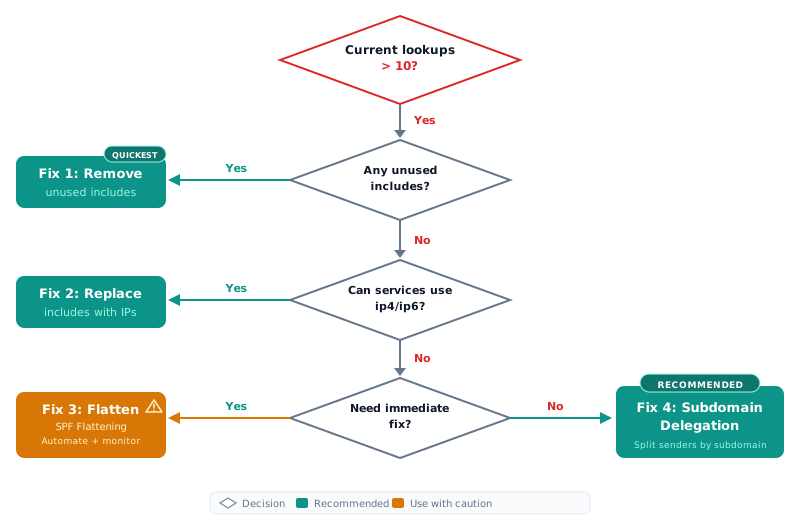
Fix 4 — Subdomain Delegation
Move email services onto dedicated subdomains. Each subdomain gets its own SPF record with a fresh 10-lookup budget.
; Root domain — only corporate email
; example.com TXT record:
v=spf1 include:_spf.google.com -all
; Lookups: 1 ✓

; Marketing subdomain — Mailchimp + SendGrid
; marketing.example.com TXT record:
v=spf1 include:servers.mcsv.net include:sendgrid.net -all
; Lookups: 1 + 2 = 3 ✓

; CRM subdomain — Salesforce
; crm.example.com TXT record:
v=spf1 include:_spf.salesforce.com -all
; Lookups: 2 ✓ (1 include + 1 exists macro)

; Each subdomain has its own 10-lookup budget
This is the approach recommended by dmarcian (DMARC co-author’s organization), Postmark, and CISA (BOD 18-01 for federal agencies).
Postmark provides a concrete example: pm.example.com for transactional email,
news.example.com for marketing, and the root domain for corporate email only.
The root domain SPF drops to as few as 2 lookups.
Trade-offs to plan for:
- Each subdomain must build its own sending reputation (30-60 days initial warmup)
- Additional DNS management overhead
- Requires DMARC subdomain policy planning: use the
sp=tag in the root domain’s DMARC record, or publish per-subdomain DMARC records - Works with relaxed DMARC alignment (the default). Strict SPF alignment
(
aspf=s) requires the From header domain to match the Return-Path domain exactly
Fix 5 — SPF Macros (Advanced)
The exists: mechanism with the %{i} macro authorizes IPs via a single DNS
lookup, regardless of IP pool size. Only
0.88% of SPF records use macros
(DMARCChecker.app, 2024), making this the least adopted but most
lookup-efficient approach.
Production implementations include Salesforce
(exists:%{i}._spf.mta.salesforce.com), Cisco CES,
Valimail Instant SPF
, and
PowerDMARC PowerSPF
.
Trade-offs:
- Untestable with most standard SPF validators — use the free SPF macro debugger to expand and verify a macro mechanism before publishing it
- Potential vendor lock-in with hosted macro services
- ESP domain verification workflows may break
- The void lookup limit of 2 still applies — a well-designed implementation
uses only one
exists:mechanism
Real-World Lookup Budget Scenarios
Startup stack:
Google Workspace (1) + Mailchimp (1) + HubSpot (1) = 3/10. Safe with room for 7 more lookups.
Enterprise stack:
Microsoft 365 (1) + Salesforce (2) + Mimecast regional include (1) = 4/10. Safe with room for 6 more lookups.
Support-heavy stack:
Microsoft 365 (1) + Zendesk (1)
- Freshdesk (7) + Intercom (0) =
9/10. Headroom: 1. Add an
mxmechanism for your own servers and you are at the limit. Freshdesk alone consumes 7 of the 10. Fix: delegate Freshdesk to a support subdomain with its own budget.
The landscape has shifted.
Google Workspace + Salesforce + SendGrid + Mailchimp + HubSpot =
7/10 today. The same stack cost more before providers
flattened their records: _spf.google.com alone dropped from 4 lookups to 1 in
December 2025, when Google removed its three nested _netblocks includes (the
Google Workspace SPF record guide has the
before-and-after). Counts move in both directions — between April and
September 2026, Mimecast’s global include grew from 8 lookups to
9 and Zoho’s from 4 to 5.
Many organizations paying for an SPF flattening tool or SPF flattening service may no longer need them. Verify your lookup counts against live DNS using an SPF record checker — not outdated documentation.
FAQ
Do ip4 and ip6 mechanisms count toward the SPF 10 lookup limit?
No. Per RFC 7208,
ip4, ip6, and all do not trigger DNS queries and are exempt from the
10-lookup limit. Only include, a, mx, ptr, exists, and redirect
count. Replacing include: mechanisms with equivalent ip4:/ip6: addresses
is one way to reduce your lookup count — though it removes the provider’s
ability to update their own IPs.
Can I have multiple SPF records on one domain?
No. RFC 7208 requires exactly one SPF record per domain. Two v=spf1 TXT
records cause PermError for all email — not just the duplicate. This is one
of the most common SPF misconfigurations. Merge all authorized senders into a
single record.
What is the difference between SPF PermError and SPF fail?
SPF fail means the sending IP is not authorized by the SPF record — the record was evaluated successfully but the IP did not match. SPF PermError means the record itself is broken and cannot be evaluated at all — due to too many lookups, duplicate records, or syntax errors. DMARC treats both as SPF failure, but PermError affects every email from the domain, not just unauthorized senders.
What is SPF flattening and is it safe?
SPF flattening replaces include: mechanisms with their resolved ip4: and
ip6: addresses to reduce DNS lookups. It solves the 10-lookup limit but
creates maintenance risk: provider IP changes can silently break your SPF
record. The organization that invented SPF flattening (dmarcian) discontinued it
in 2023. Safer alternatives include removing unnecessary includes, subdomain
delegation, and SPF macros.
How do I fix SPF too many DNS lookups in Cloudflare?
The SPF 10-lookup limit is defined by RFC 7208 and enforced by receiving mail
servers, not by Cloudflare. Cloudflare’s warning identifies the problem; fixing
it requires optimizing your SPF record regardless of DNS provider. Start by
auditing which include: mechanisms are unnecessary, then consider subdomain
delegation or SPF flattening. Use an SPF record checker to verify your lookup
count.
What is the SPF void lookup limit?
RFC 7208 Section 4.6.4 defines a second limit: a maximum of 2 void lookups.
A void lookup is a DNS query that returns NXDOMAIN or an empty result. Two stale
include: entries pointing to decommissioned domains exhaust this limit and
trigger PermError — even if your total mechanism lookups are well under 10.
Remove any includes for services you no longer use.
Conclusion
The SPF 10-lookup limit is a hard cap defined by RFC 7208. Exceeding it causes PermError and breaks DMARC alignment for every email your domain sends.
Start by auditing your includes. Many ESPs do not need a root domain include at
all — they use their own Return-Path domain, making your include: redundant.
Removing unnecessary entries is the fastest fix and carries zero risk.
Verify your lookup counts against live DNS, not outdated blog posts or vendor
documentation. Google flattened _spf.google.com in December 2025, and other
providers change their records without notice. The stack that broke the limit
last year may be well within budget today — or cost more than it did.
SPF flattening is a quick fix with real security trade-offs — over-authorization of shared IP ranges, stale record risk, and audit trail loss. Subdomain delegation is the more sustainable path for growing organizations that need to add new services without revisiting their SPF record every time.
Do not forget the void lookup limit of 2. Stale includes pointing to decommissioned providers silently trigger PermError, even when your mechanism count is well under 10.