The Google SPF Record: Setup, Lookup Math, and the Parts Google’s Docs Skip
Google’s setup doc gives you one line — v=spf1 include:_spf.google.com ~all —
and stops. It doesn’t tell you what that include expands to, how many DNS
lookups it costs, or what happens to your Google SPF record the day Mailchimp
joins it.
That gap matters. Almost every Google Workspace domain eventually adds a third-party sender — an email service provider, a CRM, a helpdesk — and that’s exactly where the failure modes Google never mentions live: duplicate records, the 10-lookup limit defined in RFC 7208 (Sender Policy Framework), and alignment gaps that make DMARC fail while SPF passes.
This guide gives you the exact record, the expansion of
_spf.google.com, copy-paste combinations for common senders, and the
misconfigurations that produce PermErrors on real domains.
What Is the SPF Record for Google Workspace?
The SPF record for Google Workspace is:
v=spf1 include:_spf.google.com ~allPublish it as a single TXT record at the root of your sending domain, at your DNS host. Not in the Google Admin console — Google’s own Set up SPF page states: “You don’t need to do anything in your Google Admin console to set up SPF. Instead… log into your domain host and add the SPF record” (last updated 2026-07-22).
Google recommends the ~all softfail qualifier, not -all. Its guidance is
verbatim: “Google recommends you use ~all in your SPF record.” We’ll come back
to why later in this post.
Two details worth catching now. First, each subdomain that sends mail needs its
own record — Google Workspace SPF is not inherited by subdomains. Second, this
one line does more work than it looks like: the include: mechanism pulls in
every IP range Google sends from, and keeps doing so as Google’s infrastructure
changes. If you’re new to how SPF works, the
mechanism-by-mechanism breakdown is worth ten minutes.
What Does include:_spf.google.com Actually Contain?
The include: mechanism triggers a recursive SPF evaluation of the named
domain (RFC 7208 §5.2). Your record delegates to Google’s record, and receivers
resolve Google’s record at delivery time. That’s why you never hard-code
Google’s IPs yourself: Google rotates ranges silently, and a pinned copy goes
stale without warning.
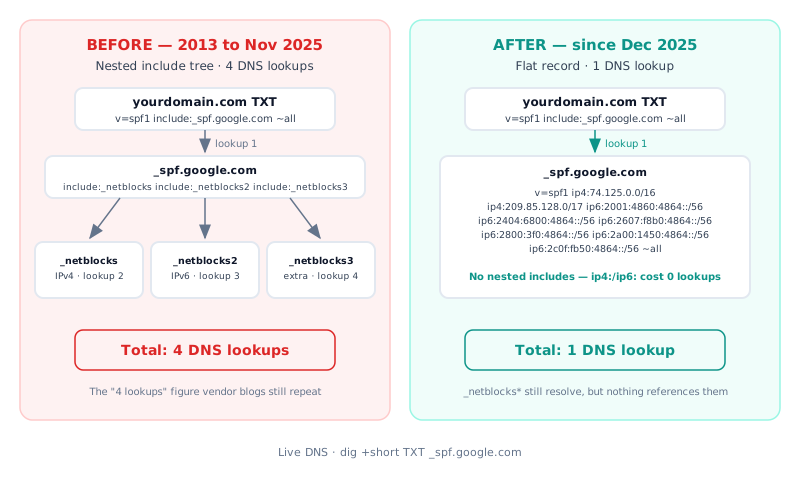
For over a decade, the delegation was a tree. As documented by URIports
(2025-12-05), from 2013 through November 2025 _spf.google.com contained three
nested includes — _netblocks.google.com (IPv4), _netblocks2.google.com
(IPv6), and _netblocks3.google.com (additional IPv4 ranges) — costing 4 DNS
lookups in total. Tom Limoncelli captured the same structure in a live dig
in 2018, with _netblocks3.google.com then holding ranges such as
172.217.0.0/19, 108.177.96.0/19, and 35.191.0.0/16.
In December 2025, Google flattened it. The include chain is gone, and
_spf.google.com now returns its IP ranges directly — as first reported by
URIports (2025-12-05) and corroborated by Suitebriar in January 2026. Here is
the record as DNS returns it today:
$ dig +short TXT _spf.google.com
"v=spf1 ip4:74.125.0.0/16 ip4:209.85.128.0/17 ip6:2001:4860:4864::/56
ip6:2404:6800:4864::/56 ip6:2607:f8b0:4864::/56 ip6:2800:3f0:4864::/56
ip6:2a00:1450:4864::/56 ip6:2c0f:fb50:4864::/56 ~all"
No include: mechanisms — only direct ip4:
and ip6: ranges. The old sub-records still resolve (_netblocks3.google.com
now returns an empty v=spf1 ~all), but nothing references them anymore. If
your record hard-codes any _netblocks*.google.com include, it’s pointing at
orphaned infrastructure.
The practical consequence: include:_spf.google.com is cheaper than it used to
be. We’ll do the exact arithmetic in the lookup-math section, because that’s
where multi-sender records live or die.
How Do You Add the Google SPF Record?
Four steps, in order:
Add the Google Workspace SPF record
-
Check what’s already published. Run
dig +short TXT yourdomain.com. If av=spf1record already exists, you will edit that record — never add a second one. Twov=spf1records on one domain is a PermError. -
Log in at your DNS host — Cloudflare, GoDaddy, Namecheap, Route 53, wherever your domain’s DNS lives. The Admin console plays no part here.
-
Create or edit the TXT record at the root (
@) with the valuev=spf1 include:_spf.google.com ~all. If other senders already appear in an existing record, keep them and add Google’s include to the same line. -
Wait for the TTL to expire, then verify. Run the dig from step 1 again and confirm one record with the expected value. Then send yourself a test message, open it in Gmail, choose “Show original,” and confirm
spf=pass.
For the verification step, you can also run your domain through an SPF record checker — it walks the full include chain and reports your live lookup count in one pass.
Which SPF Record Do You Need for Third-Party Senders?
Everything in multi-sender SPF hinges on one rule: one domain, one v=spf1
record. RFC 7208 §4.5 requires receivers to return a PermError when a domain
publishes more than one SPF record — and DMARC treats a PermError as a fail.
Google’s error page for this reads “two or more type txt spf records found.”
You merge includes into a single line. You never “replace” Google’s include with your ESP’s, and you never publish the ESP’s record alongside Google’s. This confusion is real enough that in HubSpot’s own community, an admin reported HubSpot support told them to switch domain providers rather than merge includes (HubSpot Community thread, January–April 2024). The correct fix was one merged record.
Here are the merged records for common combinations. Google’s own sender table publishes several of these; the lookup counts are ours, measured against live DNS:
| Senders | Record | Lookups |
|---|---|---|
| Workspace only | v=spf1 include:_spf.google.com ~all | 1 |
| Workspace + Mailchimp | v=spf1 include:_spf.google.com include:servers.mcsv.net ~all | 2 |
| Workspace + SendGrid | v=spf1 include:_spf.google.com include:sendgrid.net ~all | 3 |
| Workspace + HubSpot | v=spf1 include:_spf.google.com include:[ID].spf05.hubspotemail.net ~all | 2 |
| Workspace + Microsoft 365 | v=spf1 include:_spf.google.com include:spf.protection.outlook.com ~all | 2 |
Three footnotes on that table. The HubSpot include is account-specific —
HubSpot’s setup screen gives you your [ID], and the subdomain varies
(spf05, spf10); copy yours, not ours. SendGrid costs 2
because sendgrid.net nests one further include (ab.sendgrid.net). And the
Microsoft 365 row is most often a migration scenario: if you’re moving between
Google Workspace and Microsoft 365, remove the old provider’s include only
after cutover — leaving it costs a lookup, removing it early breaks in-flight
mail.
If you’re using Google Workspace SPF and Mailchimp together and something still fails, the problem is almost never the merged record above — it’s usually a leftover second record or a syntax slip. The SPF record syntax guide covers every mechanism and qualifier in detail.
How Many DNS Lookups Does the Google SPF Record Use?
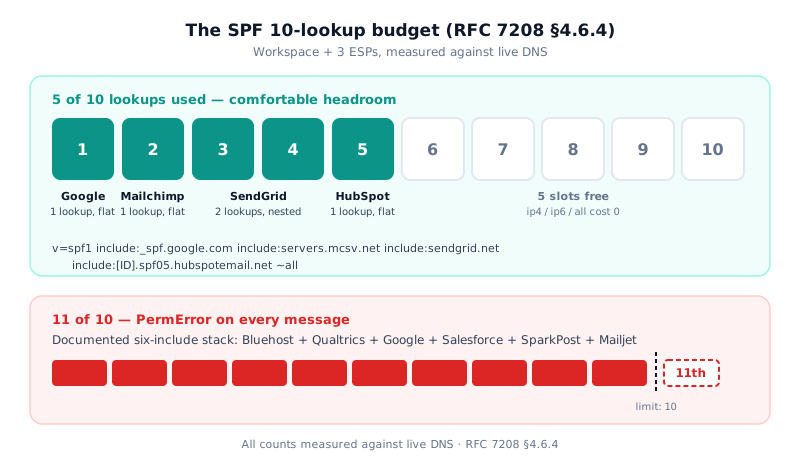
The short answer, before the arithmetic: a typical Google Workspace domain with a couple of ESPs bolted on sits around 5 lookups — comfortably under the limit of 10. If that’s your setup, you have headroom; the math below shows exactly where each lookup goes and where domains actually run out.
RFC 7208 §4.6.4 sets the budget: SPF implementations MUST limit the mechanisms
and modifiers that trigger DNS lookups — include, a, mx, ptr, exists,
and the redirect modifier — to at most 10 per check. Exceeding it is a
PermError, and the PermError applies to all your mail, not just the newest
sender. Two details that trip up manual counters: ip4, ip6, and all cost
zero, and the initial TXT fetch of your own record doesn’t count. There’s also
a separate cap of two “void lookups” — queries that return no usable answer.
Here’s the stale-number problem: “Google costs 4 lookups” was true until December 2025 and is still repeated across vendor blogs — some miscount it as 3, some hedge with “3–4.” Since the flattening, the include chain is gone.
The current cost of include:_spf.google.com is
1 lookup — the include
itself, resolving to a flat list of ip4:/ip6: ranges with zero nested
includes.
So a realistic multi-sender budget looks like this, mechanism by mechanism:
v=spf1 include:_spf.google.com                      → 1 lookup (flat)
       include:servers.mcsv.net                     → 1 lookup (flat)
       include:sendgrid.net                         → 2 lookups (nests ab.sendgrid.net)
       include:[ID].spf05.hubspotemail.net          → 1 lookup (flat)
       ~all                                         → 0
Total: 5 of 10
Five lookups for Workspace plus three ESPs — comfortable headroom. But the ceiling is real. In one case documented by InteractiveWebs, a domain stacked six includes — Bluehost, Qualtrics, Google, Salesforce, SparkPost, and Mailjet — and measured 11 DNS queries: a PermError for every message it sent.
148,655 of 3.1M SPF-enabled domains exceed the 10-lookup limit (4.8%), out of 5,499,028 domains scanned
This isn’t a fringe failure. The full breakdown is in our SPF 10-lookup limit study, including the fix ladder: prune unused senders first, delegate high-volume senders to subdomains second.
If pruning and delegation aren’t enough, an
SPF flattener can replace lookup-heavy includes with
their resolved IPs. One honesty note before you reach for it: flattened records
go stale as provider IPs rotate, so either automate the re-resolution or don’t
flatten — and keep include:_spf.google.com as an include either way. At 1
lookup, flattening Google’s record buys you nothing and costs you freshness.
If a tool tells you Google costs 4 lookups today, the tool is serving cached data. That’s why so many “Google SPF too many lookups” reports since December 2025 are false alarms: count against live DNS, not folklore.
Should You Use ~all or -all With Google Workspace?
Use ~all. That’s Google’s position, stated plainly on its About SPF records
page (updated 2026-04-29): with ~all (softfail), receivers typically accept
unlisted senders but mark them suspicious; with -all (fail), receivers may
reject them — and “if your SPF record isn’t set up correctly, the fail
qualifier might cause more messages from your domain to be sent to spam.”
Here’s the nuance security scanners miss when they flag ~all as “weak”: once
DMARC is deployed, softfail and hardfail reach the same enforcement outcome.
DMARC’s policy — not SPF’s qualifier — decides what happens to failing mail.
Switching to -all to satisfy a scanner while your senders are still unmapped
adds risk without adding protection.
What you should never use: +all, which authorizes the entire internet to send
as your domain, and ?all, which asserts nothing. These aren’t hypothetical —
a real admin in HubSpot’s community proposed a +all record before the thread
corrected it.
The decision rule: ~all from day one. Consider -all only after DMARC
aggregate reports have confirmed every legitimate sender for several weeks.
Which raises the bigger question — because a passing SPF record, with any
qualifier, is only part of the story.
Why a Passing Google SPF Record Isn’t Enough
SPF authenticates the envelope sender — the Return-Path address used in the SMTP transaction — not the From: address your recipients see. Protecting the visible domain is DMARC’s job, and DMARC requires alignment: the From: domain must match the domain that passed SPF or DKIM.
Google Workspace breaks SPF alignment by design in three flows:
- Alias domains. When you send from an alias domain, Google puts the primary domain in the Return-Path. SPF passes for the primary domain but never aligns with the alias From: (Al Iverson, mailop mailing list, October 2024).
- Calendar invites. Google sends them with
calendar-server.bounces.google.comas the Return-Path — unaligned with your domain, working as designed. - Groups and forwarded mail. Google rewrites the envelope sender, breaking the SPF-to-From: match for the original domain.
In all three cases, DKIM alignment carries DMARC — which is why Google itself leans on DKIM for Workspace mail. SPF is necessary; it is not sufficient.
The stakes are concrete. Gmail’s sender requirements (effective February 1, 2024) require SPF or DKIM from all senders, and SPF and DKIM and
DMARC — with From: alignment — from anyone sending 5,000+ messages per day to
Gmail. The SMTP codes to recognize: 4.7.27 (rate-limited, SPF didn’t pass),
5.7.27 (blocked, SPF didn’t pass), and 4.7.32 (From: not aligned with the
authenticated SPF or DKIM domain). All three are documented in Google’s
Email sender guidelines FAQ.
The DMARC half of this — record syntax, policy progression, report monitoring — has its own walkthrough: set up DMARC for Google Workspace. And if you send volume, you can check your standing directly.
See whether your domain meets Gmail’s bulk-sender requirements — free check.
What Are the Most Common Mistakes With the Google SPF Record?
Every one of these comes from documented community threads and Google’s own troubleshooting pages. Each entry: mistake → symptom → fix.
- Two
v=spf1records on one domain. Symptom: PermError; Google’s validator reports “two or more type txt spf records found”; DMARC fails. Fix: merge into one record. Even cisco.com once published duplicate SPF records simultaneously. - Legacy includes.
include:aspmx.googlemail.comtoday just returnsv=spf1 redirect=_spf.google.com— a wasted extra lookup. Hard-coded_netblocks*.google.comincludes point at records nothing references since December 2025. Fix: replace the whole stack withinclude:_spf.google.com. - Over the 10-lookup limit after stacking ESPs. Symptom: PermError; some tools even misreport “no SPF record found.” Fix: prune unused includes, delegate senders to subdomains, or flatten — the lookup-math section above has the ladder.
- Wrong qualifier.
+allauthorizes everyone;?allasserts nothing. Symptom: zero spoofing protection while every checker shows “SPF found.” Fix:~all. - Record in the Admin console instead of DNS. Admins hunt for an SPF field in admin.google.com; Google says outright there’s nothing to do there. A related trap on legacy hosts: an auto-provisioned Workspace SPF record that can’t be edited, so the admin adds a second one — and lands back at mistake #1. Fix: one merged TXT record at the DNS host.
- Syntax slips. A mechanism placed after
all(silently ignored), a space after the colon (include: _spf.google.com), a missing underscore (spf.google.com), a missingv=spf1prefix, or multi-string quoting that concatenates without spaces. Symptom: PermErrors like “used an invalid SPF mechanism.” Fix: character-exact records, verified with dig after every edit.
The confusion is genuine — “multiple spf… I am so confused” is the verbatim title of a thread in Google’s own Workspace Admin Community. The record is one line; the failure modes hide in everything around it.
FAQ
What is the SPF record for Google Workspace?
The SPF record for Google Workspace is
v=spf1 include:_spf.google.com ~all. Publish it as a single TXT record at
the root of your sending domain, at your DNS host — not in the Google Admin
console. Google recommends the ~all softfail qualifier on its Set up SPF
page.
Do I need an SPF record for personal Gmail?
No. Google publishes SPF for gmail.com itself, so mail from a personal @gmail.com address is already covered. You need your own SPF record only when you send from your own domain on Google Workspace. Gmail’s sender requirements apply when your domain sends mail to Gmail accounts.
How many DNS lookups does include:_spf.google.com use?
One. Since December 2025, _spf.google.com publishes its IP ranges directly
with no nested includes, so the include costs a single DNS lookup. The widely repeated “4 lookups” figure described the
pre-December-2025 include chain and is now obsolete.
Can I have SPF for Google Workspace and other services?
Yes — merge every service into one record with multiple include: mechanisms,
for example v=spf1 include:_spf.google.com include:servers.mcsv.net ~all.
Never publish a second v=spf1 TXT record on the same domain: RFC 7208 §4.5
makes two records a PermError, which DMARC treats as fail. The combo table
above has verified records for common stacks.
Why does my mail fail DMARC when SPF passes?
Alignment. SPF authenticates the Return-Path (envelope sender), while DMARC compares that domain to the visible From: address. Workspace alias domains, Calendar invites, and Groups mail put a different domain in the Return-Path, so SPF passes without aligning. Enable DKIM — its signature aligns for all three flows. The DMARC Workspace guide covers the full setup.
Should my Google SPF record end with ~all or -all?
~all — it’s Google’s explicit recommendation, and -all risks sending
legitimate mail to spam while your record is incomplete. Once DMARC is
deployed, the qualifier no longer changes the enforcement outcome, because
DMARC’s policy decides disposition. Revisit -all only after aggregate
reports confirm every sender.
The Record Is One Line. The Craft Is Everything Around It.
The Google SPF record itself hasn’t changed:
v=spf1 include:_spf.google.com ~all, one TXT record, published at your DNS
host. What’s around it is where domains break: merge senders into that one
line and never publish a second record; count your lookups against live DNS
rather than blog folklore — Google’s include costs 1 today, whatever an older
post says; keep ~all; and pair SPF with DKIM and DMARC, because SPF alone
never protected the From: address your recipients actually see.
By the time you read this, the only numbers that matter are your own.