Content Security Policy (CSP) Explained [2026]
What Content Security Policy is, how browsers enforce it, and how to configure, roll out, and debug one. With live examples.
Every time a browser loads your page, it reads one thing before it runs a single script: the Content Security Policy header, if you sent one. That header is a list of rules — which scripts, styles, images, fonts, and frames are allowed to load, and from where. Anything not on the list is refused, silently blocked before it can execute.
Content Security Policy — CSP — is a W3C browser standard, not an IETF RFC; more on that distinction below, so it doesn’t need repeating. By the end of this guide you’ll know what CSP actually does, where to put the header, which directives carry the most weight, how to roll a policy out without breaking your own site, and how to catch and fix violations once it’s live. If you already have a policy, you can paste it into DMARCguard’s CSP validator to see it graded against these same rules as you read.
What Is a Content Security Policy?
A Content Security Policy is an HTTP response header — or, less completely, a <meta> tag — that tells the browser which sources of scripts, styles, images, fonts, frames, and other resources a page is allowed to load. It’s an allowlist enforced at the browser, not a filter applied at your server.
Its primary job is blunting cross-site scripting (XSS): even if an attacker manages to inject a <script> tag into your page — through a comment field, a URL parameter, a stored-XSS bug — a well-scoped CSP stops the browser from running it, because the injected script’s origin (or lack of a nonce) doesn’t match the allowlist. CSP also defends against clickjacking through the frame-ancestors directive, and, via upgrade-insecure-requests, it auto-upgrades lingering http:// subresource URLs to https:// (the old block-all-mixed-content directive was removed in CSP Level 3).
CSP was developed and is maintained by the W3C’s Web Application Security Working Group. That’s worth stating plainly: it’s a W3C specification, not an IETF RFC, so there’s no “RFC number” for CSP the way there is for SPF (RFC 7208), DKIM (RFC 6376), or DMARC. CSP Level 2 is the published W3C Recommendation; CSP Level 3 — which supersedes Levels 1 and 2 while keeping them backward compatible — is a Working Draft on the Recommendation track, and is what browsers actually implement. This guide cites CSP Level 3 by section number throughout. DMARCguard built its CSP evaluator directly against this spec, which is also why the section references below match what the validator checks.
How the Browser Enforces a CSP
A CSP is a semicolon-separated list of directives, each with its own space-separated values:
directive-name value1 value2; directive-name2 value1Fetch directives — script-src, style-src, img-src, connect-src, and similar — each list the sources a given resource type may load from: a scheme (https:), a host (cdn.example.com), the keyword 'self', or a nonce/hash.
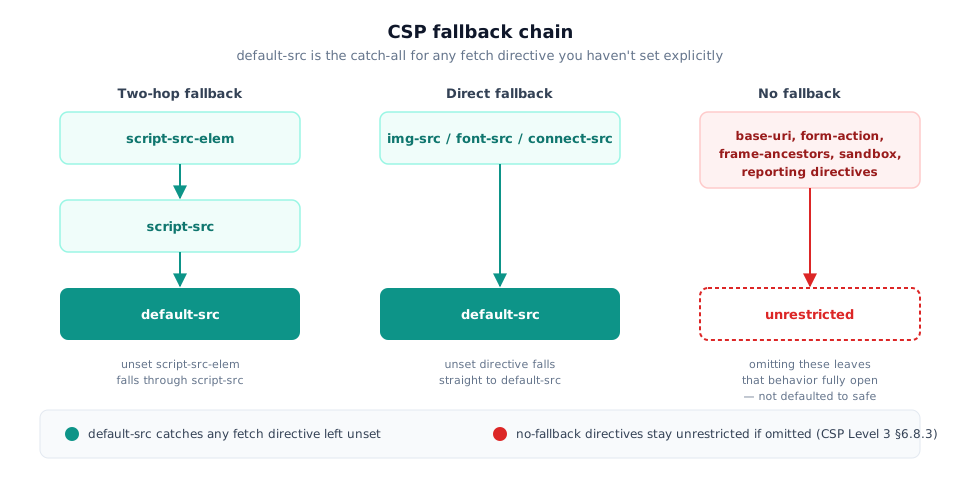
The part that trips up most first-time policies is the fallback chain. CSP Level 3 §6.8.3 defines default-src as the catch-all for any fetch directive you haven’t set explicitly — but the fallback isn’t uniform. script-src-elem falls back to script-src, then default-src. img-src, font-src, connect-src, and several others fall back straight to default-src. A handful of directives — base-uri, form-action, frame-ancestors, sandbox, and the reporting directives — have no fallback at all, so omitting them leaves that behavior completely unrestricted rather than defaulting to something safe.
The second common mistake involves the 'none' keyword. CSP Level 3 §6.7.2.7 specifies that 'none' only blocks when it’s the sole entry in a directive’s source list — a source list of size 1 whose only member is 'none'. Mix it with anything else, like object-src 'none' https://cdn.example.com, and the 'none' becomes a no-op: the host still matches and the directive still allows loads from it.
Mechanically, enforcement is straightforward: you set script-src, and for every <script> tag the page tries to run, the browser checks that tag’s origin (or nonce) against the directive’s source list. A match executes normally. A mismatch gets blocked, and the browser logs a console error naming the exact directive that refused it.
Where You Set a CSP — Header vs. <meta> Tag
The real mechanism is the Content-Security-Policy HTTP response header, set at your web server or CDN — nginx, Apache, Cloudflare, or your application framework’s middleware layer:
Content-Security-Policy: default-src 'self'; script-src 'self'; object-src 'none'The alternative is a <meta http-equiv="Content-Security-Policy"> tag inside <head>. It works for teams without server or CDN configuration access, but it’s strictly weaker: CSP Level 3 restricts what a <meta>-delivered policy can do, and in practice frame-ancestors, report-uri/report-to, and sandbox are silently ignored when the policy arrives this way — they only take effect as a response header. If you’re relying on <meta> for anything beyond the fetch directives, those three protections aren’t there, with no warning in the console.
For anyone with server or CDN access, the header is the only complete option — set it once at the edge and every page that response touches inherits the policy.
The Directives That Matter Most
A handful of directives cover most real policies:
| Directive | What it controls |
|---|---|
default-src | Fallback source list for any fetch directive not set explicitly |
script-src | Where JavaScript may load and execute from — the highest-risk directive |
style-src | Where CSS may load from |
img-src | Where images may load from |
connect-src | Where fetch(), XHR, WebSocket, and EventSource connections may target |
object-src | Plugin content (<object>/<embed>) — set to 'none' unless you have a specific reason not to |
base-uri | Restricts <base>, so an injected tag can’t silently rewrite relative URLs |
frame-ancestors | Who may embed your page in an <iframe> — the clickjacking defense |
frame-ancestors deserves its own callout. CSP Level 3 §6.4.2 defines it as controlling which origins may frame the current page — this is the modern replacement for the older X-Frame-Options header, and the two are frequently confused. X-Frame-Options only accepts a small set of fixed values (DENY, SAMEORIGIN); frame-ancestors accepts a full source list, so it can allow a specific set of trusted origins to embed your page while blocking everyone else.
Here’s a complete, annotated example for a typical SaaS page that serves self-hosted JavaScript plus a font CDN:
Reporting-Endpoints: csp-endpoint="https://example.com/csp-reports"
Content-Security-Policy:
  default-src 'self';
  script-src 'self';
  style-src 'self' 'unsafe-inline';
  font-src 'self' https://fonts.gstatic.com;
  img-src 'self' data:;
  connect-src 'self';
  object-src 'none';
  base-uri 'self';
  form-action 'self';
  frame-ancestors 'none';
  report-uri https://example.com/csp-reports;
  report-to csp-endpoint
Reading it line by line: default-src 'self' sets the fallback to same-origin only. script-src 'self' allows only scripts served from your own domain — no third-party hosts, no inline blocks. style-src allows same-origin CSS plus inline styles (a common but avoidable compromise; see the next section). font-src adds the specific font CDN host, and img-src allows data: URIs alongside same-origin. object-src 'none' blocks plugin content entirely. base-uri 'self' stops an injected <base> tag from redirecting relative URLs off-domain. form-action 'self' stops an injected <form> from posting what the user types to another origin — like base-uri, it has no default-src fallback, so leaving it out leaves it unrestricted. frame-ancestors 'none' means nothing can embed this page in a frame. The two reporting directives ship together deliberately, and the companion Reporting-Endpoints header is what gives csp-endpoint a URL — see Catching Violations for why omitting either one loses a share of your reports.
'unsafe-inline', 'unsafe-eval', and Why Nonces/Hashes Replace Them
'unsafe-inline' in script-src re-allows every inline <script> block and inline event handler on the page — which is precisely what CSP exists to stop. A policy with script-src 'self' 'unsafe-inline' blocks external script hosts but does nothing against an attacker who manages to inject an inline <script> tag directly into your markup. 'unsafe-eval' is the equivalent hole for eval() and the Function() constructor.
The modern replacement is a nonce or a hash. A nonce is a fresh, random value generated by your server on every response and echoed as an attribute on the script tags you trust: <script nonce="rAnd0m123">. A hash is a base64-encoded digest of a specific inline script’s exact contents — useful for static inline scripts that never change.
Nonce generation has a hard requirement worth citing exactly. CSP Level 3 §7.1 states the server “MUST generate a unique value each time it transmits a policy,” and that value “SHOULD be at least 128 bits long… and SHOULD be generated via a cryptographically secure random number generator.” In practice, that means a nonce is computed fresh per HTTP response — never hardcoded in a template, never reused across requests. A reused or predictable nonce is functionally the same as 'unsafe-inline', because an attacker only needs to observe one page load to steal a valid value.
'strict-dynamic' pairs with nonces and hashes to solve a different problem: a script you’ve explicitly trusted (via nonce or hash) often needs to load its own dependencies dynamically, and allowlisting every one of those third-party hosts by domain is brittle. CSP Level 3 §8.2 describes 'strict-dynamic' as extending trust from an explicitly allowed script to whatever that script loads next, while ignoring host- and scheme-based allowlists in the same directive — so a nonce-tagged loader script can pull in its dependencies without you maintaining a growing host list.
One behavior worth knowing: when a nonce or hash is present in a directive, browsers automatically ignore 'unsafe-inline' in that same directive. That’s a deliberate compatibility mechanism — it lets you ship both during a migration without the 'unsafe-inline' value undoing the nonce’s protection — but it also means a validator like DMARCguard’s should flag 'unsafe-inline' sitting alongside a nonce as dead weight to remove, not a real downgrade in effect.
Rolling Out a CSP Without Breaking Your Site
Never ship a strict policy straight to enforcement on a live site. A single missed script host or an inline handler you forgot about will break functionality the moment the policy goes live, with no staging step in between.
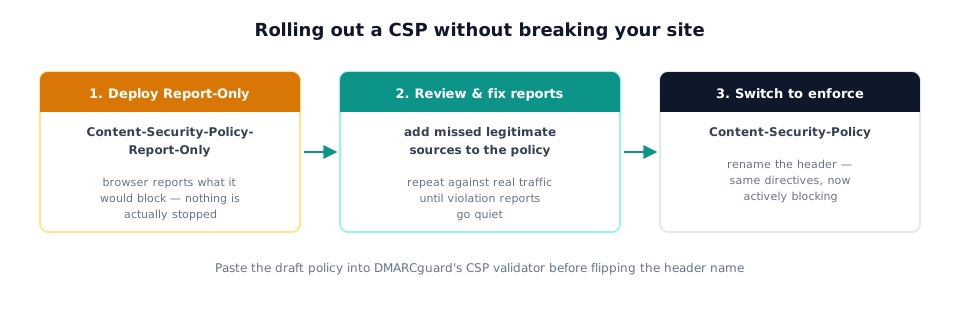
Instead, deploy first as Content-Security-Policy-Report-Only. It’s the identical syntax, but the browser only reports what it would have blocked — nothing is actually stopped:
Reporting-Endpoints: csp-endpoint="https://example.com/csp-reports"
Content-Security-Policy-Report-Only:
  default-src 'self';
  script-src 'self';
  report-uri https://example.com/csp-reports;
  report-to csp-endpoint
Run it in Report-Only for long enough to see real traffic patterns, review what shows up in your violation reports, add any legitimate sources you missed, and repeat until the reports go quiet. Only then switch the header name from Content-Security-Policy-Report-Only to Content-Security-Policy to start enforcing.
Before you flip that switch, paste your draft policy into DMARCguard’s CSP validator — it grades the policy against the same CSP Level 3 rules covered in this guide and flags weak directives the same way you’d want a teammate to during review, catching things like a 'none' mixed with other sources or a missing frame-ancestors before they reach production.
Catching Violations with report-to and Reporting-Endpoints
The modern way to collect violation reports has two parts: the report-to directive inside your CSP, and a separate Reporting-Endpoints response header that maps a name to a URL:
Reporting-Endpoints: csp-endpoint="https://example.com/csp-reports"That header’s syntax is a Structured Field Dictionary, and its format is defined by RFC 9651 (HTTP Structured Field Values, which obsoletes RFC 8941) — worth flagging explicitly, because it’s the one legitimate RFC citation anywhere near CSP. It applies only to the transport syntax of the Reporting-Endpoints header, not to CSP itself, which remains a W3C-only spec with no RFC of its own.
Browser support has a real gap here. Firefox and Safari don’t implement the Reporting API that report-to depends on for CSP — the only directive they honor is the older report-uri. Chromium-based browsers, meanwhile, prefer report-to and ignore report-uri when both are present. Ship report-to alone, and Firefox and Safari visitors generate zero violation reports. Ship both, and every browser reports through whichever mechanism it supports, with no double-reporting cost:
Reporting-Endpoints: csp-endpoint="https://example.com/csp-reports"
Content-Security-Policy:
  default-src 'self';
  script-src 'self';
  report-uri https://example.com/csp-reports;
  report-to csp-endpoint
Fixing a CSP Console Error
When your browser console shows “Refused to load… because it violates the following Content Security Policy directive,” the fix is almost always mechanical. Read the directive named in the error — img-src, connect-src, whichever it is — confirm the blocked resource is actually one you trust, then add that source to the matching directive and reload.
The wrong instinct is disabling the policy to make the error disappear. That removes the protection CSP exists to provide, and it’s rarely necessary — a legitimate blocked resource almost always needs a one-line directive addition, not a rollback of the whole policy.
A related, legitimate question is “how do I turn off CSP in Chrome?” — usually asked by a developer debugging locally, not someone trying to disable it in production. Chrome DevTools can locally override response headers for a single session (Network tab → request → Override headers), which lets you strip or loosen a policy temporarily on your own machine without touching what actually ships. That’s the honest answer to the local-debugging need; the production fix is still the directive edit above.
FAQ
Do I need a Content Security Policy?
Yes, if your site serves any user-influenced content or loads third-party scripts — CSP is the strongest browser-side defense against cross-site scripting. Even a starter policy (default-src 'self') meaningfully reduces what an injected script can do, and CSP layers on top of, not instead of, input sanitization.
Where do I set a Content-Security-Policy — header or meta tag?
Set it as the Content-Security-Policy HTTP response header at your web server or CDN — that’s the only place frame-ancestors, report-to/report-uri, and sandbox work. The <meta http-equiv> tag is a fallback for environments without server config access, but those three protections are silently ignored inside it.
What is a Content Security Policy example?
A minimal starting policy: default-src 'self'; script-src 'self'; object-src 'none'. This allows only same-origin scripts and resources by default, and explicitly blocks plugins. Real-world policies add specific third-party hosts, nonces for inline scripts, and a report-to endpoint.
How do I fix a CSP violation in the browser console?
Read the directive named in the console error (e.g. img-src), confirm the blocked resource is one you actually trust, then add that source to the matching directive and reload. Disabling the policy removes the protection — the fix is almost always a one-line directive edit, not a rollback.
How do I turn off Content-Security-Policy in Chrome?
You can’t switch off a site’s CSP from Chrome settings, and extensions that claim to do so only change your own browser — every other visitor still gets the policy. If a resource is blocked, fix it server-side: add the trusted source to the directive named in the console error, or test in Content-Security-Policy-Report-Only mode first.
Who developed Content Security Policy?
The W3C’s Web Application Security Working Group developed and maintains CSP. It’s a W3C specification, not an IETF RFC, so there’s no RFC number for CSP. CSP Level 2 is the published W3C Recommendation; CSP Level 3 — the version browsers implement and the one this guide cites — is a W3C Working Draft on the Recommendation track.
How does Content Security Policy work?
The browser reads the policy from the response header (or <meta> tag) and checks every resource the page tries to load — scripts, styles, images, frames — against the matching directive’s allowlist. Anything not explicitly permitted is blocked before it executes or renders, and the browser logs a console error naming the violated directive.
What’s the difference between 'unsafe-inline' and a nonce?
'unsafe-inline' allows every inline script and event handler on the page — the exact thing CSP exists to stop. A nonce allows only scripts tagged with a fresh, per-response random value, so an attacker’s injected script (which won’t have the nonce) still gets blocked. Browsers ignore 'unsafe-inline' automatically once a nonce is present.
Should I use report-uri or report-to for CSP violation reports?
Ship both together. report-to is the modern directive, but Firefox and Safari don’t implement the Reporting API for CSP, so they only honor the older report-uri. Chromium-based browsers prefer report-to and ignore report-uri when both are present. Omitting either one means losing reports from a share of your visitors’ browsers.
Conclusion
CSP is a browser-enforced allowlist checked against every resource a page tries to load. Set it as the Content-Security-Policy HTTP header rather than a <meta> tag, start any new or changed policy in Content-Security-Policy-Report-Only mode before enforcing it, replace 'unsafe-inline' with nonces or hashes, and ship both report-uri and report-to so no browser goes unreported.
A well-scoped Content Security Policy is one of the highest-leverage browser security controls you can ship, and it stays cheap to maintain once the initial rollout is done — most of the ongoing work is adding a directive when you add a genuinely new resource host.
Paste your policy into DMARCguard’s CSP validator to grade it against these same directives before you enforce it, or build a strict one from scratch if you’re starting fresh.
Monitor CSP for your domains
Get automated CSP monitoring, actionable insights, and step-by-step remediation guidance.
Start Free