TLSA Mismatch Troubleshooting: Compute the 3 1 1 Hash and Find the Drift
Mail flowed for weeks. Then, right after a certificate renewal, DANE-validating
senders started deferring with lines like Server certificate not trusted or
Verification failed. The certificate differs. That timing is the signature of
a DANE TLSA 3 1 1 mismatch: the SHA-256 hash published in DNS no longer
matches the public key your MX actually serves.
This guide is the debugging session. You will decode the sender’s error message, compute the served hash with OpenSSL, compare it against the published record, identify which of five root causes you have, and roll over without breaking validation again. If you are setting up a record from scratch instead, start with our TLSA record setup guide — this post assumes the record already exists and has stopped matching.
What does a TLSA 3 1 1 mismatch mean — and what’s the fastest check?
The fastest TLSA record check is two commands, side by side. First, what DNS publishes:
dig +short TLSA _25._tcp.mx.example.comA healthy answer looks like 3 1 1 followed by a single 64-character hex
string — for example 3 1 1 0d2280aa14c3…6bbc3fdf — with no (stdin)=
prefix, no whitespace inside the hash, and no truncation. Anything else in the
rdata is already a finding. Mail actively bouncing right now? Jump straight to
the emergency add-don’t-replace first aid and come back
to diagnose afterward.
Second, what the MX actually serves — the live SPKI pipeline shown in the next section. If the two hex strings differ, you have a key or selector problem. If they match but senders still fail, the problem is DNSSEC or the certificate chain, not the hash.
What do those three digits assert? A 3 1 1 mismatch means the SHA-256 digest
of your server’s SubjectPublicKeyInfo (SPKI) no longer equals the
certificate-association data published at _25._tcp.<mx>. The fields come
from RFC 6698: certificate usage 3 is DANE-EE — pin this end-entity
certificate (§2.1.1); selector 1 hashes the public key rather than the whole
certificate (§2.1.2); matching type 1 is SHA-256 (§2.1.3). RFC 7672 §3.1
recommends exactly this combination for SMTP.
Confirm DNSSEC before touching the record. Run dig +dnssec against a
validating resolver and look for the ad (authenticated data) flag. RFC 7672
§2.2 is blunt about why: a TLSA lookup that is not DNSSEC-authenticated is
unusable, so a perfect hash behind broken DNSSEC still fails. A 2022
measurement study of DANE SMTP servers (Lee et al., USENIX Security 2022) found
that missing DS records at the parent zone caused roughly 99% of the DNSSEC
failures it observed — check the DS delegation first.
Prefer one pass over five terminals? Paste your MX into our DANE/TLSA checker — it resolves the record, validates DNSSEC, and compares the live certificate in a single check.
How do you compute the TLSA hash with OpenSSL?
To compute the TLSA hash with OpenSSL, extract the SPKI, encode it as DER, and
hash it with SHA-256. This is the canonical pipeline Viktor Dukhovni published
on the IETF dane list in 2014, and the Postfix
TLS_README endorses the resulting
3 1 1 association as best practice:
# Hash the SubjectPublicKeyInfo of the certificate on disk (3 1 1 data).
# -binary | hexdump emits clean hex — no "(stdin)=" prefix, no newline.
openssl x509 -in cert.pem -noout -pubkey \
  | openssl pkey -pubin -outform DER \
  | openssl dgst -sha256 -binary \
  | hexdump -ve '/1 "%02x"'
Each stage does one job: x509 -noout -pubkey extracts the
SubjectPublicKeyInfo from the certificate, pkey -pubin -outform DER converts
it to binary DER, and dgst -sha256 hashes those bytes. The generic pkey
subcommand works for both RSA and ECDSA keys — Dukhovni noted on the same
thread that the pipeline “is not RSA-specific and works equally well for ECDSA
keys” — so prefer it over the algorithm-specific rsa/ec variants, which
produce byte-identical output.
That hashes the certificate on disk. A mismatch investigation needs the
certificate your MX serves on port 25, which may not be the same file. The
drift check swaps the input for a live s_client session:
# Hash the SPKI the MX actually serves on port 25, then compare
# against: dig +short TLSA _25._tcp.mx.example.com
openssl s_client -connect mx.example.com:25 -starttls smtp </dev/null 2>/dev/null \
  | openssl x509 -pubkey -noout \
  | openssl pkey -pubin -outform DER \
  | openssl dgst -sha256 -binary \
  | hexdump -ve '/1 "%02x"'
One honest caveat: many ISPs and cloud hosts block outbound port 25, so this command hangs rather than fails — run it from the mail server itself, or let the DANE checker make the connection for you.
We verified this pipeline against a public DANE domain: the
served SPKI hashed to 0d2280aa14c34b9f…6bbc3fdf, exactly matching one of the
three published 3 1 1 records. When your output does not match any published
record, you have found the drift.
Watch the output format. openssl dgst labels piped input — (stdin)= on
older releases, SHA2-256(stdin)= on OpenSSL 3.x — and appends a newline.
Paste that verbatim into a zone file and you have manufactured a malformed
record. The -binary | hexdump -ve '/1 "%02x"' form in the snippet emits the
bare 64-character hex digest, nothing else.
OpenSSL can also render the verdict itself. The verify one-liner hands
s_client the published rdata and asks it to authenticate the connection the
way a DANE-validating MTA would:
# Ask OpenSSL to validate the connection the way a DANE MTA would.
# Repeat -dane_tlsa_rrdata to test current + next records during rollover.
openssl s_client -connect mx.example.com:25 -starttls smtp \
  -dane_tlsa_domain mx.example.com \
  -dane_tlsa_rrdata "3 1 1 <your-published-hash>" </dev/null
A match prints DANE TLSA 3 1 1 …<hash> matched the EE certificate at depth 0
followed by Verify return code: 0 (ok) (observed with OpenSSL 3.6.1).
You can pass -dane_tlsa_rrdata multiple times to test the current and next
records together during a rollover.
Cross-check with a second tool before you edit DNS: Postfix’s
posttls-finger -c -Lsummary mx.example.com reports which published record
matched the live chain, and GnuTLS’s danetool --check performs an independent
fetch-and-verify. Once you have the correct hash, the
TLSA record generator assembles the full record — the
setup guide covers publishing it, so we won’t repeat that here.
Why doesn’t my computed hash match the published record?
Five root causes account for the mismatches that reach production. The evidence column is the differentiator — each cause leaves a distinct fingerprint in the hashes you just computed.
| Root cause | Symptom / sender error | Evidence to confirm | Fix |
|---|---|---|---|
| 1. Renewal minted a new key | Mail defers right after a certificate renewal | On-disk and live SPKI hashes agree with each other but not with DNS | certbot --reuse-key, or the current + next rollover (next section) |
| 2. Wrong selector or matching type | Record never matched, even on day one | The full-certificate digest equals the DNS value while the SPKI hash doesn’t | Recompute with the SPKI pipeline and republish as 3 1 1 |
| 3. Leaf vs intermediate confusion | Postfix logs no matching DANE TLSA records | Your hash matches an intermediate block from s_client, not the leaf | Hash the first certificate in the chain; for DANE-TA(2), serve the pinned CA in the chain |
| 4. Stray artifact in the record | Validators report malformed or wrong-length data | Record contains (stdin)=, whitespace, or fewer than 64 hex characters | Regenerate with -binary | hexdump and republish |
| 5. Not a hash problem: DNSSEC or resolver failure | TLSA lookup error (Postfix), tlsa lookup DEFER (Exim) | No ad flag on dig +dnssec; the hashes actually agree | Fix the DS record, RRSIG expiry, or resolver — leave TLSA alone |
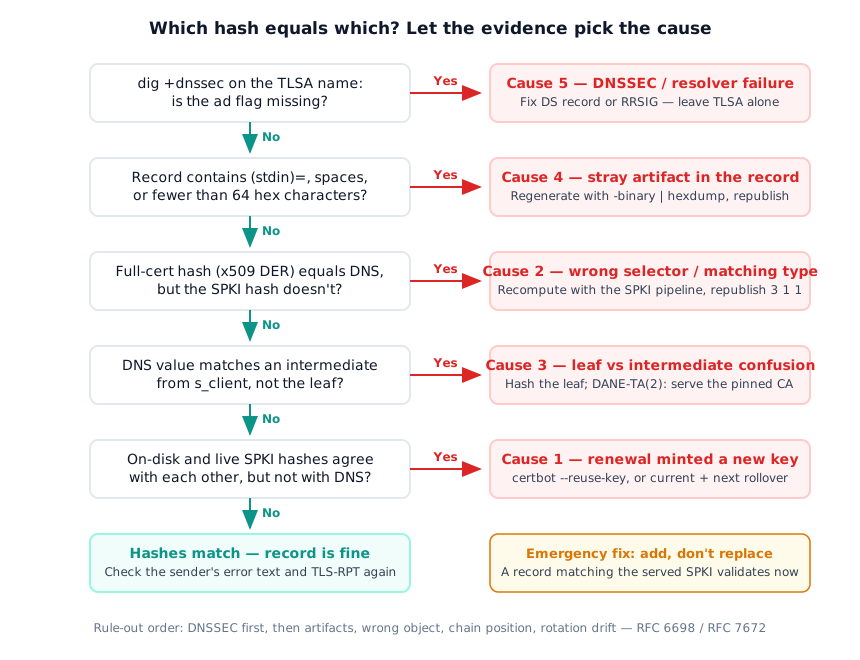
Cause 1 dominates production incidents. certbot generates a fresh key on
renewal by default, and Let’s Encrypt certificates live 90 days — so the record
breaks at the first renewal, long after anyone associates the change with DNS.
Certificate rotation is precisely the failure mode selector 1 was designed to
survive, but only when the key is reused.
Cause 2 is the classic authoring error. To confirm it, hash the full
certificate — openssl x509 -outform DER | openssl dgst -sha256 — and compare
that digest against the DNS value. The sys4 DANE
common mistakes page documents it
verbatim: “Some domains publish TLSA records with a selector of SPKI(1), which
indicates a digest of a public key, but the digest in the TLSA record is that
of the containing certificate.” Hashing the PEM text instead of binary DER is
the sibling mistake on the same page. The 2022 USENIX study found selector-0
records mismatched 34% of the time in one of its datasets — far more than
selector 1 — because a full-certificate digest changes on every reissue even
with key reuse.
Cause 3 bit DANE-TA(2) publishers hard when Let’s Encrypt stopped providing its cross-sign by default in February 2024: records pinning the ISRG root stopped validating because the root no longer appeared in the served chain.
The sender’s error message narrows things down before you type a single command:
- Postfix:
Server certificate not trustedandno matching DANE TLSA recordsmean DANE authentication ran and failed — a genuine mismatch (causes 1–3).TLSA lookup errormeans the DNS query itself failed — cause 5. - Exim:
Verification failed. The certificate differs.is the post-renewal mismatch;DANE error: tlsa lookup DEFERis a resolver problem. - Microsoft 365:
4.7.323 tlsa-invalid— per Microsoft Learn, this code “can only be generated after a DNSSEC-authentic TLSA record has been returned,” so DNSSEC is intact and the certificate is the problem.
Rule out the causes in order: rotation drift first, then the wrong hashed object, then artifacts, then DNSSEC.
How do you roll over a TLSA record without breaking DANE?
RFC 7671 §8 updates the publisher rules: every usage/selector/matching-type combination in your RRset must include at least one record matching the current chain, at all times. §8.1 spells out the safe sequence — publish the record for the future key alongside the current one at least two TTLs before deploying the new chain, let caches age out, deploy the new certificate, verify, then remove the obsolete record. The Postfix TLS_README goes one step more conservative: wait until the DNSSEC signature on the previous TLSA RRset expires. We walk through the publish-before-swap zone file in the setup guide, so here we stay on the operational choice.
Two models keep renewals from ever reopening this incident:
- Key reuse.
certbot --reuse-keykeeps the SPKI stable across renewals, so the3 1 1record never needs to change. Confirmreuse_key = Trueactually landed in the lineage’s renewal config — a Let’s Encrypt community thread documents operators who believed it was set while certbot kept minting fresh keys. - Current + next. Pre-generate the next key pair and publish its
3 1 1record alongside the current one, so the RRset always contains both. Dukhovni presented this pattern at ICANN61 (2018); on renewal you switch to the already-trusted next key, then publish a fresh “next.”
Two caveats scale with your fleet. If your server offers both RSA and ECDSA
certificates, the negotiated ciphersuite decides which one is served — the
RRset needs a matching 3 1 1 for each key. And RFC 7672 §2.1 binds TLSA
records to each MX hostname, so every MX host needs its own correct set.
One forward-looking date worth planning around: Let’s Encrypt announced on 2 December 2025 that certificate lifetimes shrink to 45 days by February 2028. That halves the drift window — manual TLSA maintenance stops being viable.
How do you catch TLSA drift before mail bounces?
Your own monitoring sees your DNS; only senders see your DNS, DNSSEC, and
certificate the way validation does. TLS-RPT (RFC 8460) gives you that
sender’s-eye view: publish a _smtp._tls TXT record and participating senders
mail you daily JSON reports. Three
RFC 8460 result types
separate the failure classes this guide covered: tlsa-invalid means the
record was DNSSEC-authentic but the certificate didn’t match (causes 1–4);
dnssec-invalid means the resolver couldn’t validate the record (cause 5);
and dane-required means the sender demanded DANE and found no usable record
at all. New to the protocol? Start with our TLS-RPT guide,
and drop a report into the
TLS report analyzer to translate result types
into the failing MX and cause.
Scheduled checks close the loop between renewals. Dukhovni’s
danecheck walks every MX host,
returns a non-zero exit code on any mismatch, and can verify chains at a
future time offset to catch imminent breakage — cron-friendly by design.
sys4’s smtp-dane-verify ships a Prometheus exporter for the same check. And
the -dane_tlsa_rrdata one-liner from earlier belongs inside your ACME deploy
hook, blocking the deployment when verification returns anything but 0.
If you run MTA-STS alongside DANE, note that a missing policy file fails in the same silent way a stale TLSA does — we cover that failure mode in fixing a missing MTA-STS policy.
DMARCguard monitors DANE and TLS-RPT among its 9 protocols: it performs the live-vs-published comparison continuously and tells you which record to fix, instead of leaving the diff to your next incident.
FAQ
How do I compare my live certificate against my published TLSA record?
Run two commands side by side: dig +short TLSA _25._tcp.<mx> shows what DNS
publishes, and openssl s_client -starttls smtp piped through the SPKI
pipeline hashes what the server actually serves. If the hex differs, the
record has drifted. A DANE checker performs the same comparison in one pass.
Why does OpenSSL print (stdin)= before my TLSA hash?
openssl dgst labels piped input — older releases print (stdin)=, OpenSSL
3.x prints SHA2-256(stdin)=. Pasting that label into a zone file corrupts
the record. Add -binary and pipe through hexdump -ve '/1 "%02x"' to emit
the bare 64-character hex digest with no prefix or trailing newline.
What does Microsoft 365 error 4.7.323 tlsa-invalid mean?
Per Microsoft Learn, 4.7.323 can only be generated after a DNSSEC-authentic TLSA record was returned — so DNS and DNSSEC are fine, but the destination certificate does not match the authentic record. Recompute the SPKI hash from the live certificate and republish the TLSA record.
Can I fix a TLSA mismatch without waiting for the TTL?
Yes. Add a second TLSA record whose hash matches the certificate the server currently serves, and keep the old record in place. Adding a matching record validates as soon as resolvers fetch the RRset, because DANE passes when any published record matches. Replacing forces you to wait out cached copies.
Is my problem the TLSA record or DNSSEC?
Run dig +dnssec on the TLSA name against a validating resolver. No ad flag
means DNSSEC is broken and senders discard the record unauthenticated
(RFC 7672 §2.2). In TLS-RPT reports, tlsa-invalid points at the certificate;
dnssec-invalid points at the DNS chain.
Conclusion
A DANE TLSA 3 1 1 mismatch is a diff, and diffs are debuggable: compute the
served SPKI hash with OpenSSL, compare it against the published record, and
let the evidence pick one of the five root causes. Fix it by adding — not
replacing — a matching record, then make the fix permanent with key reuse or a
current + next rollover per RFC 7671, and put TLS-RPT plus a scheduled DANE
check in place so the next renewal is a non-event.
And when you want the comparison running every day instead of every incident: start monitoring your DMARC reports — free plan, no credit card.