“MTA-STS Policy Is Missing: STSFetchResult.NONE” — What It Means and How to Fix It
You ran a status check — most likely Mail-in-a-Box’s System Status Checks — and
one line came back with a red ✖: MTA-STS policy is missing: STSFetchResult.NONE. Mail still sends. Mail still arrives. So what is actually
broken?
Short version: nothing is down, but a protection layer you intended to have is
not there. This guide decodes the STSFetchResult.NONE token — where the
string comes from and what the enum means — then walks a three-stage diagnosis
with copy-paste dig, curl, and openssl commands: DNS TXT record, HTTPS
policy fetch, TLS certificate chain. If you first want the protocol background,
start with what MTA-STS does and why; this post stays on the
error.
What does “MTA-STS policy is missing: STSFetchResult.NONE” mean?
It means the checker queried DNS and HTTPS for your MTA-STS policy and found
nothing usable — no _mta-sts.<domain> TXT record, no fetchable policy file,
or both. The fix is to publish the TXT record and serve
https://mta-sts.<domain>/.well-known/mta-sts.txt over a valid certificate
with a direct HTTP 200 response.
The token itself is worth decoding, because no other guide does.
STSFetchResult is a Python enum from the open-source
postfix-mta-sts-resolver library by Vladislav Yarmak. Mail-in-a-Box imports
that library in management/status_checks.py and prints its return value
verbatim — output.print_error(f"MTA-STS policy is missing: {valid}") — which
is how a Python enum’s repr ends up in your admin panel. The library’s GitHub
Issue #60 shows the runtime values: NONE = 0 (no policy found at all) and
FETCH_ERROR = 2 (a policy was found but could not be fetched or validated). A
working policy returns VALID.
Only two tools emit this exact string: Mail-in-a-Box and the library’s own
mta-sts-query CLI. MXToolbox, Hardenize, and Google’s Workspace checker
report the same condition in their own wording. So if you are seeing
stsfetchresult.none, you are almost certainly looking at Mail-in-a-Box status
checks.
One thing this error does not mean: an outage.
Fail open RFC 8461: when no policy is fetchable, senders "MUST continue with delivery as though the domain has not implemented MTA-STS"
Your mail is not blocked. Senders fall back to opportunistic TLS. What you are missing is downgrade protection — the guarantee that supporting senders refuse to deliver over a stripped or plaintext connection. That is worth fixing, on your schedule, one gate at a time.
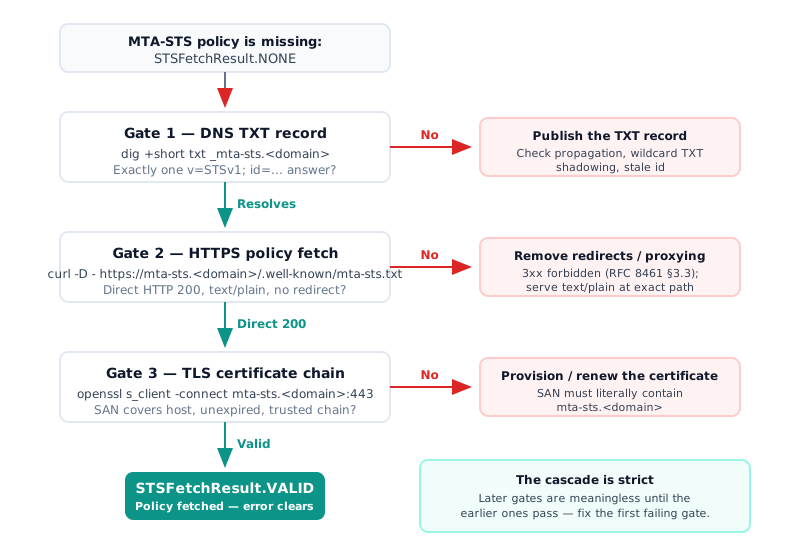
Stage 1 — Is the _mta-sts DNS TXT record resolving?
Start at DNS, because every later stage is meaningless until this one passes. A
sending server discovers your policy through a single TXT record — the
_mta-sts TXT record — and if that record does not resolve, the resolver
returns NONE without ever attempting the HTTPS fetch.
# Query the MTA-STS discovery record
dig +short txt _mta-sts.example.com

# Expected: exactly one record in this shape (empty output = record missing)
"v=STSv1; id=20260728120000"

# Real-world reference (gmail.com, verified 2026-07-28)
dig +short txt _mta-sts.gmail.com
"v=STSv1; id=20190429T010101;"
You want exactly one v=STSv1; id=... answer. If you get nothing, work through
these branches — ordered most common first, and each one is a documented
incident, not a hypothetical:
- The record was never published to your real DNS. After a Mail-in-a-Box
install or upgrade, users of external DNS (Cloudflare, registrar DNS) found
the box generated the record internally but never wrote it to the
authoritative zone. This is the root cause in the 2020 forum thread (6960)
that still ranks for this error. Add
_mta-sts.yourdomain.com IN TXT "v=STSv1; id=<timestamp>"at your provider. - Propagation lag. Mail-in-a-Box zones use a 1,800-second TTL; a freshly added record can take that long to appear everywhere. Cross-check several public resolvers before concluding it is missing.
- A wildcard TXT record is shadowing the answer. One admin in the same
thread traced the failure to a
*.<domain>TXT record that stopped the_mta-stsquery from being answered. Remove the wildcard or re-add it after the MTA-STS records. - Stale
idafter a policy edit. The record exists but senders keep a cached copy. Microsoft’s MTA-STS documentation requires theidvalue to change to a new unique string on every policy update so senders re-fetch — Google’s checker enforces a 1–32 alphanumericidas well.
One library quirk to know: a local DNS resolver error on the box also returns
NONE (Issue #60), so an external validator can pass while your own status
check still errors. When in doubt, run the full discovery chain from outside
with our MTA-STS checker — it walks DNS, fetch, and
certificate in one pass.
Gate passed when: the TXT record resolves from public resolvers. Now the fetch.
Stage 2 — Does the HTTPS policy fetch return a direct 200?
The second gate is the policy file itself. A sending MTA fetches
https://mta-sts.<domain>/.well-known/mta-sts.txt — the mta-sts.txt
well-known path — and it is far stricter about the response than a browser is.
Test it the way an MTA sees it. The first status line of the response must
read HTTP/2 200 — if you see a 301 or 302 instead, that redirect is not
a detour on the way to the policy; it is the failure itself:
# Fetch the policy exactly like a sending MTA: no redirects, headers visible
curl -sS -D - --max-time 10 \
  https://mta-sts.example.com/.well-known/mta-sts.txt -o /dev/null

# Pass criteria — all three, on the FIRST response:
#   HTTP/2 200            <- a 301/302/307 is a hard failure (RFC 8461 §3.3)
#   content-type: text/plain
#   (no HTML challenge page in the body)

# Example healthy output:
#   HTTP/2 200
#   content-type: text/plain

# Example failing output (site-wide redirect caught the mta-sts host):
#   HTTP/2 301                              <- the redirect IS the failure
#   location: https://www.example.com/
Why the no-redirect rule matters enough to check headers:
200 only RFC 8461 §3.3: HTTP 3xx redirects MUST NOT be followed and HTTP caching MUST NOT be used — any status other than a direct 200 fails the fetch
This single rule explains the most confusing symptom in the wild: the policy
opens fine in your browser, yet the checker still reports
STSFetchResult.NONE. Browsers follow redirects silently; sending MTAs must
not. None of the top-ranking guides for this error mention it.
Failure branches at this gate, in order of how often they show up, each from a documented case:
- 404 or no host to connect to. Wrong path, or no web server (and no
A/AAAA records) on the subdomain — the single largest bucket in the URIports
survey below. The path is exact:
/.well-known/mta-sts.txt. - Cloudflare proxying or Browser Integrity Check. With the record proxied
(orange cloud), the policy fetch fails unless it is served from a Worker; and
in one documented bounce, Browser Integrity Check served a challenge page to
the sending MTA’s
libwww-perlUser-Agent instead of the policy. Unproxy the record, or add a WAF rule that skips security features for that hostname. - A site-wide redirect catches the mta-sts host. A Cloudflare community
poster redirected their whole site to another domain; the blanket rule also
applied to
mta-sts.<domain>, so every MTA fetch died on the 301. Exclude the mta-sts host from redirects. - Wrong Content-Type. An F5 BIG-IP team found Microsoft rejected their
policy until the response sent
text/plain. Serve the file as plain text, not HTML or octet-stream.
These are not exotic edge cases — they are the mainstream failure modes among domains that publish MTA-STS:
34% + 25% of misconfigured published policies: missing A/AAAA records for the policy host (34%) and HTTPS certificate problems (25%)
Once the fetch returns a direct 200, sanity-check the body: version, mode,
mx, and max_age, in that shape. A full worked policy with hosting options
lives in our working MTA-STS policy example, and the
MTA-STS policy generator produces a correct file
from your MX hosts. This post stays on diagnosis.
Gate passed when: direct 200, text/plain, sane body. One gate left.
Stage 3 — Is the TLS certificate on the policy host valid?
The final gate is the certificate the policy host presents. The fetch happens
over HTTPS, and
RFC 8461 requires a CA-trusted
certificate that covers
mta-sts.<domain> — an MTA-STS certificate problem fails the fetch even when
DNS and the file are perfect. Inspect what the host actually serves:
# Inspect the certificate the policy host actually serves
echo | openssl s_client -connect mta-sts.example.com:443 \
  -servername mta-sts.example.com 2>/dev/null \
  | openssl x509 -noout -dates -subject -ext subjectAltName

# Pass criteria:
#   notAfter is in the future (not expired)
#   subjectAltName contains DNS:mta-sts.example.com — literally, not a wildcard
#     for a different level
#   s_client's "Verify return code" is 0 (ok) — run without the x509 pipe to see
#     chain errors such as "unable to get local issuer certificate"

# Example healthy output:
#   notBefore=Jun  1 00:00:00 2026 GMT
#   notAfter=Aug 30 23:59:59 2026 GMT       <- in the future: not expired
#   subject=CN=mta-sts.example.com
#   X509v3 Subject Alternative Name:
#       DNS:mta-sts.example.com             <- SAN literally covers the host

# Example failing output (cert never provisioned for the subdomain):
#   notAfter=Mar 12 23:59:59 2026 GMT       <- already past: renewal lapsed
#   subject=CN=example.com
#   X509v3 Subject Alternative Name:
#       DNS:example.com, DNS:www.example.com   <- no mta-sts entry: SAN miss
Three checks, in order of how often they fail:
- SAN coverage. The Subject Alternative Name list must literally contain
mta-sts.<domain>. This is the dominant failure mode by far:
94.5% of TLS-handshake failures on self-managed MTA-STS policy hosts stem from Common Name / Subject Alternative Name mismatches
- Expiry.
notAftermust be in the future. - Chain. The full chain must reach a trusted root — no self-signed leaf, no missing intermediate.
Both patterns show up repeatedly in Mail-in-a-Box reports. In the 2020 upgrade
thread, the certificate for the mta-sts. subdomain was never provisioned —
openssl showed the SAN entries missing — and the community-confirmed fix was
to provision the Let’s Encrypt certificate in the admin console, then re-run
sudo mailinabox so the records regenerate. In a 2025 thread (16160), the
error appeared suddenly across all domains because certificates had silently
stopped renewing; the main site still worked, and the error cleared on its own
once renewal succeeded. If your policy host’s certificate is managed
separately from your main site’s, check its renewal explicitly.
It was working before — why did it break?
A deployment that passed all three gates can regress without anyone touching the policy. These are the drift modes setup guides skip:
- Certificate renewal lapsed. The most common “sudden” cause, per the 2025 Mail-in-a-Box case above. Nothing changed — a renewal quietly failed.
- Stale
idwith a longmax_age. You edited the policy but never bumped the DNSid, so senders keep the old cached policy untilmax_ageexpires — up to the RFC maximum of roughly a year. Broken cache, correct file. - MX drift. You migrated mail providers and the policy’s
mx:lines no longer match your live MX records. - Provider constraints. Microsoft does not support CNAME’d MX hosts with
MTA-STS — the MX name must resolve to A/AAAA records
(Microsoft Tech Community, “Introducing MTA-STS for Exchange Online”).
Google Workspace validates your records but does not host the policy file
for you — you still need a web server for the
mta-stssubdomain (Google Workspace Help, answer 9276387). mailcow serves the policy dynamically since its 2025-09 release, so there is no static.well-knownfile to edit.
If you are in enforce mode and need to stop the bleeding while you fix a
gate, roll back safely — revert the mode and invalidate sender caches in the
same change:
# 1. Edit the policy file back to testing mode
version: STSv1
mode: testing
mx: mail.example.com
max_age: 86400

# 2. Bump the id in DNS so senders discard the cached enforce policy
_mta-sts.example.com. IN TXT "v=STSv1; id=20260728130000"

# 3. Verify the rollback landed: allow one DNS TTL to pass, then re-run the
#    checker (status checks or the three-stage commands above) and confirm
#    the new id and mode: testing come back
And build yourself an early-warning system: senders that fail to fetch your
policy tell you about it in TLS-RPT reporting with
machine-readable result codes like sts-policy-fetch-error and
certificate-expired. A domain with TLS-RPT enabled finds out about a lapsed
certificate from reports — not from a status check weeks later. DANE has the
same failure class on the other side of the handshake: a renewed certificate that
no longer matches its published hash, which is
how to debug a DANE 3 1 1 mismatch.
FAQ
Is my email being blocked when I see STSFetchResult.NONE?
No. RFC 8461 requires senders to deliver as though MTA-STS were not implemented when no policy can be fetched, and Gmail and Exchange Online both fall back to opportunistic TLS. You lose downgrade protection, not delivery.
Which tool produces the “STSFetchResult.NONE” error message?
Mail-in-a-Box’s System Status Checks, which print the enum returned by the
postfix-mta-sts-resolver library verbatim. No mainstream online checker —
MXToolbox, Hardenize, Google’s Workspace checker — emits this string; they
report the same condition in their own wording.
Why does my policy load in a browser but still fail?
RFC 8461 §3.3 forbids senders from following HTTP 3xx redirects, and browsers follow them silently. A site-wide redirect, a proxied Cloudflare record, or a bot-challenge page returns something other than a direct 200 to the sending server, so the fetch fails.
How long until the error clears after I fix it?
Once the TXT record resolves publicly and the policy returns a direct HTTP 200
over a valid certificate, the next status-check run flips to VALID. Allow for
DNS TTL propagation, and bump the policy id so senders discard cached
copies.
Should I start in testing or enforce mode?
Start with mode: testing and TLS-RPT enabled — the NCSC’s explicit
recommendation — then move to enforce and increment the id once reports
show no failures. Jumping straight to enforce is the one path that can block
inbound mail.
Fix the one gate that fails
“MTA-STS policy is missing: STSFetchResult.NONE” is a Mail-in-a-Box status
check printing a library enum, and the enum means one thing: no policy could be
fetched. The diagnosis is a strict cascade — dig the _mta-sts TXT record,
curl the policy for a direct 200, openssl the certificate chain — and in
every documented incident the failure sat at exactly one gate. Fix that gate;
the later ones are meaningless until the earlier ones pass.
The error will come back the same way it appeared: a renewal lapses, an MX
drifts, an id goes stale. DMARCguard monitors MTA-STS alongside DMARC, SPF,
DKIM, and TLS-RPT and tells you which gate broke before senders notice.