The DMARC Aggregate Report, Dissected: XML Anatomy, Senders, and the RFC 9990 Schema
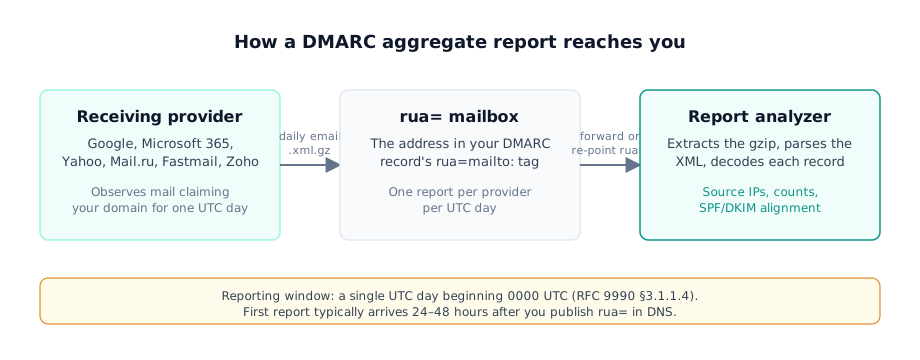
That summary is the whole contract: one receiving provider, one UTC day, one XML file covering every message that claimed your domain. The rest of this guide is what sits inside it and what to do about it. The format is defined in RFC 9990 — the DMARCbis aggregate reporting specification, published May 2026 as a Standards Track document that, together with RFC 9989 and RFC 9991, obsoletes RFC 7489.
If one of these landed in your inbox: your own DNS asked for it. Google,
Microsoft, Yahoo, Mail.ru, Fastmail, Zoho, and other receivers send one report
per UTC day, and the first usually arrives 24–48 hours after you publish
rua=mailto: in your DMARC record. It is normal, and it is the feedback loop
DMARC was designed around — not an attack. Just want to know whether the email
in your inbox is safe? Jump straight to
is this report legitimate.
553,586 of 937,931 DMARC-enabled domains (top 1.8M) had a rua= tag configured in 2026 — the other 41% publish a policy and collect nothing back
This post dissects the report object itself: a full annotated RUA XML file, a sender-by-sender cadence table with sourcing labels, the element-level schema diff RFC 9990 introduced, and how to tell a real report from a fake. Every schema claim below cites an RFC 9990 section or appendix directly. When you want the other half — how to read and act on each field once you have the file open — that walkthrough is its own guide.
What does a real RUA XML sample look like, annotated?
Here is a complete, realistic DMARC aggregate report sample in the shape you
will actually receive today — the legacy RFC 7489 form that Google-style
generators still emit, with <pct> present and no XML namespace. All names are
synthetic.
<?xml version="1.0" encoding="UTF-8"?>
<feedback>
  <report_metadata>
    <org_name>Example Mail Receiver</org_name>
    <email>noreply-dmarc@reporter.example</email>
    <report_id>8267341290173392847</report_id>
    <date_range>
      <begin>1755993600</begin>
      <end>1756079999</end>
    </date_range>
  </report_metadata>
  <policy_published>
    <domain>yourdomain.example</domain>
    <adkim>r</adkim>
    <aspf>r</aspf>
    <p>none</p>
    <sp>none</sp>
    <pct>100</pct>
  </policy_published>
  <record>
    <row>
      <source_ip>203.0.113.25</source_ip>
      <count>412</count>
      <policy_evaluated>
        <disposition>none</disposition>
        <dkim>pass</dkim>
        <spf>pass</spf>
      </policy_evaluated>
    </row>
    <identifiers>
      <envelope_from>yourdomain.example</envelope_from>
      <header_from>yourdomain.example</header_from>
    </identifiers>
    <auth_results>
      <dkim>
        <domain>yourdomain.example</domain>
        <selector>mail2026</selector>
        <result>pass</result>
      </dkim>
      <spf>
        <domain>yourdomain.example</domain>
        <result>pass</result>
      </spf>
    </auth_results>
  </record>
</feedback>
Before the XML even opens, the envelope follows conventions worth knowing. The
email subject must match the ABNF in RFC 9990 §3.5.2: Report Domain: yourdomain.example Submitter: reporter.example Report-ID: <id>. The attachment
filename is bang-separated per the same section:
receiver!policy-domain!begin-timestamp!end-timestamp.xml.gz — for example,
reporter.example!yourdomain.example!1755993600!1756079999.xml.gz. Both
patterns are legitimacy signals we will use later.
Inside, every aggregate report follows the same fixed element order (RFC 9990 §3.1.1.2). Walking the sample above by its own values, top to bottom:
report_metadata—org_namenames the generator (“Example Mail Receiver”),report_id8267341290173392847uniquely identifies this file, and thedate_rangepair1755993600–1756079999is Unix time for exactly one UTC day: 00:00:00 to 23:59:59 on 2025-08-24. RFC 9990 §3.1.1.3 adds an optionalgeneratorelement naming the reporting software and version.policy_published— the DMARC policy this receiver discovered in your DNS during the window (RFC 9990 §3.1.1.5):p=nonewith relaxed DKIM and SPF alignment (adkim=r,aspf=r) applied to 100% of mail (pct=100, a legacy-only tag). If this block differs from what you think you published, the receiver saw stale or different DNS.record→row— the payload. One source, IP203.0.113.25, sent 412 messages (count) during the day, andpolicy_evaluatedrecords the DMARC verdict for all of them:dispositionisnonebecause the published policy isp=none, and bothdkimandspfevaluated as aligned passes (RFC 9990 §3.1.1.10–3.1.1.11).record→identifiersandauth_results—header_fromis the domain DMARC actually judged (yourdomain.example), andauth_resultsholds the raw outcomes behind the verdict: a DKIM pass signed with selectormail2026— the selector field RFC 9990 §3.1.1.12 now makes required — and an SPF pass for the same domain (§3.1.1.13).extension— absent from this legacy-shaped sample. New in RFC 9990: an optional slot for namespaced extension elements at file level, with a matching slot at record level (RFC 9990 §5).
Reports are GZIP-compressed XML. RFC 9990 §3.5.2 says the file SHOULD be compressed, precisely because an uncompressed report can exceed a receiver’s SMTP size limit — though in practice the files are tiny. Measured per-provider report sizes ran 3.6–4.8 KB (Google 3,962 bytes, Yahoo 4,626, Fastmail 4,839 — Ashiq et al., USENIX Security, 2023 data).
7 domains received 43% of all DMARC aggregate reports on behalf of domain owners as of January 2023 — most owners point rua= at a processing service, not a human mailbox
One experience note from our side: when we built DMARCguard’s parser, we made
it namespace-agnostic. RFC 7489 reports carry
http://dmarc.org/dmarc-xml/0.1 — or, very often, no effective namespace at
all — while RFC 9990 reports declare urn:ietf:params:xml:ns:dmarc-2.0. A
parser keyed to either one silently drops the other, so we accept both and key
on structure instead. The full walkthrough of what each
DMARC policy field means for your next action is in the
reading guide linked above.
Our own scan data shows how few domain owners ever see one of these files at
all: most publish a policy without the rua= tag that requests the feedback.
16.3% of domains DMARCguard scans with a working DMARC record publish a working rua= URI — the other 83.7% have enforcement on and telemetry off
Who sends DMARC aggregate reports, and how often?
Any DMARC-implementing receiver that got mail claiming your domain can send
one. In practice, six senders account for most of what lands in a rua=
mailbox. Cadence and addresses below are labeled official or
community-sourced, because several providers never documented their own
behavior — a gap most explainers paper over.
| Receiver | Cadence | Reporter address | Format | Sends RUF? |
|---|---|---|---|---|
| Daily — “usually sent once a day” (official, updated 2026-07-22) | noreply-dmarc-support@google.com (official example XML) | .zip/.gz XML | Not documented | |
| Microsoft 365 | Daily, covering the previous day (official, updated 2026-05-14) | dmarcreport@microsoft.com (community-observed) | GZIP XML (official) | No — official: Microsoft 365 doesn’t send failure reports even with a valid ruf= |
| Yahoo / AOL | Not documented officially | dmarchelp@yahooinc.com (community-captured) | Not documented | Not documented — Sender Hub FAQ describes DMARC but not Yahoo’s own reporting behavior |
| Mail.ru | Daily (official, updated 2025-09-08) | dmarc_support@corp.mail.ru (official) | .gz XML (official) | No |
| Fastmail | Not documented | reports@fastmaildmarc.com (community-captured) | XML | No — Fastmail-authored setup text: aggregate only, no plans for ruf |
| Zoho | Daily per Zoho’s general RUA description; own cadence not documented | noreply-dmarc@zoho.com (community-captured, 2021 — may have drifted) | XML attachment | Not documented |
Reporter addresses drift and are mostly undocumented — only Google and Mail.ru state theirs officially — so never hard-code an allow-list to a single address.
Timing. The reporting period “will encompass a single UTC day, beginning at
0000UTC” (RFC 9990 §3.1.1.4), and reports are sent after the window closes.
That is why the first report takes 24–48 hours: publish rua= at 08:00 UTC and
collection only starts at the next UTC midnight. Community measurements from
dmarcian, GlockApps, and DMARC Advisor — platforms observing report timestamps
at scale — put worst-case first-report latency around 38 hours for low-volume
domains.
Who will never write to you. Apple/iCloud and Proton are not documented as sending aggregate reports, and admin observation backs the absence. Microsoft’s own guidance sets the expectation plainly: “Not all receivers send reports. Coverage is typically 70-90% of total mail volume” (Microsoft Learn, 2026-05-14). No official source publishes a numeric minimum-volume threshold below which reports stop — the only documented condition is functional: no observed mail claiming your domain, no report.
Why volume exploded in 2024. The February 2024 Google/Yahoo bulk-sender
mandate forced every 5,000-plus-message sender to publish DMARC, and millions
of new rua= endpoints came online — and millions of inboxes started
receiving XML their owners never expected.
265 billion fewer unauthenticated messages sent to Gmail in 2024 after the bulk-sender mandate
Aggregate RUA reports are one of two DMARC feedback channels. The other, per-message failure reports (RUF), uses the ARF format and a different RFC entirely — what ARF failure reports contain is its own topic, and as the table shows, most major receivers simply don’t send them.
What did RFC 9990 change in the report schema?
RFC 9990, together with RFC 9989 (core protocol) and RFC 9991 (failure reporting), obsoletes and replaces RFC 7489 (RFC 9990 §2). The old single document was split three ways so each part can evolve independently. Most vendor documentation — Microsoft Learn included — still points readers at “RFC 7489 Appendix C” for the report schema. The current Standards Track schema is RFC 9990 Appendix A, and its own Appendix C enumerates six differences from RFC 7489:
- The XSD was clarified — explicit multiplicity and typed enums, so different generators produce more consistent XML.
- The report identifier has more structure — Report-ID now has a formal ABNF (RFC 9990 §3.5.1) instead of a bare message-id.
- One domain per report — each report MUST cover exactly one DMARC Policy Domain and one policy configuration.
- Extensions — reports may carry namespaced
extensionelements at file and record level. - PSD is in the specification — Public Suffix Domain reporting and its privacy considerations are folded in.
- DKIM
selectoris now required — it was optional in RFC 7489.
In practice only one of those six can break an existing setup — the required
DKIM selector — so read the table that follows as a checklist, not a threat.
For most senders nothing breaks except the DKIM selector field; every other
change is additive or relaxing. Element by element, from both
schemas (RFC 7489 Appendix C XSD vs RFC 9990 Appendix A XSD):
| Element | RFC 7489 | RFC 9990 | Change | What it means for you |
|---|---|---|---|---|
| XML namespace | http://dmarc.org/dmarc-xml/0.1 | urn:ietf:params:xml:ns:dmarc-2.0 | Changed (Appendix A) | Any parser you run must accept both namespaces |
pct in policy_published | Required | Removed | Removed (§3.1.1.5) | Stop treating a missing pct as a malformed file |
DKIM selector | Optional | Required | The one hard break (§3.1.1.12) | Fix any generator or parser that drops selector |
discovery_method, np, testing | Absent | Optional in policy_published | Added (§3.1.1.5) | Extra context when present; safe to ignore |
generator | Absent | Optional in report_metadata | Added (§3.1.1.3) | Tells you which software produced the report |
extension blocks | Absent | File level + record level | Added (§5) | Ignore unknown blocks — never reject the report |
envelope_from, version, sp, spf | Required | Optional | Relaxed | Do not require these fields to accept a report |
reason/type enum | Includes forwarded, sampled_out | Both dropped; policy_test_mode added | Changed (§3.1.6) | Update any enum allow-lists in strict validators |
disposition (evaluated) | none/quarantine/reject | Adds pass | Widened (Appendix A) | Handle pass as a valid disposition value |
SPF scope | helo/mfrom | mfrom only | Narrowed (§3.1.1.13) | Expect mfrom only in new-shape reports |
| Report-ID | Bare msg-id | Formal ABNF, optional in the Subject line | Structured (§3.5.1) | Subject-line parsing may meet a structured ID |
Read as a whole, the diff is overwhelmingly additive or relaxing. With the
single exception of the DKIM selector becoming required, nothing that parsed
before breaks after. The operational risk runs the other way: a strict RFC
7489 validator will reject valid new-shape reports — pct is gone,
envelope_from and version may be absent, and the namespace differs, so
namespace-keyed validators silently fail to match. RFC 9990 §5 settles the
posture: a processor that cannot handle an extension “SHOULD ignore the data
and continue.” Tolerant parsing is now the specified behavior, not a
workaround.
For contrast, here is what a spec-shaped RFC 9990 fragment looks like — labeled clearly, because no major provider emits this yet:
<!-- Spec-shaped example per RFC 9990 Appendix A/B —
     no major provider emits this shape yet. -->
<feedback xmlns="urn:ietf:params:xml:ns:dmarc-2.0">
  <version>1.0</version>
  <report_metadata>
    <org_name>Example Mail Receiver</org_name>
    <email>noreply-dmarc@reporter.example</email>
    <report_id>3v98abbp8ya9n3va8yr8oa3ya</report_id>
    <date_range>
      <begin>1755993600</begin>
      <end>1756079999</end>
    </date_range>
    <generator>Example DMARC Aggregate Reporter v1.2</generator>
  </report_metadata>
  <policy_published>
    <domain>yourdomain.example</domain>
    <p>quarantine</p>
    <np>none</np>
    <testing>n</testing>
    <discovery_method>treewalk</discovery_method>
  </policy_published>
  <!-- extension and record elements follow -->
</feedback>
That “not yet” matters. Google’s own example report in its Admin Help — page
last updated July 2026 — is still legacy-shaped, <pct> and all. Microsoft
Learn still cites RFC 7489 Appendix C as the schema. And URIports, an
independent processor that began validating incoming reports against RFC 9990
in June 2026, confirms senders still ship legacy and incomplete reports. Plan
for a multi-year mixed-shape window: treat the 2015 schema as the floor and
RFC 9990 fields as enrichment when present. The record-tag side of DMARCbis —
pct, rf, and ri removal, the DNS tree walk — is covered in what changed
across the full DMARCbis set.
“Find attached the DMARC aggregate report”: is it legitimate?
Almost certainly yes — and receiving it is desirable, not a problem. But the confusion is real and recurring. A recipient on Microsoft Q&A in December 2023: “I don’t understand what is wanted from me, why and what I should do.” The same question resurfaces in Shopify, Zoho, and Cisco communities every quarter, usually from someone whose predecessor published the DMARC record.
Five checks separate a genuine report from a phish dressed up as one:
- Match the sender against a documented reporter address. Use the table
above —
noreply-dmarc-support@google.com,dmarcreport@microsoft.com,dmarc_support@corp.mail.ru, and peers. If the sender is nothing your domain’s mail could plausibly have reached, be suspicious. - Check the subject against the RFC 9990 §3.5.2 pattern. A genuine
report reads
Report Domain: <your-domain> Submitter: <reporter-domain> Report-ID: <id>. This exact “Report Domain: … Submitter: …” pattern is probably what brought you here — it is the standard, not a scam template. - Inspect the attachment. Expect inert compressed XML with the
bang-separated filename
(
receiver!your-domain!begin!end.xml.gz). A.exe,.html,.js, or macro-enabled document is the red flag — never the XML itself. - Confirm the report email passes its own authentication. Open the headers (Show original in Gmail) and check for SPF, DKIM, and DMARC passes. RFC 9990 §3.5.2 requires report mail streams to produce an aligned DMARC pass, so a failing report email deserves suspicion. Note the direction of the rule: it binds the sender’s mail stream — for you as recipient it is a strong heuristic, and RFC 9990’s recipient-side protection is the DNS authorization in §4, not this header check.
- Look for what real reports never contain. No links to click, no payment demands, no credential requests, no expiry warnings. A genuine aggregate report is machine data only.
If you want the reports to stop, do not just delete them from your inbox —
edit DNS. Removing the rua= tag ends the reports but blinds you to spoofing
attempts against your domain; re-pointing rua= at an analyzer keeps the
visibility without the clutter. If the new destination is on a different
domain, that domain must publish the authorization record RFC 9990 §4
requires — a TXT record at <policy-domain>._report._dmarc.<receiver-domain>
containing v=DMARC1; — or receivers will silently stop sending. And if the
reports show your legitimate mail failing through a gateway such as Mimecast,
that has a specific fix: why DMARC fails behind Mimecast and how to fix
it.
If no reports arrive at all, the fault is usually upstream of the artifact:
the rua= tag itself or the destination behind it.
DMARC rua tag: are reports reaching you? covers
the tag, the external-destination record and the mailbox that has to accept
them.
FAQ
Why am I getting a DMARC aggregate report?
Your domain’s DMARC TXT record contains a rua=mailto: address that points at
(or forwards to) you. Most major receivers that saw mail claiming your domain
send a daily summary to that address (RFC 9990 §1; Google Workspace Help) —
coverage is broad but not universal, as the sender table above shows. It is
not spam and not an attack — your own DNS requested it.
Who sends DMARC aggregate reports?
Receiving mail providers — “Mail Receivers” in RFC 9990 §3.1. In practice:
Google (noreply-dmarc-support@google.com), Microsoft 365
(dmarcreport@microsoft.com), Yahoo, Mail.ru, Fastmail, and Zoho. Apple/iCloud
and Proton are not documented as report senders, so expect no reports from
them regardless of configuration.
How often are DMARC aggregate reports sent?
Once per day per reporting provider, covering a single UTC day beginning at
0000 UTC (RFC 9990 §3.1.1.4). You receive one report from each provider that
saw your mail — Google notes large senders can receive hundreds daily. The
first report typically arrives 24–48 hours after you publish rua=.
What triggers a DMARC report?
A valid rua=mailto: URI in your DMARC record, plus mail that a receiver
observed claiming your From domain. No rua= tag means no reports — RFC 9989
states receivers MUST NOT generate aggregate feedback without it. Reports can
list mail you never sent; that is spoofing or forwarding being surfaced to
you.
How do I read a DMARC aggregate report?
Extract the .gz or .zip attachment, open the XML, check
policy_published for the policy the receiver saw, then walk each record
for the source IP, message count, and SPF/DKIM alignment results. The full
field-by-field walkthrough is covered in our reading guide, linked in the
introduction.
The report object, settled
A DMARC aggregate report is a once-per-UTC-day XML summary of everything that
claimed your domain, sent because your rua= tag asked for it. The senders
and cadences above are documented where documentation exists — and labeled
where it doesn’t. RFC 9990 is now the schema’s source of truth, but every
major generator still emits the legacy shape, so the practical posture is
tolerant parsing: both namespaces, no hard-required pct, unknown elements
ignored.
The XML is only step one; choosing what processes it is where the workflow starts, and we compared the field in best DMARC reporting tools. Or skip straight to the data you already have: paste a report into DMARCguard’s free DMARC report analyzer — no signup required — and see it decoded record by record.