Best DMARC Reporting Tools in 2026, Ranked by Reporting Depth
Raw DMARC reports arrive as compressed XML from every receiving provider. A domain that mails Gmail, Outlook, and Yahoo gets at least three aggregate reports per day — one from each provider, each covering a 24-hour window — and high-volume senders receive hundreds (PowerDMARC, 2026). DMARC reporting tools exist to turn that XML into something you can act on.
This guide compares 9 tools on what they do with your reports: parsing quality, source naming, forwarding attribution, retention, and export. It is deliberately not about monitoring breadth — protocol coverage, uptime checks, and alerting live in our best DMARC monitoring tools guide.
If you just want to paste one XML report and read it, use our free DMARC report analyzer — no signup.
For everyone comparing platforms: 9 tools below, with dated pricing linked to each vendor’s own page, and honest caveats about what forensic (RUF) reporting — the per-message failure samples some receivers send alongside aggregate (RUA) reports — can and cannot show you.
Quick verdict: which DMARC reporting tool fits you?
For the most reporting depth per dollar, URIports and Red Sift OnDMARC lead: both include forensic reporting and export or API access on their cheapest paid plans. dmarcian, EasyDMARC, and PowerDMARC parse well but gate forensic processing, export, or API behind mid or top tiers. Valimail publishes only one paid price and skews enterprise. Postmark DMARC Digests is a readable weekly digest, not a platform. DMARCguard — our product — sits in the full-depth group: RUA parsing plus named sender identification, ARC chain analysis, and CSV/JSON export on Pro, with a permanent free tier.
| Tool | Reporting depth | Free tier | Entry price | Best for |
|---|---|---|---|---|
| DMARCguard | RUA on all plans; ARF failure reports, ARC chain analysis, CSV/JSON export on Pro | Yes — 2 domains, 30-day history | $29/mo including 2 domains; then $15/domain (3–10) and $10/domain (11+); annual = 2 months free | Teams that want remediation guidance with their reports |
| URIports | All report types + JSON/CSV export + encrypted RUF on every plan | No — 1-month trial | $6/mo annual (Pebble) | Most reporting depth per dollar |
| Red Sift OnDMARC | Forensic reporting + RESTful API + Event Hub on every tier | No — trial only | $9/mo annual (Express) | API-first teams on a budget |
| dmarcian | Detail/Forensic Viewers from Basic; API Enterprise-only | Yes — non-business, 1,250 msgs/mo | $19.99/mo annual (Basic) | Deep per-report drill-down |
| EasyDMARC | 1,200+ named sources; RUF from Plus; API Enterprise-only | Yes — 1 domain, 14-day history | $35.99/mo annual (Plus) | Polished parsing UX |
| PowerDMARC | RUF even on Free; CSV export + API Enterprise-only | Yes — 1 domain, 10-day history | $8/mo (Basic, 10k–50k email band) | 1-year retention at entry price |
| Valimail | Strongest source naming; RUF+ Enterprise-only; retention unpublished | Yes — Monitor, no downloads | $5,000/yr (Enforce Starter) | Enterprise procurement |
| Mailhardener | RUA+RUF aggregation from Standard; export undocumented | Yes — 1 domain, 1-month history | €19/mo (Standard) | Flat EU pricing, multi-domain |
| Postmark DMARC Digests | RUA only; no RUF, no API/CSV | Yes — legacy weekly email digest | $14/mo per domain | Readable summaries, small teams |
Pricing verified 2026-08 from vendor pricing pages linked in each cell. DMARCguard prices are our published rates.
One number frames why this category matters at all:
53.5% of DMARC-enabled domains publish a rua= reporting address — 894,057 of 1,670,975
Nearly half of the domains that deployed DMARC never see a single report. If you’re choosing a DMARC reporting tool, you’re already ahead of them — the next step is picking one whose depth matches your rollout.
How we evaluated reporting depth (5 criteria)
Our monitoring-tools guide scores vendors on a seven-dimension rubric covering protocols, pricing transparency, and MSP fit. This guide narrows to reporting only. The peer-reviewed backbone for that focus: the USENIX Security ‘23 measurement study found “pervasive mismanagement and missing security considerations in DMARC reporting” across the ecosystem (Ashiq, Li, Fiebig & Chung, 2023 — older data, but still the definitive peer-reviewed measurement). Raw reporting is messy; the tool’s job is to absorb that mess. Five criteria:
1. RUA/RUF parsing quality. Aggregate reports (RUA, standardized in RFC 9990) arrive gzip- or zip-compressed, often with multiple records per file. Does the tool parse all of it reliably, and does it process forensic (RUF) reports — and on which tier?
2. Source identification. The single most recurring practitioner pain is
a report full of bare IP addresses. Dedicated vendor KB pages exist just to
answer “how do I identify unfamiliar sources in my DMARC report?”
(Postmark support);
as DMARC Digests’ own docs put it, “The hardest part of this process is
knowing whether the source is legitimate or not.” A good DMARC report
analyzer shows “Mailchimp,” not 52.24.128.5.
3. Forwarding attribution. Forwarded mail and mailing lists fail SPF and DKIM alignment through no fault of yours. Does the tool label a source as a forwarder versus a threat — ideally using ARC (RFC 8617)? None of the pages currently ranking for this keyword explains this mechanism at all.
4. Retention. The make-or-break column for a p=none → p=reject progression. Verified windows range from 10 days (PowerDMARC Free) to unlimited (dmarcian Enterprise). Short windows can’t show trends.
5. Export and API. Can you get your data out — CSV, JSON, API — and on which tier? This is where vendors most often gate.
If you want to understand the raw format these criteria operate on, our guide on how to read a DMARC report walks through the XML field by field, and the anatomy of the aggregate report itself covers the RFC 9990 schema these tools parse.
Whether a free tier is enough is a separate question from which tool parses best — free vs paid DMARC monitoring draws that line by capability rather than by price.
The RUF reality check: why forensic reports are scarce
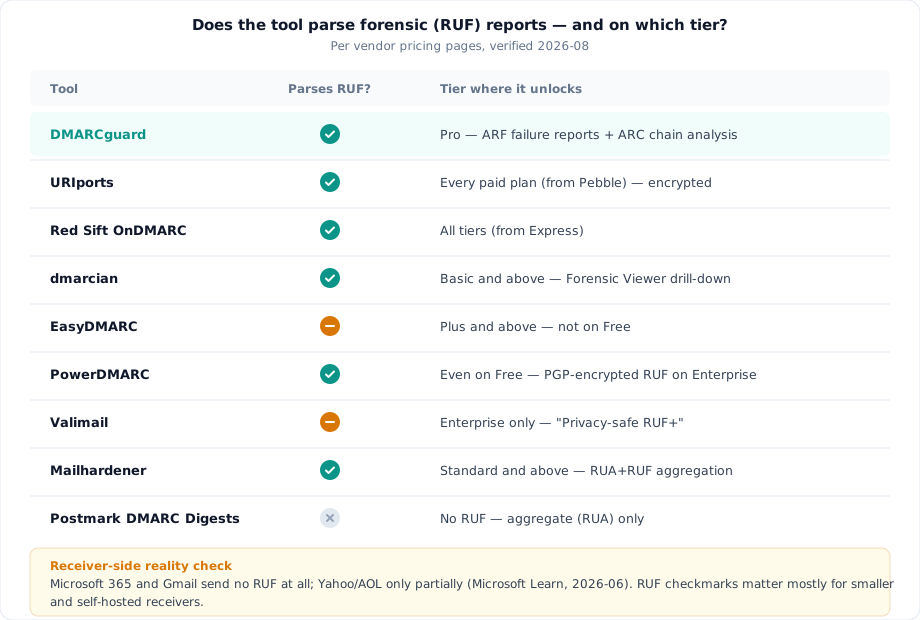
Competing listicles mark forensic reports ”✅” for every vendor and move on. The receiver-side truth is different, and it changes what those checkmarks are worth.
Microsoft documents it plainly: “Microsoft 365 doesn’t send DMARC Forensic reports (also known as DMARC Failure reports), even if a valid ruf=mailto: address exists in the DMARC TXT record of the source domain” (Microsoft Learn, updated 2026-06-02). Gmail has never sent RUF reports. Yahoo and AOL send them only for some failure conditions (DDMARC, 2026 — vendor-published, corroborating the Microsoft primary source).
The consequence: a tool’s RUF features only matter for mail received by smaller providers and self-hosted servers that still emit failure reports. At scale, RUA is the signal. Weigh the matrix below accordingly.
Why does forwarded mail fail in the first place? A forwarder re-sends your message from its own IP (breaking SPF alignment) and often modifies it in transit (breaking the DKIM signature). John Levine, who chaired the IRTF Anti-Spam Research Group, put it bluntly: DMARC “has caused severe damage to mail forwarders and discussion lists” (draft-levine-dmarc-listugh-01, 2023). ARC (RFC 8617) is the repair mechanism: each intermediary signs a snapshot of the authentication results it observed, so the final receiver can see the message passed at origin even though SPF and DKIM now fail.
Few tools surface this. URIports shows when a provider overrode a failing DMARC verdict because of a passing ARC chain. DMARCguard performs ARC chain analysis and factors benign forwarders into its compliance grade. Everyone else in this list either doesn’t document forwarding attribution or handles it as an unlabeled bucket.
Next step: before comparing RUF checkmarks, check your last month of aggregate data for forwarders — that tells you whether ARC-aware attribution should be on your shortlist criteria at all.
The 9 best DMARC reporting tools in 2026
Facts below come from each vendor’s own pricing and documentation pages, loaded 2026-07-28; third-party listing sites are frequently stale (Capterra still lists a Red Sift tier that vendor’s page no longer shows), so every claim links to the primary source.
DMARCguard — reporting with remediation guidance built in
Disclosure: DMARCguard is our product, so read this entry with that in mind — and check the vendor pages of everything else here.
DMARCguard parses aggregate (RUA) reports on every plan and adds ARF failure-report processing, ARC chain analysis, and a forwarding-aware compliance grade on Pro. Sender identification is by name — 170+ services on Pro, top-10 sources on Free — and every failing source ships with service-specific remediation guidance rather than a bare verdict. CSV/JSON export, scheduled reports, and API access are on Pro; the free plan monitors 2 domains with 30-day history and never expires.
Pricing is $29/mo including 2 domains, then $15/domain (3–10) and $10/domain (11+). Subdomains of a domain you already pay for are free. Annual billing gives 2 months free (pricing, as of 2026-08). No per-email-volume caps.
Honest limitation: DMARCguard is a younger product than dmarcian or Valimail, and its third-party integration catalog (SIEM, ticketing) is smaller than Red Sift’s. Try DMARCguard free and see how it compares.
URIports — most reporting depth per dollar
URIports includes every report type, JSON and CSV export, and encrypted DMARC failure (RUF) processing on all paid subscriptions — starting at the Pebble plan, $6/month billed annually for 5 domains and 100,000 reports/month (URIports pricing). It is also the rare tool that shows when a receiver overruled a failing DMARC result because of a passing ARC chain — genuine forwarding attribution, not a bucket.
Limitations: retention is 30 days until the Mountain tier ($120/mo annual) extends it to 90 days, and there is no permanent free tier — only a 1-month trial. For long enforcement campaigns, that retention ceiling is the number to check. See our URIports comparison.
Red Sift OnDMARC — forensic + API on the $9 entry tier
Red Sift’s Express tier — from $9/month billed annually, up to 4 domains and 1M monthly emails — includes forensic reporting, a RESTful API, and Event Hub streaming to SIEM and webhooks; those are core features on every tier (Red Sift pricing, as of 2026-08). For an API-first team, that is an unusually complete entry plan.
Limitations: Express retention is 30 days; 1-year retention starts at Essentials, and Essentials, Enterprise, and Premier are all quote-only. ARC-aware forwarding attribution is not documented. See our Red Sift comparison.
dmarcian — pioneer detail viewers, Enterprise-gated API
dmarcian’s Basic plan — $19.99/month billed annually, 2 domains, 100,000 messages/month, 3-month retention — unlocks forensic report processing plus the Detail Viewer and Forensic Viewer, per-report drill-downs that remain some of the deepest in the category (dmarcian pricing). A free Personal tier covers non-business use (2 domains, 1,250 messages/month, 1-month history).
Limitations: API access is Enterprise-only ($499/mo annual), and no CSV/JSON export is listed for lower tiers. Note also that third-party spend benchmarks run far above list — Vendr’s verified-purchase bands put dmarcian Enterprise contracts at $12,000–$30,000+ annually against a published $5,988 ceiling, so budget for the quote, not the page. See our dmarcian comparison.
EasyDMARC — polished parsing, gated failure reports
EasyDMARC identifies over 1,200 email sources by name in its backend and pairs that with one of the cleaner XML analyzers in the market. The Plus plan — $35.99/month billed annually, 2 domains, from 100,000 emails/month — adds failure (RUF) reports and 3-month retention (EasyDMARC pricing, as of 2026-08).
Limitations: the free tier retains only 14 days of history — enough to confirm reports are flowing, not enough to decide an enforcement move — and API access is Enterprise-only. See our EasyDMARC comparison.
PowerDMARC — RUF on Free, but export locked to Enterprise
PowerDMARC is the only vendor here with basic RUF processing on its free tier, and its Basic plan carries 1-year retention — the longest entry-tier window in this list. Basic pricing is volume-banded: the “$8/month” headline applies to the 10,001–50,000 email band; the recommended 100,000 band is $15/month ($12 annual) (PowerDMARC pricing, as of 2026-08).
Limitations: Free retention is just 10 days, and CSV export (RUA/RUF), advanced PDF, and API access are all Enterprise-only — the widest export gate in this comparison. See our PowerDMARC comparison.
Valimail — strongest source naming, steepest cliff
Valimail (a DigiCert company since 2025-09-16) leads on named source identification — “Precision sender intelligence” is on all tiers, including the free self-serve Monitor. But after the mid-priced Align tier was retired post-acquisition, the jump from free Monitor to paid is Enforce Starter at “starting at $5,000/year,” annual only; Premium and Enterprise are quote-only (Valimail pricing).
Limitations: “Privacy-safe RUF+” is Enterprise-only, Monitor includes no downloadable reports, and data retention is not published anywhere on the pricing page — we state that as unverified rather than guessing. See our Valimail comparison.
Mailhardener — flat EU pricing, modest reporting docs
Mailhardener’s Standard plan — €19/month or €199/year, covering 1–10 domains — includes DMARC aggregation of both RUA and RUF, 3-month retention, and hosted MTA-STS and BIMI, with pricing that doesn’t scale per domain within the band (Mailhardener pricing, as of 2026-08). A free tier covers 1 domain with 1-month retention.
Limitations: export and per-report drill-down are not documented on the pricing page — unverified, not absent, but you should confirm before buying — and forwarding/ARC handling is likewise undocumented. See our Mailhardener comparison.
Postmark DMARC Digests — the readable weekly digest, not a platform
DMARC Digests does one thing: turn aggregate reports into summaries a human will actually read. One flat plan at $14/month per domain, 60 days of history, with source identification built in (DMARC Digests). A legacy free weekly email digest (top 10 sources, email-only) still runs at dmarc.postmarkapp.com.
Limitations: RUA only — no RUF, no public API, no CSV export; raw reports are available only on request via support. Best for small teams that want readable summaries over a workbench.
One omission to note: Sendmarc parses RUF from its Premium tier with unlimited history, but every paid tier is quote-only with zero published dollar figures, so it can’t be placed in a price-comparison list — our Sendmarc comparison covers it, and the full head-to-head comparisons hub covers 20+ vendors.
Data retention compared: the column that decides your rollout
No page ranking for this keyword publishes a normalized retention table. Here is one, per tier, each row sourced from the vendor page linked in the verdict table above:
| Tool | Free tier | Entry paid | 1-year retention available at |
|---|---|---|---|
| DMARCguard | 30 days | 1 year (Pro) | Pro — $29/mo incl. 2 domains |
| URIports | — (trial) | 30 days (Pebble) | Not offered (90 days max, Mountain) |
| Red Sift OnDMARC | — (trial) | 30 days (Express) | Essentials (quote-only) |
| dmarcian | 1 month | 3 months (Basic) | Plus — $199/mo annual |
| EasyDMARC | 14 days | 3 months (Plus) | Premium — $71.99/mo annual |
| PowerDMARC | 10 days | 1 year (Basic) | Basic — from $8/mo |
| Valimail | Unpublished | Unpublished | Unpublished — ask before buying |
| Mailhardener | 1 month | 3 months (Standard) | Large — €99/mo |
| Postmark DMARC Digests | 7 days (email digest) | 60 days (flat) | Not offered |
DMARCguard pricing is quoted net: excl. VAT & sales tax. Competitor prices are shown as each vendor publishes them.
Why it matters: a p=none → p=reject progression typically needs months of history — you shift policy when the trend shows legitimate sources aligned, and a 10- or 30-day window cannot show a trend across seasonal senders, quarterly billing runs, or that CRM that only mails twice a month. If enforcement is the goal, budget for a 1-year tier from day one: PowerDMARC Basic and DMARCguard Pro carry it at entry price; dmarcian, EasyDMARC, Red Sift, and Mailhardener sell it one tier up. Aim for at least 6 months of retention, ideally 1 year.
Next step: write down your target enforcement date, count back the months of history you’ll need, and strike any tier that can’t hold that window.
Free DMARC reporting tools vs. paid: where the line is
DMARC report analyzer or reporting platform: which do you need?
Free options split into two kinds: one-off analyzers (paste an XML file, read it, nothing stored) and continuous platforms with free tiers. The first kind is genuinely useful for spot checks. The second kind is constrained by retention: EasyDMARC’s 14 days and PowerDMARC’s 10 days are fine for verifying that reports flow, but unfit for the months-long trend view an enforcement decision needs.
Our best free DMARC tools guide breaks down the full free-tier taxonomy. And if your shortlist criteria go beyond reporting — uptime, DNS change tracking, alerting — that’s the scope of the monitoring-tools guide linked earlier.
When a free tier stops being enough, the free vs paid comparison lists what each paid tier actually adds, so the upgrade decision rests on a capability you need rather than on a vendor’s checkbox.
Frequently asked questions
What is a DMARC report analyzer?
It’s software that decompresses the XML reports mailbox providers send and turns them into readable views: who sent mail as your domain, what aligned, and what receivers did with failures. A free one-off analyzer covers a single report; continuous analysis needs a platform.
How do I identify unknown sources in my DMARC reports?
Raw reports list senders only by IP address. Tools attach names through reverse lookups and curated service mappings, so comparing on catalog size is fair game: EasyDMARC cites 1,200+ named sources, DMARCguard names 170+, and Valimail makes source naming its lead feature.
Why do I get DMARC failures for mail I actually sent?
Forwarding and mailing lists are the usual cause. A forwarder re-sends your message from its own IP, breaking SPF alignment, and list software that modifies messages breaks DKIM signatures — a design tension DMARC’s own community acknowledges. ARC-aware tools can attribute these failures to forwarding instead of flagging them as threats, which keeps your report review focused on real spoofing.
Do Gmail and Microsoft send forensic (RUF) reports?
No — neither does, regardless of your ruf= address, and Yahoo and AOL send
them only for some failure conditions. In practice RUF arrives mainly from
smaller providers and self-hosted servers, so a tool’s aggregate (RUA) depth
should carry far more weight than its forensic checkmark.
How much DMARC report history do I need?
It depends on your goal. Confirming reports flow takes days; moving from p=none to p=reject takes months of trend data across every legitimate sender, including infrequent ones. Free and entry tiers commonly keep 10–30 days, which cannot support that decision. For enforcement, choose a tier with at least 6 months — ideally 1 year — of retention.
Can DMARC reports be read without a tool?
Yes, in principle — they’re XML, and one file is readable by hand. Volume is what defeats you: reports arrive daily from every receiving provider, so manual reading holds up for a one-time spot check and collapses as ongoing practice.
What should I do next?
The best DMARC reporting tools are not the ones with the most checkmarks — they’re the ones whose depth matches your rollout: honest RUF expectations, named sources instead of bare IPs, retention long enough for an enforcement decision, and export that isn’t held hostage by a top tier.
Three steps from here:
- Paste one of your aggregate reports into the free analyzer linked in the introduction and see what your raw data looks like.
- Shortlist by retention: if p=reject is the goal, only tiers with at least 6 months of history — ideally 1 year — qualify.
- Trial two tools with your own reports for a month — parsing quality only shows itself on your traffic.